Windows Server:Essentials 2022ライセンスの箇条書き
Summary: この記事では、Windows Server Essentials 2022に適用されるライセンスの概念について説明します。
This article applies to
This article does not apply to
This article is not tied to any specific product.
Not all product versions are identified in this article.
Instructions
Windows Server Essentials 2022のライセンスのポイント
Windows Server Essentials 2022を使用する場合は、次の点を考慮してください。- OEMのみ: Windows Server EssentialsはOEMのみのオプションです。これは、個別に購入できないことを意味します。PowerEdgeサーバーと一緒に購入する必要があります。
- 1 CPU / 10コア: Windows Server Essentials 2022は、1つのCPUでコア数が10以下のサーバーに対してのみ購入できます。
- CALは不要: Windows Server Essentials 2022を使用する場合、サーバーに接続するユーザーのユーザーごとまたはデバイスごとのCALを購入する必要はありません。ただし、使用できるユーザー数は最大です。次の箇条書きを参照してください。
- 25ユーザー/最大50デバイス: Windows Server Essentials 2022エンド ユーザー ライセンス契約(EULA)に準拠するため、ネットワークには最大25人のユーザー(管理者のアカウントを含む)と50台のデバイスを含めることができます。
- 特別なインストール メディアなし: Windows Server Essentials 2022とともにサーバーを注文すると、プロダクト キーが記載されたCOAステッカーが付属します。オペレーティング システムをアクティブ化するには、次のようなDISMコマンドでこのプロダクト キーを使用します。
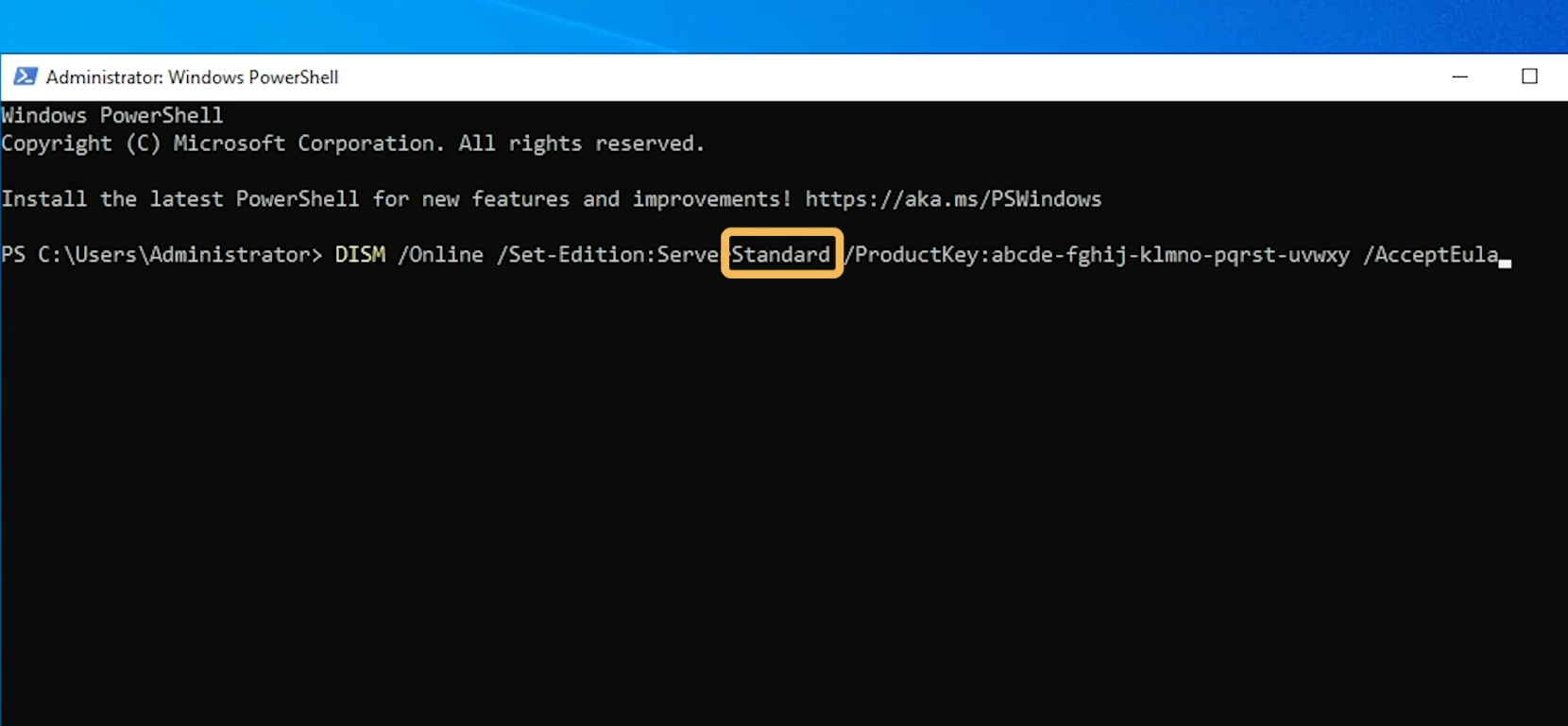
メモ: プロダクト キーがEssentialsエディション用であっても、 Standard Editionを指定する必要があることに注意してください。これは、Windows Server Essentials 専用のインストール メディアがないためです。ライセンス コンプライアンスは、プロダクト キーによって適用されます。
- コンプライアンス違反のシャットダウン: Windows Server Essentials 2022を搭載したサーバーは、25台を超えるユーザーまたは50台を超えるデバイスが存在することを検出すると、自動的にシャットダウンを開始します。
Additional Information
Essentialsエディションの詳細については、次の記事を参照してください。
Microsoft Windows: Server 2022 Essentialsは標準として表示され、機能はありません
Poweredge:Windows Server 2022 Essentialsのブランディングの説明
次のビデオをご覧ください。
Windows Server Essentials 2022のライセンス
Affected Products
Microsoft Windows Server 2022Products
PowerEdge R250, PowerEdge R260, PowerEdge R350, PowerEdge R360, PowerEdge R450, PowerEdge R550, PowerEdge R650, PowerEdge R650xs, PowerEdge R6515, PowerEdge R6525, PowerEdge R660, PowerEdge R660xs, PowerEdge R6615, PowerEdge R6625, PowerEdge R750
, PowerEdge R750XA, PowerEdge R750xs, PowerEdge R7515, PowerEdge R7525, PowerEdge R760, PowerEdge R760XA, PowerEdge R760xd2, PowerEdge R760xs, PowerEdge R7615, PowerEdge R7625, PowerEdge R860, PowerEdge R960, PowerEdge T150, PowerEdge T160, PowerEdge T350, PowerEdge T360, PowerEdge T550, PowerEdge T560
...
Article Properties
Article Number: 000225025
Article Type: How To
Last Modified: 04 Jan 2025
Version: 3
Find answers to your questions from other Dell users
Support Services
Check if your device is covered by Support Services.