PowerProtect 虚拟机备份因独立磁盘而失败
Summary: PowerProtect Data Manager 虚拟机 (VM) 保护解决方案无法使用独立磁盘保护虚拟机。
This article applies to
This article does not apply to
This article is not tied to any specific product.
Not all product versions are identified in this article.
Symptoms
PowerProtect Data Manager 用于保护 vSphere 环境。Transparent Snapshot Data Mover (TSDM) 和虚拟机 (VM) Direct 解决方案无法保护特定虚拟机。虚拟机配置作业和备份作业失败,指示资产包含独立磁盘。 “JobsSystem Jobs>”下的虚拟机配置作业和“JobsProtection > Jobs”下的虚拟机备份作业显示:
ABV0025: VM Direct engine is unable to back up the virtual machine 'my-vm-name' on vCenter 'my-vcenter'.

The VM Direct engine cannot complete protection of this virtual machine because the protection configuration was unsuccessful.

Review the error details and summary log in the Jobs window, or export the job logs and review the log files for more information. If the issue persists, contact Dell Customer Support.

Read Less
Unable to configure protection for the asset because independent disks are not supported.

Cause
PowerProtect Data Manager VMware Protection 解决方案不支持独立磁盘,这在《PowerProtect Data Manager 虚拟机用户指南》中进行了介绍。为方便起见,戴尔支持网站上也提供了最新版本的 PowerProtect Data Manager 文档。
Resolution
可以从保护中排除独立磁盘,以允许保护其余磁盘。下面概述了如何识别独立磁盘并将其从保护中排除。
- 向 vSphere Web Client 界面进行身份验证。
- 在清单中选择受影响的虚拟机,然后选择“ActionsEdit >Settings”。
- 展开硬盘以确定哪些磁盘的磁盘模式为独立(持久或非持久)。
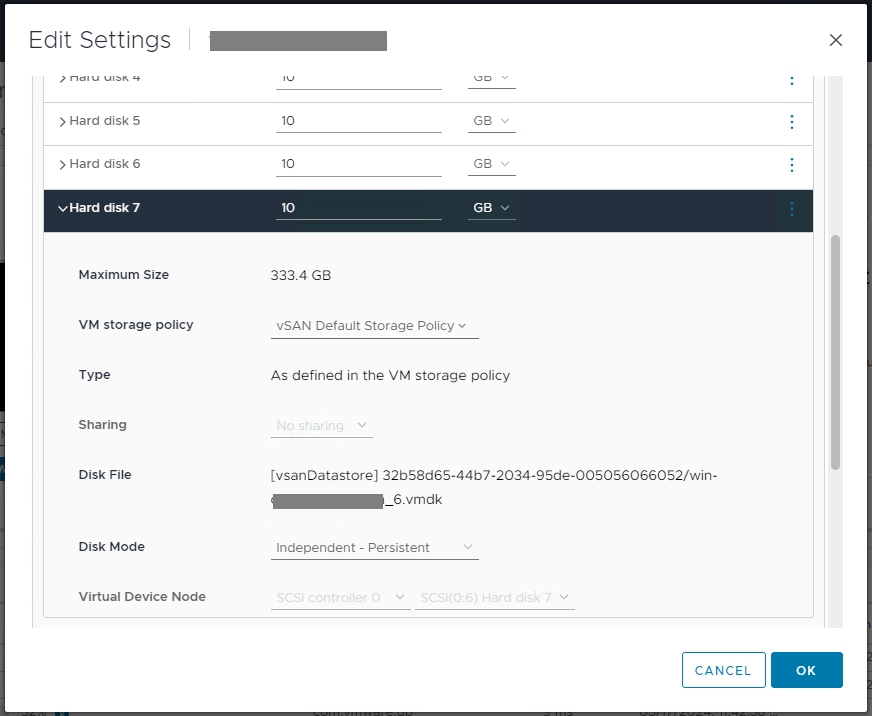
- 向 PowerProtect Data Manager 界面进行身份验证。
- 浏览至“InfrastructureAssetsVirtual >>Machines”。
- 选择受影响的虚拟机,以在 “Disk Excluded” 列下显示超链接。
- 超链接将打开 “排除磁盘” 属性页。
- 选择切换按钮以从保护中排除独立磁盘。

- 运行保护策略以自动触发对其余磁盘的虚拟机配置。
Article Properties
Article Number: 000225183
Article Type: Solution
Last Modified: 21 Nov 2025
Version: 2
Find answers to your questions from other Dell users
Support Services
Check if your device is covered by Support Services.