SupportAssist for Business PCs를 최신 버전으로 수동으로 업데이트하는 방법
Summary: 이 문서에서는 자동 업데이트에 실패할 경우 SupportAssist for Business PCs를 최신 버전으로 수동으로 업데이트하는 방법에 대해 자세히 설명합니다.
This article applies to
This article does not apply to
This article is not tied to any specific product.
Not all product versions are identified in this article.
Instructions
영향을 받는 제품:
- 비즈니스 PC용 SupportAssist
영향을 받는 버전:
- v3.2.x 버전
- v3.3.x 버전
영향을 받는 운영 체제:
- Windows 11
- Windows 10
업데이트 단계:
참고:
- 이 파일은 v3.3.x 이하가 설치된 컴퓨터에서 작동합니다.
- 파일을 관리자 권한으로 실행해야 합니다.
- 파일이 자동 모드로 실행됩니다.
- 이 파일은 컴퓨터에서 .net 6.0 을 확인합니다. 없는 경우 .net v6.0.28을 다운로드하여 설치한 다음 .msi SupportAssist v3.6을 계속 다운로드하고 설치합니다.
- 수동 업그레이드가 실패할 경우 이 파일은 컴퓨터에서 SupportAssist for Business PCs 애플리케이션의 기존 버전을 제거하고 v3.6 .msi를 설치합니다.
- 관리자 모드에서 명령 프롬프트를 엽니다.
- 파일이 저장된 위치(아래 예에서는 c:\SupportAssist)로 이동합니다.
- SupportAssistUpgradeTool.exe 입력하고 Enter 키를 눌러 명령을 실행합니다.
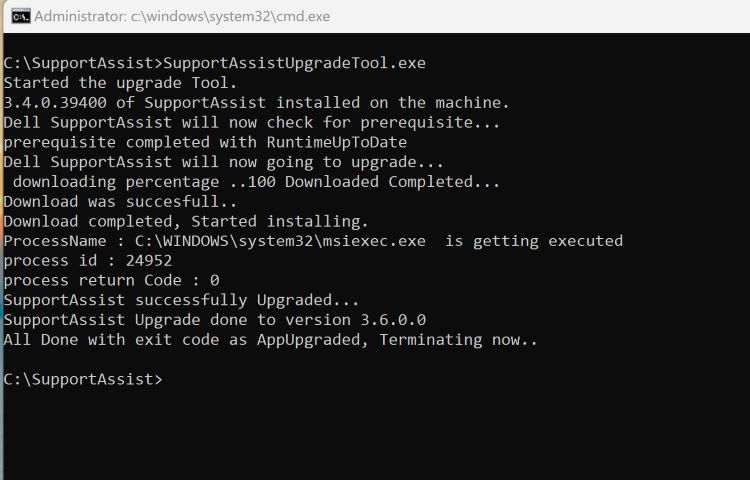
그림 1: (영어로만 제공) 명령 프롬프트에 SupportAssistUpgradeTool.exe를 입력합니다.
참고: 로그는 C:\Windows\temp\SupportAssist에서 찾을 수 있습니다.
- 명령을 실행한 후 TechDirect 인벤토리 페이지에서 컴퓨터가 v3.6으로 업데이트되었는지 확인합니다.
Affected Products
SupportAssist for Business PCsArticle Properties
Article Number: 000225269
Article Type: How To
Last Modified: 21 May 2024
Version: 1
Find answers to your questions from other Dell users
Support Services
Check if your device is covered by Support Services.