如何手动将 SupportAssist for Business PCs 更新到最新版本
Summary: 本文提供有关如何在自动更新失败时手动将 SupportAssist for Business PCs 更新到最新版本的详细信息。
This article applies to
This article does not apply to
This article is not tied to any specific product.
Not all product versions are identified in this article.
Instructions
受影响的产品:
- SupportAssist for Business PCs
受影响的版本:
- 3.2.x 版
- 3.3.x 版
受影响的操作系统:
- Windows 11
- Windows 10
更新步骤:
提醒:
- 该文件适用于安装了 v3.3.x 及更早版本的计算机。
- 应以 管理员身份运行该文件。
- 文件以 静默模式运行。
- 该文件将检查计算机上的 .net 6.0 。如果不存在,它将下载并安装 .net v6.0.28,然后继续下载并安装 SupportAssist v3.6 .msi。
- 如果手动升级失败,该文件将卸载计算机上 SupportAssist for Business PCs 应用程序的任何现有版本,并安装 v3.6 .msi。
- 在管理员模式下打开命令提示符。
- 转至文件的保存位置(在下面的示例中为 c:\SupportAssist)。
- 键入 SupportAssistUpgradeTool.exe 并按 Enter 键以运行命令。
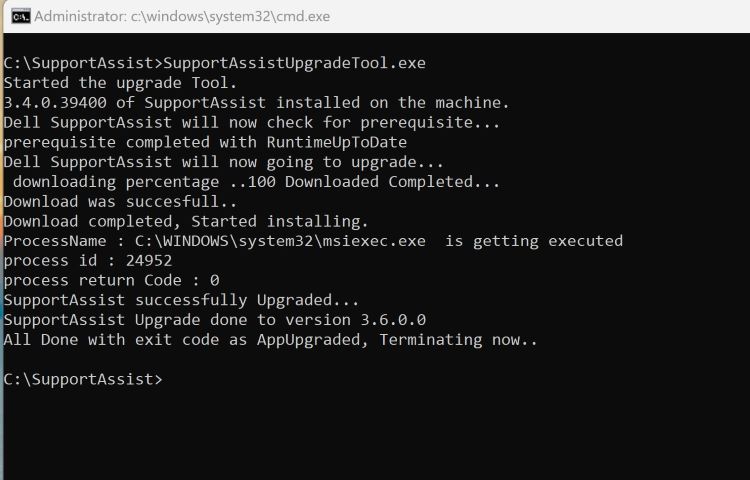
图 1:(仅限英文)在命令提示符中键入 SupportAssistUpgradeTool.exe
提醒:日志可在 C:\Windows\temp\SupportAssist 中找到。
- 运行命令后,在 TechDirectInventory页面上检查计算机是否已更新到 v3.6。
Affected Products
SupportAssist for Business PCsArticle Properties
Article Number: 000225269
Article Type: How To
Last Modified: 21 May 2024
Version: 1
Find answers to your questions from other Dell users
Support Services
Check if your device is covered by Support Services.