Registratie van PowerProtect Linux-bestandssysteem mislukt met "voorkeursadres is ongeldig"
Summary: De registratie van de Linux File System Agent met de FQDN (Fully Qualified Domain Name) of het IP-adres mislukt met de melding voorkeursadres is ongeldig.
This article applies to
This article does not apply to
This article is not tied to any specific product.
Not all product versions are identified in this article.
Symptoms
PowerProtect Data Manager wordt gebruikt om de Linux-servers te beveiligen met de bestandssysteemagent (applicatieagent). De registratie van de applicatieagent met de FQDN (Fully Qualified Domain Name) of het IP-adres mislukt met de melding 'voorkeursadres is ongeldig'.
[root@my-application-agent]# /opt/dpsapps/agentsvc/register.sh --enable
AgentService is already commissioned.
Enter the PowerProtect Data Manager server FQDN or IP address: my-ppdm.my-domain.com
The PowerProtect Data Manager server FQDN or IP address that is used by the application agent host is my-ppdm.my-domain.com
To use the Fully Qualified Domain Name (FQDN) as the preferred address for the agent host, in the PowerProtect Data Manager UI, go to Infrastructure > Application Agents and select Configure DNS Name Resolution.
Enter the preferred FQDN or IP address of the application host: my-application-agent.my-domain.com
preferred address is invalid
Enter the preferred FQDN or IP address of the application host: XXX.XXX.XXX.XXX
preferred address is invalid
Failed to get a valid preferred address of the application host even after 2 attempts. Failing registration
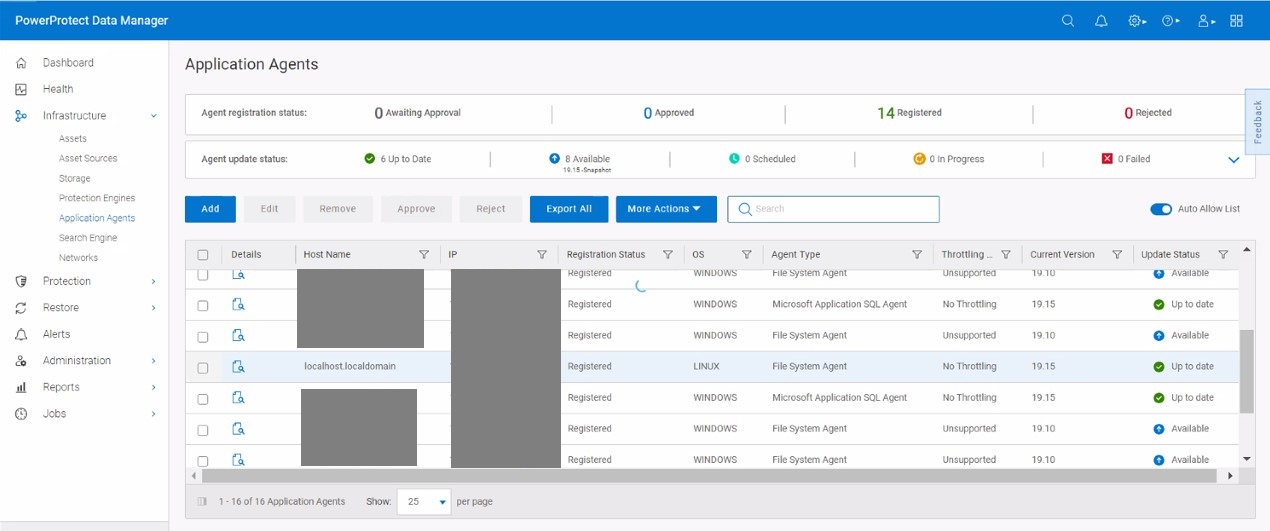
De naamomzetting tussen de applicatieagent en PowerProtect Data Manager werkt goed. Op de pagina PowerProtect Data Manager Application Agents wordt een registratie weergegeven met het IP-adres van de applicatieagent en localhost.localdomain.
Cause
De applicatieagenten /etc/hosts Het bestand bevat een 127.0.0.1 loopback-vermelding voor localhost.localdomain. Het localhost.localdomain zorgtervoor dat de configuratie van de applicatieagent de onjuiste naam gebruikt tijdens de registratie.
[root@my-application-agent]# cat /etc/hosts
127.0.0.1	localhost.localdomain locoalhost
::1		localhost.localdomain locoalhost
XXX.XXX.XXX.XXX my-application-agent.my-domain.com my-application-agent
Resolution
De applicatieagenten /etc/hosts Bestandsregels voor localhost.localdomain moeten worden becommentarieerd of bijgewerkt om de naam van de applicatieagenten weer te geven.
[root@my-application-agent]# cat /etc/hosts
#127.0.0.1	localhost.localdomain locoalhost
#::1		localhost.localdomain locoalhost
XXX.XXX.XXX.XXX my-application-agent.my-domain.com my-application-agent
of
[root@my-application-agent]# cat /etc/hosts
XXX.XXX.XXX.XXX my-application-agent.my-domain.com my-application-agent
127.0.0.1	my-application-agent.my-domain.com my-application-agent
::1		my-application-agent.my-domain.com my-application-agent
Article Properties
Article Number: 000225590
Article Type: Solution
Last Modified: 17 Nov 2025
Version: 2
Find answers to your questions from other Dell users
Support Services
Check if your device is covered by Support Services.