Data Protection Central: RabbitMQ non si avvia
Summary: Questo articolo fornisce una procedura per DPC (Data Protection Central) quando RabbitMQ non si avvia dopo un aggiornamento software.
This article applies to
This article does not apply to
This article is not tied to any specific product.
Not all product versions are identified in this article.
Symptoms
Quando RabbitMQ non si avvia dopo un aggiornamento del software DPC, lo stato mostra il servizio RabbitMQ (
rabbitmq-server) si attiva ma non completa mai:
# /usr/local/dpc/bin/dpc status
Version: 19.9.0-13
msm-ui-main: active
msm-monitor: inactive
msm-elg: active
mongod: active
rabbitmq-server: activating
nginx: active
dp-iam: active
FIPS: disabled
#
Il registro RabbitMQ mostra errori durante l'accesso all'archivio messaggi durante l'avvio. Ad esempio, nella finestra di dialogo /var/log/dpc/rabbitmq/rabbit@<DPC Hostname>.log, mostra che RabbitMQ ha esito negativo quando si tenta di ricostruire l'indice:
2024-05-07 23:56:25.408992-04:00 [info] <0.230.0> Running boot step recovery defined by app rabbit
2024-05-07 23:56:25.410137-04:00 [info] <0.423.0> Making sure data directory '/var/lib/dpc/rabbitmq/mnesia/rabbit@<DPC Hostname>/msg_stores/vhosts/628WB79CIFDYO9LJI6DKMI09L' for vhost '/' exists
2024-05-07 23:56:25.412199-04:00 [info] <0.423.0> Starting message stores for vhost '/'
2024-05-07 23:56:25.412425-04:00 [info] <0.428.0> Message store "628WB79CIFDYO9LJI6DKMI09L/msg_store_transient": using rabbit_msg_store_ets_index to provide index
2024-05-07 23:56:25.413720-04:00 [info] <0.423.0> Started message store of type transient for vhost '/'
2024-05-07 23:56:25.413970-04:00 [info] <0.432.0> Message store "628WB79CIFDYO9LJI6DKMI09L/msg_store_persistent": using rabbit_msg_store_ets_index to provide index
2024-05-07 23:56:25.414552-04:00 [warning] <0.432.0> Message store "628WB79CIFDYO9LJI6DKMI09L/msg_store_persistent": rebuilding indices from scratch
2024-05-07 23:56:25.495894-04:00 [error] <0.369.0> ** Generic server <0.369.0> terminating
2024-05-07 23:56:25.495894-04:00 [error] <0.369.0> ** Last message in was {'$gen_cast',
2024-05-07 23:56:25.495894-04:00 [error] <0.369.0>                            {submit_async,
2024-05-07 23:56:25.495894-04:00 [error] <0.369.0>                                #Fun<rabbit_classic_queue_index_v2.11.72031207>,
2024-05-07 23:56:25.495894-04:00 [error] <0.369.0>                                <0.367.0>}}
2024-05-07 23:56:25.495894-04:00 [error] <0.369.0> ** When Server state == undefined
2024-05-07 23:56:25.495894-04:00 [error] <0.369.0> ** Reason for termination ==
2024-05-07 23:56:25.495894-04:00 [error] <0.369.0> ** {function_clause,
2024-05-07 23:56:25.495894-04:00 [error] <0.369.0>        [{rabbit_queue_index,journal_minus_segment1,
2024-05-07 23:56:25.495894-04:00 [error] <0.369.0>             [{no_pub,no_del,ack},
2024-05-07 23:56:25.495894-04:00 [error] <0.369.0>              {{true,
2024-05-07 23:56:25.495894-04:00 [error] <0.369.0>                   <<136,59,154,30,244,191,111,192,154,235,124,189,92,104,1,207,
Cause
RabbitMQ non si avvia a causa di un volume elevato di messaggi bloccati nella coda.
In questo esempio, nella coda sono presenti oltre 800 MB di dati:
In questo esempio, nella coda sono presenti oltre 800 MB di dati:
<DPC Hostname>:/var/lib/dpc/rabbitmq/mnesia # du -h .
20K     ./rabbit@<DPC Hostname>/quorum/rabbit@<DPC Hostname>
20K     ./rabbit@<DPC Hostname>/quorum
58M     ./rabbit@<DPC Hostname>/msg_stores/vhosts/628WB79CIFDYO9LJI6DKMI09L/msg_store_persistent
824M    ./rabbit@<DPC Hostname>/msg_stores/vhosts/628WB79CIFDYO9LJI6DKMI09L/queues/BV3H25N6AGWF7TDIN2L5RE0DA
824M    ./rabbit@<DPC Hostname>/msg_stores/vhosts/628WB79CIFDYO9LJI6DKMI09L/queues
0       ./rabbit@<DPC Hostname>/msg_stores/vhosts/628WB79CIFDYO9LJI6DKMI09L/msg_store_transient
881M    ./rabbit@<DPC Hostname>/msg_stores/vhosts/628WB79CIFDYO9LJI6DKMI09L
881M    ./rabbit@<DPC Hostname>/msg_stores/vhosts
881M    ./rabbit@<DPC Hostname>/msg_stores
20K     ./rabbit@<DPC Hostname>/coordination/rabbit@<DPC Hostname>
20K     ./rabbit@<DPC Hostname>/coordination
881M    ./rabbit@<DPC Hostname>
0       ./rabbit@<DPC Hostname>-plugins-expand
881M    .
<DPC Hostname>:/var/lib/dpc/rabbitmq/mnesia #
Resolution
Per risolvere il problema, utilizzare la procedura riportata di seguito per ricostruire le risorse RabbitMQ:
Esempio di output da un'ambiente lab:
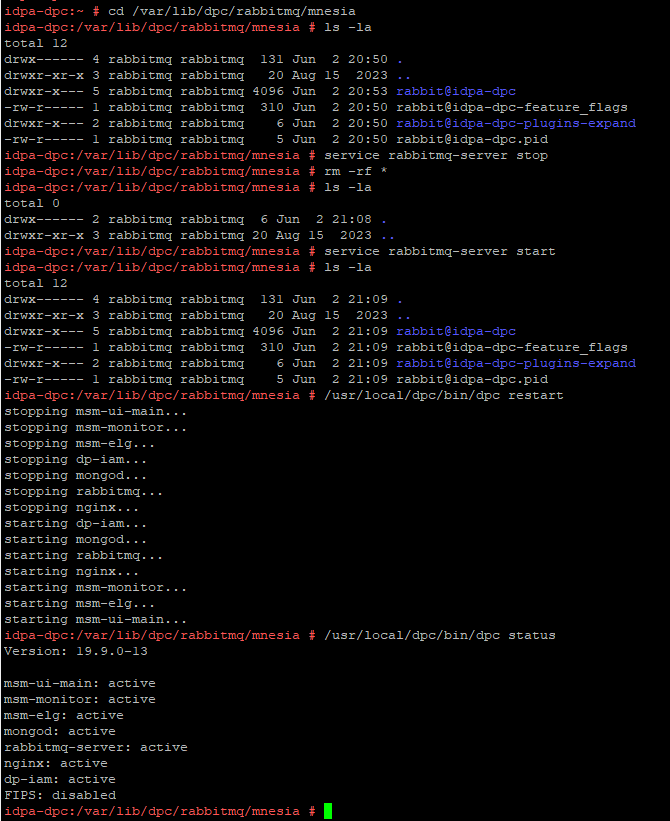
- Creare un'istantanea della macchina virtuale DPC o eseguire un backup completo del server DPC.
- Connettersi tramite SSH a DPC come "admin", quindi modificare l'utente in root:
su -
- Arrestare il servizio RabbitMQ (
rabbitmq-server) con il seguente comando:
service rabbitmq-server stop
- Modificare la directory in
/var/lib/dpc/rabbitmq/mnesia:
cd /var/lib/dpc/rabbitmq/mnesia
- Se c'è abbastanza spazio libero in
/tmp, copiare i dati in/tmp(Opzionale):
cp -rp * /tmp
- Rimuovere i dati in
/var/lib/dpc/rabbitmq/mnesiacon il seguente comando:
rm -rf *
- Riavviare il servizio RabbitMQ, file in
/var/lib/dpc/rabbitmq/mnesiadevono essere rigenerati:
service rabbitmq-server start
- Riavviare i servizi DPC:
/usr/local/dpc/bin/dpc restart
Esempio di output da un'ambiente lab:
Figura 1. Un esempio che mostra RabbitMQ che rigenera la struttura dei dati in
/var/lib/dpc/rabbitmq/mnesia durante l'avviamento
- Accedere all'interfaccia utente di DPC per verificare se DPC funziona come previsto.
- Eliminare le sottocartelle precedentemente spostate in
/tmpse i dati sono stati copiati nel passaggio 5. - Quando il servizio torna alla normalità, eliminare la snapshot della macchina virtuale DPC , se è stata acquisita.
Affected Products
Data Protection Central, PowerProtect DP4400, PowerProtect DP5300, PowerProtect DP5800, PowerProtect DP8300, PowerProtect DP8800, PowerProtect Data Protection Software, Integrated Data Protection Appliance Family
, Integrated Data Protection Appliance Software, PowerProtect DP5900, PowerProtect DP8400, PowerProtect DP8900
...
Article Properties
Article Number: 000225640
Article Type: Solution
Last Modified: 27 Jun 2025
Version: 3
Find answers to your questions from other Dell users
Support Services
Check if your device is covered by Support Services.