Data Protection Central: RabbitMQ를 시작하지 못함
Summary: 이 문서에서는 소프트웨어 업데이트 후 RabbitMQ를 시작하지 못하는 경우 DPC(Data Protection Central) 절차를 제공합니다.
This article applies to
This article does not apply to
This article is not tied to any specific product.
Not all product versions are identified in this article.
Symptoms
DPC 소프트웨어 업데이트 후 RabbitMQ를 시작하지 못하면 상태에 RabbitMQ 서비스(
rabbitmq-server)가 활성화되고 있지만 완료되지 않습니다.
# /usr/local/dpc/bin/dpc status
Version: 19.9.0-13
msm-ui-main: active
msm-monitor: inactive
msm-elg: active
mongod: active
rabbitmq-server: activating
nginx: active
dp-iam: active
FIPS: disabled
#
시작 중에 메일 저장소에 액세스할 때 RabbitMQ 로그에 오류가 표시됩니다. 예를 들어, /var/log/dpc/rabbitmq/rabbit@<DPC Hostname>.log인덱스를 다시 작성하려고 할 때 RabbitMQ가 실패하는 것으로 표시됩니다.
2024-05-07 23:56:25.408992-04:00 [info] <0.230.0> Running boot step recovery defined by app rabbit
2024-05-07 23:56:25.410137-04:00 [info] <0.423.0> Making sure data directory '/var/lib/dpc/rabbitmq/mnesia/rabbit@<DPC Hostname>/msg_stores/vhosts/628WB79CIFDYO9LJI6DKMI09L' for vhost '/' exists
2024-05-07 23:56:25.412199-04:00 [info] <0.423.0> Starting message stores for vhost '/'
2024-05-07 23:56:25.412425-04:00 [info] <0.428.0> Message store "628WB79CIFDYO9LJI6DKMI09L/msg_store_transient": using rabbit_msg_store_ets_index to provide index
2024-05-07 23:56:25.413720-04:00 [info] <0.423.0> Started message store of type transient for vhost '/'
2024-05-07 23:56:25.413970-04:00 [info] <0.432.0> Message store "628WB79CIFDYO9LJI6DKMI09L/msg_store_persistent": using rabbit_msg_store_ets_index to provide index
2024-05-07 23:56:25.414552-04:00 [warning] <0.432.0> Message store "628WB79CIFDYO9LJI6DKMI09L/msg_store_persistent": rebuilding indices from scratch
2024-05-07 23:56:25.495894-04:00 [error] <0.369.0> ** Generic server <0.369.0> terminating
2024-05-07 23:56:25.495894-04:00 [error] <0.369.0> ** Last message in was {'$gen_cast',
2024-05-07 23:56:25.495894-04:00 [error] <0.369.0>                            {submit_async,
2024-05-07 23:56:25.495894-04:00 [error] <0.369.0>                                #Fun<rabbit_classic_queue_index_v2.11.72031207>,
2024-05-07 23:56:25.495894-04:00 [error] <0.369.0>                                <0.367.0>}}
2024-05-07 23:56:25.495894-04:00 [error] <0.369.0> ** When Server state == undefined
2024-05-07 23:56:25.495894-04:00 [error] <0.369.0> ** Reason for termination ==
2024-05-07 23:56:25.495894-04:00 [error] <0.369.0> ** {function_clause,
2024-05-07 23:56:25.495894-04:00 [error] <0.369.0>        [{rabbit_queue_index,journal_minus_segment1,
2024-05-07 23:56:25.495894-04:00 [error] <0.369.0>             [{no_pub,no_del,ack},
2024-05-07 23:56:25.495894-04:00 [error] <0.369.0>              {{true,
2024-05-07 23:56:25.495894-04:00 [error] <0.369.0>                   <<136,59,154,30,244,191,111,192,154,235,124,189,92,104,1,207,
Cause
대기열에 많은 양의 중단된 메시지로 인해 RabbitMQ를 시작하지 못합니다.
이 예에서는 대기열에 800MB가 넘는 데이터가 있습니다.
이 예에서는 대기열에 800MB가 넘는 데이터가 있습니다.
<DPC Hostname>:/var/lib/dpc/rabbitmq/mnesia # du -h .
20K     ./rabbit@<DPC Hostname>/quorum/rabbit@<DPC Hostname>
20K     ./rabbit@<DPC Hostname>/quorum
58M     ./rabbit@<DPC Hostname>/msg_stores/vhosts/628WB79CIFDYO9LJI6DKMI09L/msg_store_persistent
824M    ./rabbit@<DPC Hostname>/msg_stores/vhosts/628WB79CIFDYO9LJI6DKMI09L/queues/BV3H25N6AGWF7TDIN2L5RE0DA
824M    ./rabbit@<DPC Hostname>/msg_stores/vhosts/628WB79CIFDYO9LJI6DKMI09L/queues
0       ./rabbit@<DPC Hostname>/msg_stores/vhosts/628WB79CIFDYO9LJI6DKMI09L/msg_store_transient
881M    ./rabbit@<DPC Hostname>/msg_stores/vhosts/628WB79CIFDYO9LJI6DKMI09L
881M    ./rabbit@<DPC Hostname>/msg_stores/vhosts
881M    ./rabbit@<DPC Hostname>/msg_stores
20K     ./rabbit@<DPC Hostname>/coordination/rabbit@<DPC Hostname>
20K     ./rabbit@<DPC Hostname>/coordination
881M    ./rabbit@<DPC Hostname>
0       ./rabbit@<DPC Hostname>-plugins-expand
881M    .
<DPC Hostname>:/var/lib/dpc/rabbitmq/mnesia #
Resolution
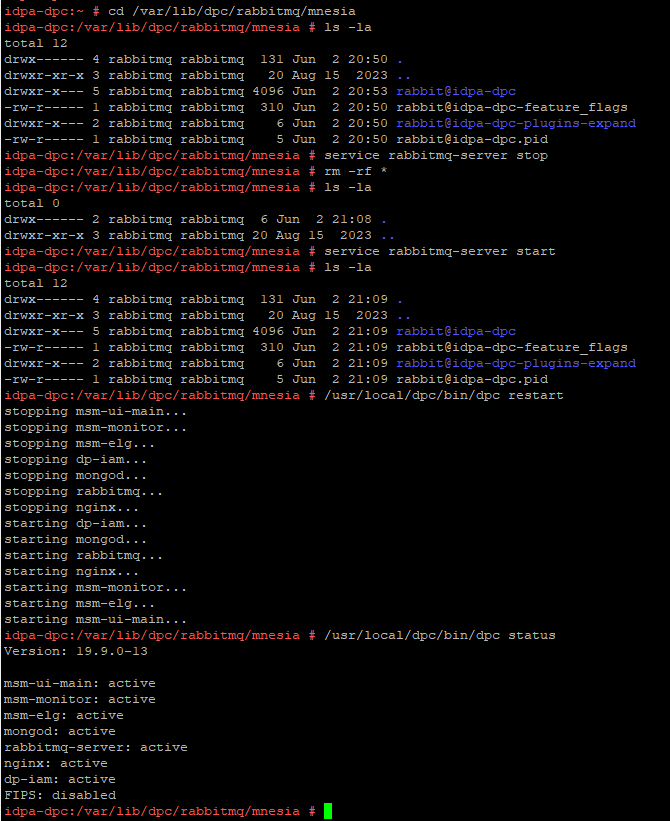
이 문제를 해결하려면 아래 절차에 따라 RabbitMQ 리소스를 재구축하십시오.
실습 환경의 출력 예:
- DPC 가상 머신의 스냅샷을 생성 하거나 DPC 서버의 전체 백업을 수행합니다.
- SSH를 통해 DPC에 연결하고 "admin"으로 로그인한 다음 사용자를 root로 변경합니다.
su -
- RabbitMQ 서비스 (
rabbitmq-server)을 다음 명령으로 바꿉니다.
service rabbitmq-server stop
- 디렉토리를 다음으로 변경합니다 .
/var/lib/dpc/rabbitmq/mnesia을 설정합니다.
cd /var/lib/dpc/rabbitmq/mnesia
- 사용 가능한 공간이 충분한 경우
/tmp에서 데이터를/tmp(선택 사항):
cp -rp * /tmp
- 아래의 데이터를 제거합니다 .
/var/lib/dpc/rabbitmq/mnesia다음 명령을 사용합니다.
rm -rf *
- RabbitMQ 서비스를 재시작하고
/var/lib/dpc/rabbitmq/mnesia다시 생성해야 합니다.
service rabbitmq-server start
- DPC 서비스를 재시작합니다.
/usr/local/dpc/bin/dpc restart
실습 환경의 출력 예:
그림 1: 아래에서 데이터 구조를 재생성하는 RabbitMQ를 보여주는 예
/var/lib/dpc/rabbitmq/mnesia 시동 중
- DPC UI에 로그인 하여 DPC가 예상대로 작동하는지 확인합니다.
- 이전에 이동한 하위 폴더를 삭제합니다.
/tmp5단계에서 데이터를 복사한 경우 - 서비스가 정상으로 돌아오면 DPC 가상 머신 스냅샷이 생성된 경우 삭제합니다.
Affected Products
Data Protection Central, PowerProtect DP4400, PowerProtect DP5300, PowerProtect DP5800, PowerProtect DP8300, PowerProtect DP8800, PowerProtect Data Protection Software, Integrated Data Protection Appliance Family
, Integrated Data Protection Appliance Software, PowerProtect DP5900, PowerProtect DP8400, PowerProtect DP8900
...
Article Properties
Article Number: 000225640
Article Type: Solution
Last Modified: 27 Jun 2025
Version: 3
Find answers to your questions from other Dell users
Support Services
Check if your device is covered by Support Services.