IDPA:設定從 ESXi 到遠端伺服器的遠端記錄 系統記錄轉送
Summary: 此程序會設定 ESXi 主機,以將系統記錄轉送至 IDPA 中的遠端伺服器。這是透過修改 Syslog.global.logHost 金鑰值並調整防火牆設定以啟用系統記錄來完成的。
This article applies to
This article does not apply to
This article is not tied to any specific product.
Not all product versions are identified in this article.
Instructions
-
使用 root 登入 ESXi vSphere Web UI。前往管理 標籤,然後前往 系統 > 進階設定。
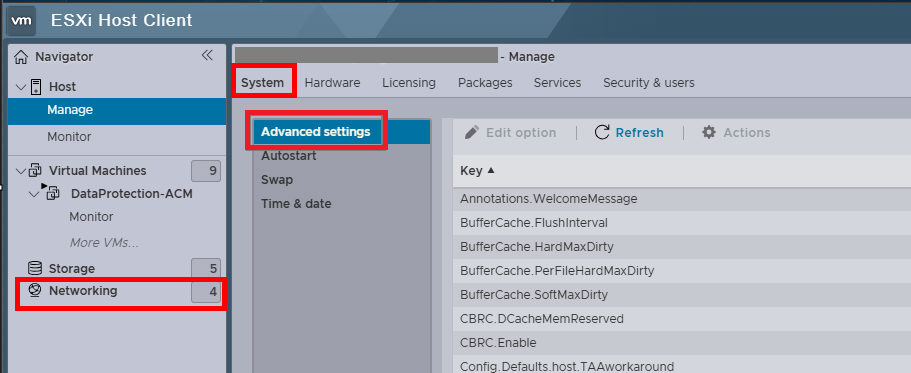
-
搜尋金鑰值:Syslog.global.logHost,然後按一下編輯選項。

-
以 udp://< SYSLOG_SERVER_IP_ADDRESS>:514 格式輸入您的系統記錄伺服器 IP
以 192.168.100.100 作為範例,此處應使用系統記錄伺服器位址。
-
轉到 “網络 ”選項卡,然後選擇 “防火牆規則”。
-
搜尋 系統記錄。按一下動作,然後按一下啟用。
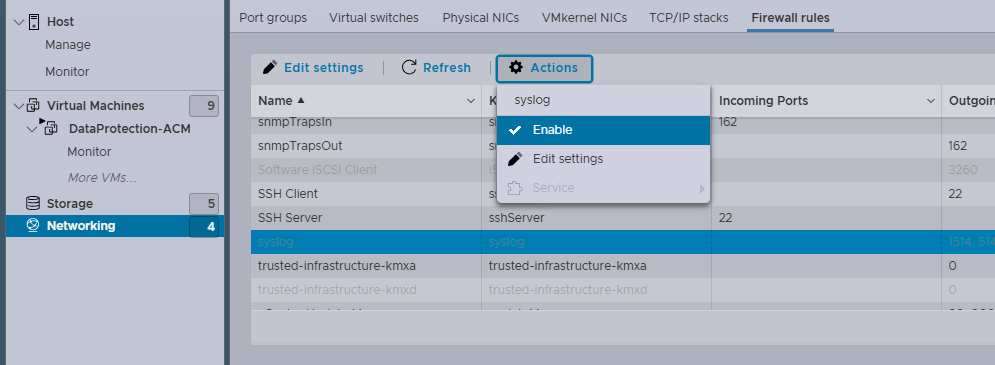
- 程序完成。
Affected Products
Integrated Data Protection Appliance FamilyProducts
Integrated Data Protection Appliance SoftwareArticle Properties
Article Number: 000225857
Article Type: How To
Last Modified: 01 Feb 2025
Version: 2
Find answers to your questions from other Dell users
Support Services
Check if your device is covered by Support Services.