I computer Dell con scheda WWAN DW5932e non riescono a connettersi a Internet dopo aver inserito una scheda SIM
Summary: Questo articolo fornisce informazioni sulle workstation Latitude e Precision con la scheda WWAN DW5932e installata, che non riescono a connettersi a Internet dopo aver inserito una scheda SIM. ...
This article applies to
This article does not apply to
This article is not tied to any specific product.
Not all product versions are identified in this article.
Symptoms
Piattaforme interessate:
- Latitude 5350
- Latitude 5450
- Latitude 5550
- Latitude 7030 Rugged Extreme Tablet
- Latitude 7350
- Latitude 7350 con tablet rimovibile
- Latitude 7450
- Latitude 7650
- Latitude 9450
- Dell Precision 3490
- Dell Precision 3590
- Dell Precision 3591
Il computer non dispone di connessione Internet, quando si attiva la connessione cellulare dalle impostazioni di rete e Internet di Windows,
Schede WWAN interessate:
- DW5932e
Cause
Si sospetta che il driver WWAN non sia completamente aggiornato quando l'utente esegue l'aggiornamento tramite Windows update.
Resolution
Scaricare e installare manualmente il driver WWAN dal sito web di supporto Dell.
La versione più recente del driver DW5932e è 3.2.0.16.
Dopo aver installato questo driver, Gestione dispositivi mostrerà la versione 3.1.0.8.
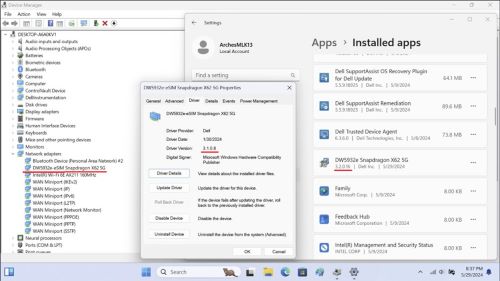
Nota:
- Non spegnere, mettere in sospensione o mettere in stato di ibernazione durante l'installazione del driver.
- Il completamento dell'installazione richiede circa due o tre minuti e viene visualizzato uno stato di avanzamento sullo schermo.
- Attendere che raggiunga il 100%, altrimenti l'installazione potrebbe essere incompleta.

Affected Products
Latitude 7030 Rugged Extreme Tablet, Latitude 5350, Latitude 7350, Latitude 7350 Detachable, Latitude 5450, Latitude 7450, Latitude 9450 2-in-1, Latitude 5550, Precision 3490, Precision 3590, Mobile Precision 3591Article Properties
Article Number: 000225950
Article Type: Solution
Last Modified: 23 Apr 2025
Version: 5
Find answers to your questions from other Dell users
Support Services
Check if your device is covered by Support Services.