插入 SIM 卡後,配備 DW5932e WWAN 卡的 Dell 電腦無法連線至網際網路
Summary: 本文提供關於安裝 DW5932e WWAN 卡的 Latitude 和 Precision 工作站在插入 SIM 卡後無法連線至網際網路的相關資訊。
This article applies to
This article does not apply to
This article is not tied to any specific product.
Not all product versions are identified in this article.
Symptoms
受影響的平台:
- Latitude 5350
- Latitude 5450
- Latitude 5550
- Latitude 7030 Rugged Extreme 平板電腦
- Latitude 7350
- Latitude 7350 Detachable
- Latitude 7450
- Latitude 7650
- Latitude 9450
- Precision 3490
- Precision 3590
- Precision 3591
從 Windows 網路 > 互聯網設置打開蜂窩連接時,計算機沒有互聯網連接,
受影響的 WWAN 卡:
- DW5932e
Cause
當使用者透過 Windows 更新更新時,懷疑 WWAN 驅動程式未完全更新。
Resolution
從 Dell 支援網站下載並手動安裝 WWAN 驅動程式。
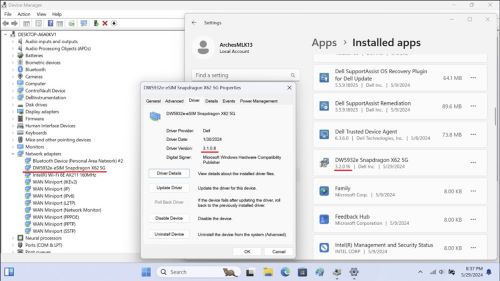
最新的驅動程式 DW5932e 驅動程式版本為 3.2.0.16。
安裝此驅動程式後, 裝置管理員會將版本顯示 為 3.1.0.8。
注意:
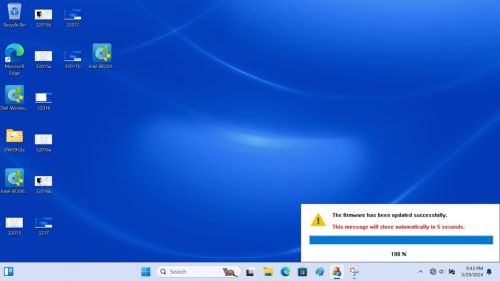
- 請勿在驅動程式安裝期間關機、進入睡眠或休眠狀態。
- 完成安裝大約需要兩到三分鐘,螢幕上會出現進度狀態。
- 等待達到 100%,否則可能會導致安裝不完整。
Affected Products
Latitude 7030 Rugged Extreme Tablet, Latitude 5350, Latitude 7350, Latitude 7350 Detachable, Latitude 5450, Latitude 7450, Latitude 9450 2-in-1, Latitude 5550, Precision 3490, Precision 3590, Mobile Precision 3591Article Properties
Article Number: 000225950
Article Type: Solution
Last Modified: 23 Apr 2025
Version: 5
Find answers to your questions from other Dell users
Support Services
Check if your device is covered by Support Services.