Dell Networking Edge GatewayのWindowsの購入時のセットアップ エラー
Summary: Windowsの実行中にEdge Gatewayを起動すると、設定不要のセットアップでエラーが発生する場合があります。
This article applies to
This article does not apply to
This article is not tied to any specific product.
Not all product versions are identified in this article.
Symptoms
Windowsを実行しているEdge Gatewayを初めて起動する場合、初期セットアップを行うことはできません。このような場合、デバイスに次のエラーが表示されることがあります。

Cause
このエラー メッセージは、特定のレジストリー ビットに誤ってフラグが設定された結果です。
Resolution
このエラーから回復するには、次の手順を実行します。
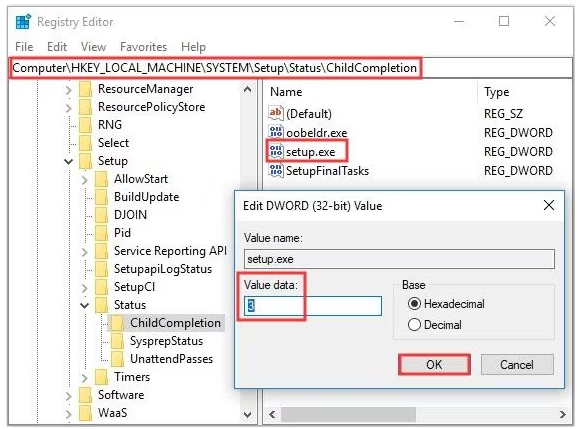
- 「Shift」+「F10」キーを使用してコマンドプロンプトを開きます
- 次のように入力して、「レジストリー エディター」を起動します。「regedit」と入力し、Enterを押します。
- regeditで、次のオブジェクトに移動します
-
HKEY_LOCAL_MACHINE\SYSTEM\Setup\Status\ChildCompletion
- setup.exeの編集
- [Value Data]を1から3に変更
-
- 編集が完了したら、[OK]をクリックして変更を保存します
- Regeditを閉じ、次のコマンドを使用して、コマンド プロンプトからシステムを再起動します。
-
shutdown /r
-
Affected Products
Dell Edge Gateway 3200, Dell Edge Gateway 5200Article Properties
Article Number: 000226062
Article Type: Solution
Last Modified: 05 Jun 2025
Version: 3
Find answers to your questions from other Dell users
Support Services
Check if your device is covered by Support Services.