Dell Networking Edge Gateway Windows İlk Çalıştırma kurulum hataları
Summary: Bazen Windows çalışırken Edge Gateway i açmak, ilk çalıştırma kurulumunda hatalara neden olabilir.
This article applies to
This article does not apply to
This article is not tied to any specific product.
Not all product versions are identified in this article.
Symptoms
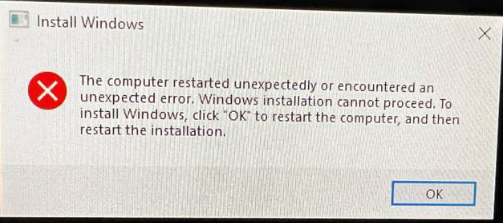
Windows çalıştıran Edge Gateway ilk kez önyüklenirken ilk kurulum yapılamaz. Bu gibi durumlarda cihaz aşağıdaki hatayı gösterebilir:
Cause
Bu hata mesajı, belirli bir kayıt defteri bitinin yanlış işaretlenmesinin bir sonucudur.
Resolution
Bu hatadan kurtulmak için:

- Shift" + "F10" tuşlarını kullanarak komut istemini açın.
- Aşağıdakileri yazarak "Kayıt Defteri Düzenleyicisi" ni başlatın: "regedit" ve enter tuşuna basın.
- Regedit'te aşağıdaki nesneye gidin
-
HKEY_LOCAL_MACHINE\SYSTEM\Setup\Status\ChildCompletion
- setup.exe düzenle
- "Değer Verisi"ni 1'den 3'e değiştirin
-
- Düzenlemeler yapıldıktan sonra değişiklikleri kaydetmek için "Tamam"a tıklayın
- Regedit'i kapatın ve sistemi komut isteminden şu komutla yeniden başlatın:
-
shutdown /r
-
Affected Products
Dell Edge Gateway 3200, Dell Edge Gateway 5200Article Properties
Article Number: 000226062
Article Type: Solution
Last Modified: 05 Jun 2025
Version: 3
Find answers to your questions from other Dell users
Support Services
Check if your device is covered by Support Services.