Dell Networking Edge Gateway Windows 开箱即用设置错误
Summary: 有时,在运行 Windows 时为 Edge Gateway 开机可能会导致开箱即用设置出错。
This article applies to
This article does not apply to
This article is not tied to any specific product.
Not all product versions are identified in this article.
Symptoms
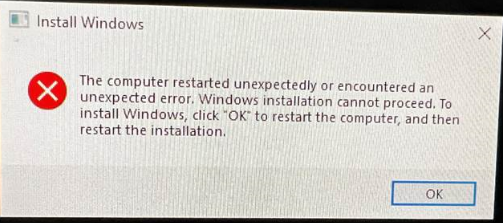
首次启动运行 Windows 的 Edge Gateway 时,将无法执行初始设置。在这种情况下,设备可能会显示以下错误:
Cause
此错误消息是由于某个注册表位被错误标记的结果。
Resolution
要从此错误中恢复,请执行以下操作:
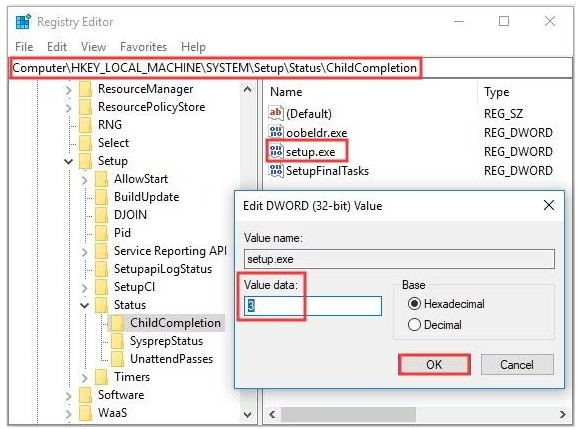
- 使用“Shift”+“F10”键打开命令提示符
- 通过键入以下命令启动“Registry Editor”:输入“regedit”,然后按 Enter 键。
- 在 regedit 中,导航到以下对象
-
HKEY_LOCAL_MACHINE\SYSTEM\Setup\Status\ChildCompletion
- 编辑setup.exe
- 将“Value Data”从 1 更改为 3
-
- 编辑完成后,单击“OK”保存更改
- 使用以下命令从命令提示符关闭注册表编辑器并重新启动系统:
-
shutdown /r
-
Affected Products
Dell Edge Gateway 3200, Dell Edge Gateway 5200Article Properties
Article Number: 000226062
Article Type: Solution
Last Modified: 05 Jun 2025
Version: 3
Find answers to your questions from other Dell users
Support Services
Check if your device is covered by Support Services.