DM5500: AD user access with "NGINX 500 internal server error"
Summary: When a user with numerous Active Directory (AD) groups accesses the DM5500 web interface, they may encounter a "500 Internal Server Error." The permanent resolution is in the DM5500 version 5.18.0.0 or later. ...
This article applies to
This article does not apply to
This article is not tied to any specific product.
Not all product versions are identified in this article.
Symptoms
If a user's AD profile has many associated groups, the user could encounter a "500 Internal Server Error" when connecting to the DM5500 user interface.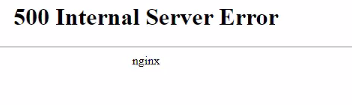
Figure 1. A "500 Internal Server Error" from the web browser
In the PowerProtect Data Manager (PPDM) NGINX error.log, an error similar to below can be found:
2024/04/24 05:31:46 [error] 82#82: *507187 upstream sent too big header while reading response header from upstream, client: xxx.xxx.xxx.xxx, server: ppoe, request: "GET / HTTP/1.1", subrequest: "/_iam_auth_internal", upstream: "http://xxx.xxx.xxx.xxx:8080/iam-token-handler/private/add-auth-header", host: "xxx.xxx.xxx.xxx"
Cause
In DM5500 version 5.16.0.0 or earlier, an AD user belonging to many groups can lead to an oversized Application Programming Interface (API) payload header that the NGINX service cannot handle.
Resolution
The permanent resolution is in the DM5500 version 5.18.0.0 or later.
Affected Products
PowerProtect Data Manager Appliance, PowerProtect DM5500Article Properties
Article Number: 000226158
Article Type: Solution
Last Modified: 05 Aug 2025
Version: 2
Find answers to your questions from other Dell users
Support Services
Check if your device is covered by Support Services.