PowerEdge: 'SST-performance profile'과 'Number of cores per processor' BIOS 설정을 함께 변경한 후 시스템이 무한 재부팅 루프로 전환됨
Summary: PowerEdge 16G 플랫폼이 무한 루프에서 멈추며 "메모리 구성..." 무대.
This article applies to
This article does not apply to
This article is not tied to any specific product.
Not all product versions are identified in this article.
Symptoms
"SST-Performance Profile" 및 "Number of Cores per Processor"에 대한 BIOS 옵션을 함께 수정한 후 시스템이 무한 루프에 갇혀 POST 중에 "메모리 구성..." 무대.
Cause
"SST-Performance Profile"과 "Number of Cores per Processor"의 조합은 함께 작동하지 않습니다.
Resolution
"SST-Performance Profile"과 "Number of Cores per Processor"를 동시에 수정하지 마십시오.
시스템이 이미 무한 재부팅 루프에 빠진 경우 NVRAM 지우기를 수행하여 주기를 중단합니다. 점퍼로 NVRAM을 지우는 방법에 대한 지침은 PowerEdge R660용 점퍼를 통해 NVRAM을 지우는 방법 비디오를 참조하십시오.
예정된 Dell BIOS September Block 릴리스 2.3.x에는 다음과 같은 향상된 기능이 도입되었습니다.
- 이제 사용자는 BIOS 설정에서 "프로세서당 코어 수"와 "SST-성능 프로필"을 동시에 수정할 수 없습니다. "프로세서당 코어 수"는 "SST-Performance Profile"이 OP2 또는 OP3으로 변경되는 즉시 차단됩니다. 반대로 "프로세서당 코어 수"가 "모두" 이외의 값으로 설정된 직후 "SST-성능 프로필"이 차단됩니다.
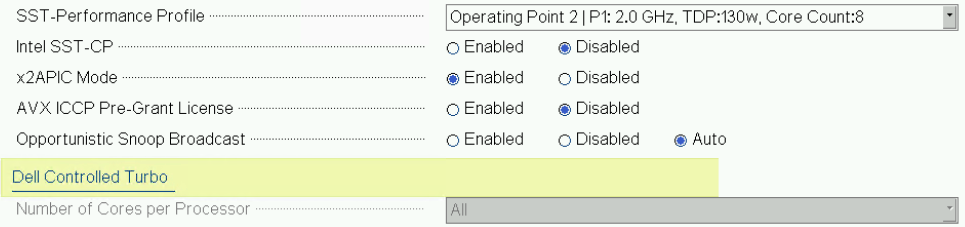
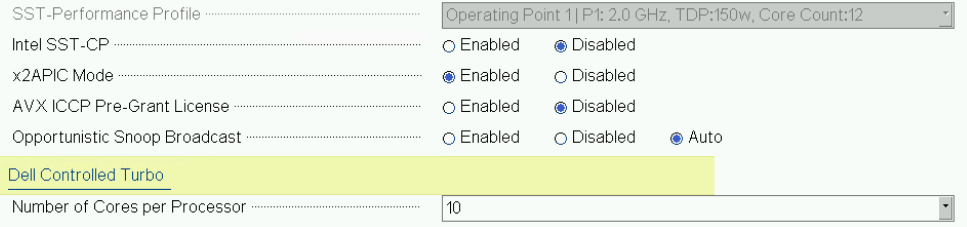
iDRAC WebGUI의 Configuration -> BIOS Settings에서 이러한 제한 사항은 시스템 재부팅 후에만 적용됩니다.
두 설정을 동시에 수정할 수는 여전히 있지만 재부팅 시 LC(Lifecycle Controller)에 다음 오류 메시지가 기록되고 시스템이 무제한 재부팅 루프로 들어가지 않습니다.
PR16 일부 구성 값을 디바이스에 적용할 수 없음: PowerEdge R660(System BIOS Setup)
Affected Products
PowerEdge R660, PowerEdge R660xs, PowerEdge R760, PowerEdge R760XA, PowerEdge R760xd2, PowerEdge R760xs, PowerEdge R860, PowerEdge R960, PowerEdge T560Products
PowerEdgeArticle Properties
Article Number: 000226735
Article Type: Solution
Last Modified: 05 May 2025
Version: 2
Find answers to your questions from other Dell users
Support Services
Check if your device is covered by Support Services.