『PowerEdge: 「SST-Performance Profile」と「Number of Cores per Processor」のBIOS設定を同時に変更した後、システムが無限の再起動ループに入る
Summary: PowerEdge 16Gプラットフォームが無限ループでスタックし、POST中に「メモリの構成...」で再起動し続けます。舞台。
This article applies to
This article does not apply to
This article is not tied to any specific product.
Not all product versions are identified in this article.
Symptoms
[SST-Performance Profile]と[Number of Cores per Processor]のBIOSオプションを同時に変更した後、システムが無限ループに陥り、POST中の「configure memory...」で繰り返し再起動します。舞台。
Cause
「SST-Performance Profile」と「Number of Cores per Processor」の組み合わせは連携しません。
Resolution
[SST-Performance Profile]と[Number of Cores per Processor]を同時に変更しないでください。
システムがすでに無限の再起動ループに陥っている場合は、NVRAMクリアを実行してサイクルを中断します。ジャンパーでNVRAMをクリアする方法については、ビデオ「PowerEdge R660のジャンパーでNVRAMをクリアする方法」を参照してください。
次回のDell BIOSの9月ブロック リリース2.3.xでは、以下の改善点が導入されています。
- BIOSセットアップで、[Number of Cores Per Processor]と[SST-Performance Profile]を同時に変更できなくなりました。[SST-Performance Profile]をOP2またはOP3に変更した直後に、[Number of Cores Per Processor]がブロックされます。逆に、[Number of Cores Per Processor]を[All]以外の値に設定すると、すぐに[SST-Performance Profile]がブロックされます。
![[SST-Performance Profile]メニュー オプション](https://supportkb.dell.com/img/ka0Do0000001nBxIAI/ka0Do0000001nBxIAI_ja_1.png)
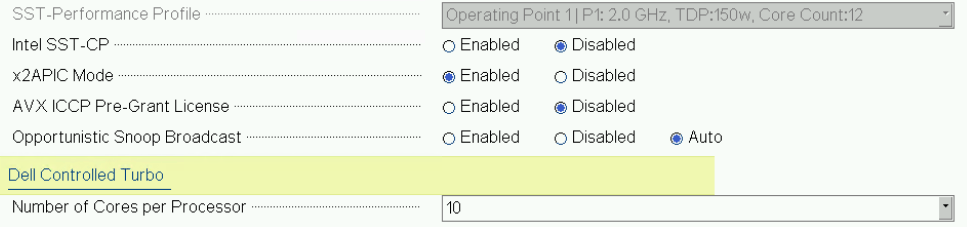
iDRAC WebGUIの[Configuration]-[> BIOS Settings]で、これらの制限はシステムの再起動後にのみ有効になります。
両方の設定を同時に変更することは可能ですが、再起動時に次のエラー メッセージがLifecycle Controller(LC)に記録され、システムが無限の再起動ループに陥ることはありません。
PR16 一部の設定値をデバイスに適用できませんでした: PowerEdge R660(システムBIOSセットアップ)
Affected Products
PowerEdge R660, PowerEdge R660xs, PowerEdge R760, PowerEdge R760XA, PowerEdge R760xd2, PowerEdge R760xs, PowerEdge R860, PowerEdge R960, PowerEdge T560Products
PowerEdgeArticle Properties
Article Number: 000226735
Article Type: Solution
Last Modified: 05 May 2025
Version: 2
Find answers to your questions from other Dell users
Support Services
Check if your device is covered by Support Services.