适用于 Red Hat OpenShift 的 Dell APEX 云平台:由于证书验证错误,无法创建断开连接的 HCP 管理群集
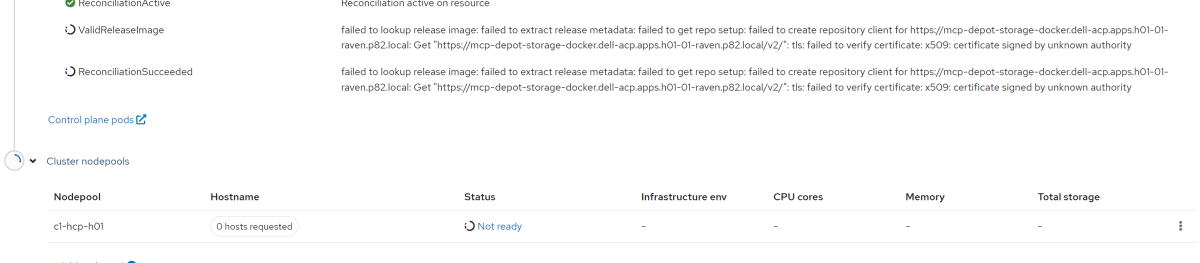
Summary: 由于错误“无法验证证书:x509:证书由未知颁发机构签名”,创建断开连接的托管控制平面 (HCP) 托管群集失败。
This article applies to
This article does not apply to
This article is not tied to any specific product.
Not all product versions are identified in this article.
Symptoms
按照管理员指南创建断开连接的 HCP 管理群集时,该过程可能会失败。UI 控制台将显示错误“无法验证证书:x509:证书由未知颁发机构签名”。
Cause
在 Dell APEX Cloud Platform for Red Hat OpenShift (ACP4OCP) 群集中,需要两个注册表:
但是,在 HCP 管理的群集设置期间,ACP4OCP 的 hypershift 组件会根据 image.config.openshift.io 资源的设置创建自己的 trustedCA。它使用它来验证 OpenShift Container Platform (OCP) 版本映像。如果 additionalTrustedCA 配置包含两个证书并使用“|-”作为分隔符,则 hypershift 不会在第一个证书后添加换行符。这会导致两个证书都被视为无效。
在 YAML 语法中,“|-”和“|”都是有效的分隔符,用于表示多行字符串值。从 OCP Web 控制台创建或修改“键/值”ConfigMap 时,“|-”将用作默认分隔符。
要检查 Configmap 是否包含“|-”作为分隔符,请在 ACP 管理器上运行以下命令:

- ACP4OCP Hub 群集中名为 depot-manager 的内部注册表,用于存储 OCP 和 ACP Manager 映像。
- 用于处理断电的外部注册表。
但是,在 HCP 管理的群集设置期间,ACP4OCP 的 hypershift 组件会根据 image.config.openshift.io 资源的设置创建自己的 trustedCA。它使用它来验证 OpenShift Container Platform (OCP) 版本映像。如果 additionalTrustedCA 配置包含两个证书并使用“|-”作为分隔符,则 hypershift 不会在第一个证书后添加换行符。这会导致两个证书都被视为无效。
在 YAML 语法中,“|-”和“|”都是有效的分隔符,用于表示多行字符串值。从 OCP Web 控制台创建或修改“键/值”ConfigMap 时,“|-”将用作默认分隔符。
要检查 Configmap 是否包含“|-”作为分隔符,请在 ACP 管理器上运行以下命令:
-
oc get configmap -n openshift-config acp-ingress-ca -o yaml
Resolution
要将证书名称和证书密钥之间的分隔符从“|-”更改为“|”,请执行以下步骤:
- 在 ACP 管理器上运行“oc edit configmap -n openshift-config acp-ingress-ca”,将“|-”更改为“|”,并将更改保存在 Configmap 中。
- 使用命令“oc delete pod -n hypershift --all”重新启动 hypershift 组件 pod。
- Hypershift Pod 准备就绪后,重试 HCP 管理的群集设置。
Affected Products
APEX Cloud Platform for Red Hat OpenShiftArticle Properties
Article Number: 000226907
Article Type: Solution
Last Modified: 28 Aug 2024
Version: 1
Find answers to your questions from other Dell users
Support Services
Check if your device is covered by Support Services.