VxRail:如何更新 ESXi 主機中的 VMware Tools 版本
Summary: 在本文中,我們將展示如何使用來自 Broadcom 的離線封包,更新 ESXi 主機中的 VMware Tools 版本。
This article applies to
This article does not apply to
This article is not tied to any specific product.
Not all product versions are identified in this article.
Instructions
-
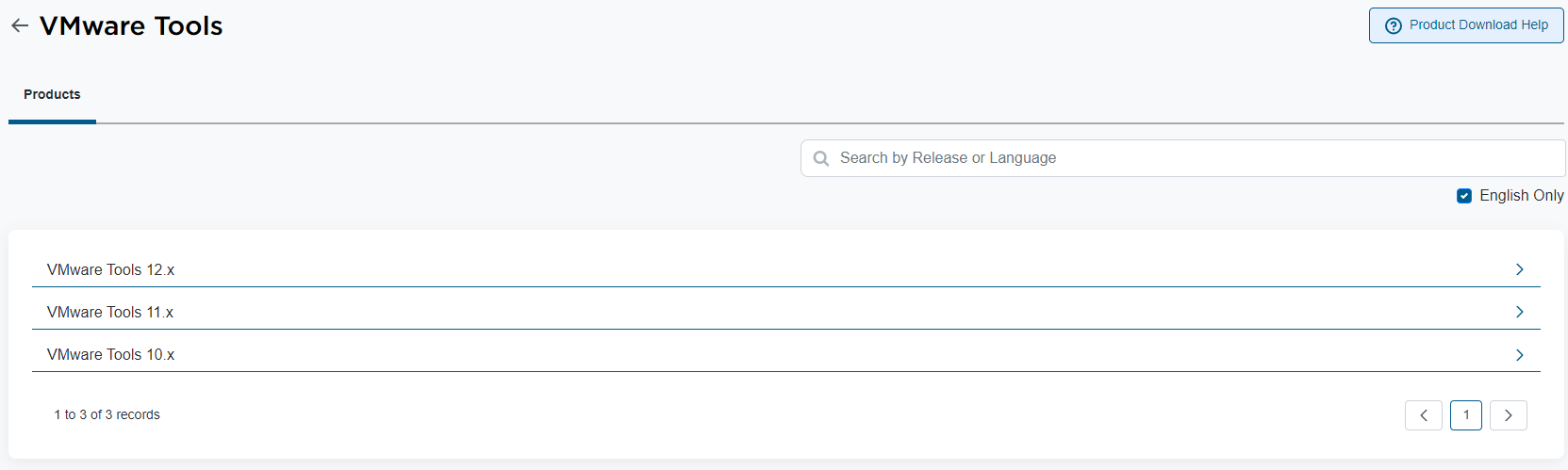
從 Broadcom 支援頁面下載「VMware Tools 離線 VIB 套裝」。前往「我的下載」區段,然後依「VMware 工具」進行搜尋。選取所需的版本並下載離線 VIB 套裝:

-
套用更新之前,您可以檢查 ESXi 主機中目前的 VMware Tools 版本。透過 SSH 並執行下列命令存取 ESXi 主機:
esxcli software component get | grep VMware-VM-Tools -B 1 -A 14
範例:
[root@host01:~] esxcli software component get | grep VMware-VM-Tools -B 1 -A 14

VMware-VM-Tools_12.3.5.22544099-23794019
   Name: VMware-VM-Tools
   Display Name: ESXi VM Tools
   Version: 12.3.5.22544099-23794019
   Display Version: 12.3.5
   VIBs: VMware_locker_tools-light_12.3.5.22544099-23794019
   Vendor: VMware
   Summary: ESXi Tools Component
   Severity: general
   Urgency: critical
   Category: security
   Release Type: patch
   Kburl: https://docs.vmware.com/en/VMware-vSphere/7.0/rn/vsphere-esxi-70u3q-release-notes/index.html#Resolved%20Issues-VMware-VM-Tools_12.3.5.22544099-23794019
   Description: This component contains the tools VIB.
   Contact: VMware
   ReleaseDate: 05-21-2024
在這種情況下,ESXi 主機中目前的 VMware Tools 版本為「12.3.5.22544099-23794019」。
-
在 ESXi 主機中,建立一個臨時目錄來放置「VMware 工具離線 VIB 套裝」。在這種情況下,「VMware Tools Offline VIB Bundle」版本 12.4.5 的大小約為 370 MB。您必須將此檔案放在 ESXi 主機中支援的目錄中。在此範例中,我們在本地資料儲存中創建一個臨時目錄:
[root@host01:~] cd /vmfs/volumes/LOCAL-DATASTORE

[root@host01:/vmfs/volumes/LOCAL-DATASTORE] mkdir vmware-tools-temp
建立臨時目錄後,將檔案「VMware Tools Offline VIB Bundle」複製到其中。您可以使用 WinSCP、Powershell 或您偏好的應用程式,將檔案複製到 ESXi 主機。
-
若要更新 VMware Tools 版本,不需要讓 ESXi 主機進入維護模式或重新開機。您可以使用以下命令進行確認:
esxcli software sources vib get --depot=file:/vmfs/volumes/LOCAL-DATASTORE/vmware-tools-temp/VMware-Tools-12.4.5-core-offline-depot-ESXi-all-23787635.zip
命令輸出範例:
VMware_locker_tools-light_6.5.0-12.4.5.23787635
   Name: tools-light
   Version: 6.5.0-12.4.5.23787635
   Type: locker
   Vendor: VMware
   Acceptance Level: VMwareCertified
   Summary: VMware Tools VIB for Windows and Linux guests for ESXi 6.5.0
   Description: This package contains cdrom and floppy images used to install the VMware Tools inside virtual machines.
   ReferenceURLs:
   Creation Date: 2024-05-22
   Depends: esx-version = 6.5.0
   Conflicts:
   Replaces:
   Provides:
   Maintenance Mode Required: False
   Hardware Platforms Required:
   Live Install Allowed: True
   Live Remove Allowed: True
   Stateless Ready: True
   Overlay: False
   Tags:
   Payloads: tools

VMware_locker_tools-light_12.4.5.23787635-23919197
   Name: tools-light
   Version: 12.4.5.23787635-23919197
   Type: locker
   Vendor: VMware
   Acceptance Level: VMwareCertified
   Summary: VMware Tools VIB for Windows and Linux guests (generated by vmtoolspkg build 23919197)
   Description: This package contains cdrom and floppy images used to install the VMware Tools inside virtual machines.
   ReferenceURLs:
   Creation Date: 2024-05-22
   Depends: esx-version >= 6.6.0
   Conflicts:
   Replaces:
   Provides:
   Maintenance Mode Required: False
   Hardware Platforms Required:
   Live Install Allowed: True
   Live Remove Allowed: True
   Stateless Ready: True
   Overlay: False
   Tags:
   Payloads: tools
-
若要套用更新,您可以執行下列命令:
esxcli software vib install --depot=file:/vmfs/volumes/LOCAL-DATASTORE/vmware-tools-temp/VMware-Tools-12.4.5-core-offline-depot-ESXi-all-23787635.zip
命令輸出範例:
[root@vxrail01:/vmfs/volumes/LOCAL-DATASTORE/vmware-tools-temp] esxcli software vib install --depot=file:/vmfs/volumes/LOCAL-DATASTORE/vmware-tools-temp/VMware-Tools-12.4.5-core-offline-depot-ESXi-all-23787635.zip
Installation Result
   Message: Operation finished successfully.
   Reboot Required: false
   VIBs Installed: VMware_locker_tools-light_12.4.5.23787635-23919197
   VIBs Removed: VMware_locker_tools-light_12.3.5.22544099-23794019
   VIBs Skipped:
-
之後,您可以檢查 VMware Tools 版本:
[root@vxrail01:/vmfs/volumes/LOCAL-DATASTORE/vmware-tools-temp] esxcli software component get | grep VMware-VM-Tools -B 1 -A 14TOOLS-23919197
   Name: VMware-VM-Tools
   Display Name: VMware Tools Async Release
   Version: 12.4.5.23787635-23919197
   Display Version: 12.4.5
   VIBs: VMware_locker_tools-light_12.4.5.23787635-23919197
   Vendor: VMware
   Summary: VMware Tools 12.4.5 Async Release
   Severity: general
   Urgency: important
   Category: bugfix
   Release Type: patch
   Kburl: https://docs.vmware.com/en/VMware-Tools/12.4/rn/vmware-tools-1245-release-notes/index.html
   Description: VMware Tools 12.4.5 Async Release
   Contact: http://www.vmware.com/support/contacts/
   ReleaseDate: 06-27-2024
如您所見,新的 VMware Tools 版本為「12.4.5.23787635-23919197」。
-
現在您可以存取 vSphere Client,選取您更新了 VMware Tools 的 ESXi 主機,並在其上執行的 VM 上更新 VMware 工具。
注意:建議在叢集中的所有 ESXi 主機上進行更新!
Affected Products
VxRailArticle Properties
Article Number: 000227059
Article Type: How To
Last Modified: 23 Jul 2024
Version: 1
Find answers to your questions from other Dell users
Support Services
Check if your device is covered by Support Services.