PowerStore VSIサービスは、インストール後もまだすべてが稼働しているわけではありません
Summary: Virtual Storage Integrator (VSI)のインストール後、VSI WebUIログイン画面に次のエラーが表示されます。「VSIサービスはまだすべて稼働していません。数分待ってから、このページを更新してください。問題が15分以上解決しない場合は、VSI仮想マシンを再起動して再試行してください。
This article applies to
This article does not apply to
This article is not tied to any specific product.
Not all product versions are identified in this article.
Symptoms
VSI WebUIログイン画面でのエラー: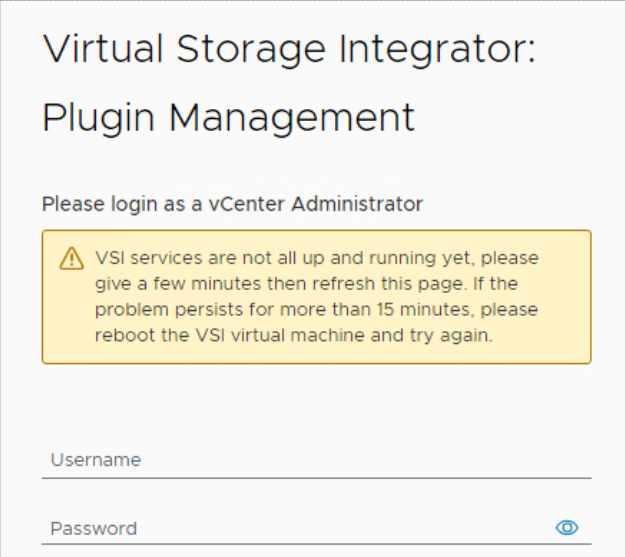
VSIログの「iapi-rest-error」ログに、次のようなエラー メッセージが繰り返し表示されます。
Caused by: java.util.concurrent.ExecutionException: org.redisson.client.RedisConnectionException: java.net.UnknownHostException: Failed to resolve 'redis' [A(1)] after 2 queries
そうすると、 docker ps VSI仮想マシン(VM)からコマンドを実行すると、Redisコンテナが常に「再起動中」の状態になっていることが示されます。Internet Application Programming Interface (IAPI) コンテナーも再起動し、アップタイムが他のコンテナーよりも大幅に短くなります。
root@photon [ ~ ]# docker ps
CONTAINER ID   IMAGE                                                                       COMMAND                  CREATED          STATUS                          PORTS                                           NAMES
475db176af94   amaas-eos-mw1.cec.lab.emc.com:8125/externals/redis:5.0                      "/bin/bash -c 'redis…"   26 minutes ago   Restarting (1) 17 seconds ago                                                   redis
b423bae65c3e   amaas-eos-mw1.cec.lab.emc.com:8125/dellemc/vsi-proxy:10.6.0-983             "/docker-entrypoint.…"   30 minutes ago   Up 10 minutes                   80/tcp, 0.0.0.0:443->443/tcp, :::443->443/tcp   vsi-proxy
f1c4b6edc1da   amaas-eos-mw1.cec.lab.emc.com:8125/dellemc/iapi:1.16.0-1371                 "/tini -g -v -- /opt…"   3 months ago     Up 12 seconds                   0.0.0.0:32851->8001/tcp, :::32851->8001/tcp     iapi
5c042bbd9a53   amaas-eos-mw1.cec.lab.emc.com:8125/dellemc/vsi-aggregation-service:10.6.0   "docker-entrypoint.s…"   3 months ago     Up 14 minutes                   0.0.0.0:32768->8082/tcp, :::32768->8082/tcp     vsi-aggregation-service
621ee8dab64a   amaas-eos-mw1.cec.lab.emc.com:8125/dellemc/vsi-ui:10.6.0-983                "/docker-entrypoint.…"   3 months ago     Up 14 minutes                   0.0.0.0:32769->80/tcp, :::32769->80/tcp         vsi-ui
Cause
データベースのパスワードには、パスワードの先頭に # が付きます (例: #PassWord123!間のデッドロックが原因で潜在的なHMONタイムアウトが発生する問題が解決されています。
この問題を回避するには、パスワードの先頭に「#」を使用しないでください。
これは、初期パスワードが設定されている場所です。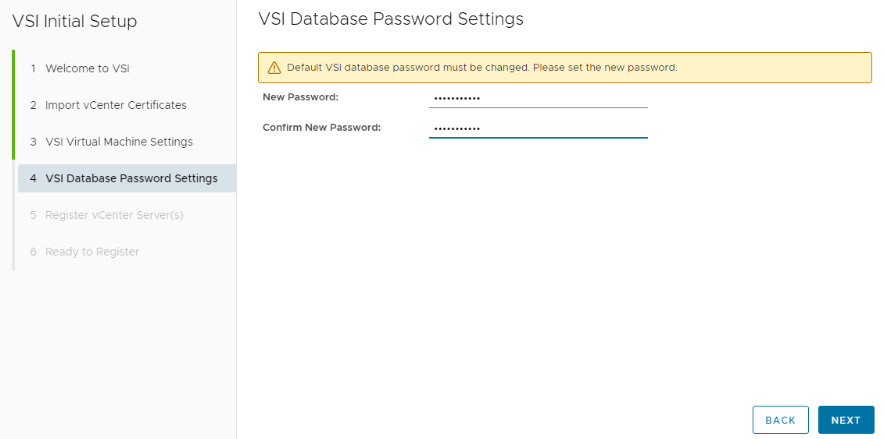
Resolution
VSI仮想マシンのコマンドラインインターフェイスを使用してRedisデータベースをリセットします。
VSI仮想マシンにログインします。これは、仮想コンソールを起動するか、VSI VMにSSHで接続することで、VMwareを介して実行できます。VMに初めてログインした場合、ユーザー名とパスワードは rootです。ログイン後にパスワードの変更が必要です。
次のコマンドを実行して、Redisパスワードをリセットします。
root@photon [ ~ ]# /opt/files/iapi-maintenance-util/apis/redis/redis-config.sh --rollback
WARNING: The DOCKERHOST variable is not set. Defaulting to a blank string.
Stopping redis ... done
WARNING: The DOCKERHOST variable is not set. Defaulting to a blank string.
Going to remove redis
Removing redis ... done
WARNING: The DOCKERHOST variable is not set. Defaulting to a blank string.
WARNING: The create command is deprecated. Use the up command with the --no-start flag instead.
Creating redis ... done
WARNING: The DOCKERHOST variable is not set. Defaulting to a blank string.
Starting redis ... done
Successfully copied 2.56kB to iapi:/opt/iapi/conf/redisson.yaml
iapi
iapi
コマンドが完了したら、VSI Web UIにログインすると、警告が消えます。
ウィンドウの上部に、Redisパスワードをリセットするためのアラートが表示されます。
「#または!」を含まないRedisパスワードを設定しますパスワードの開始時に、パスワードが設定された後、画面が更新されるまでに最大5分かかる場合があります。
Additional Information
頭字語の定義:
VSI - Virtual Storage Integrator
VM - Virtual Machine
IAPI - Internet Application Programming Interface
Affected Products
PowerStore, Virtual Storage Integrator (VSI), PowerStoreOSArticle Properties
Article Number: 000227235
Article Type: Solution
Last Modified: 29 Jul 2025
Version: 3
Find answers to your questions from other Dell users
Support Services
Check if your device is covered by Support Services.