Avamar:vSphere 中的 Avamar Virtual Edition OVA 部署報告 Entrust 代碼簽署憑證無效
Summary: vSphere 中的 Avamar Virtual Edition OVA 部署報告 Entrust 代碼簽署憑證無效,因為從 vCenter 7.0 U2 開始有嚴格的憑證驗證。本文提供綜合認證檔案和指示,以將其新增至 VMware 端點憑證存放區以解決警告。
This article applies to
This article does not apply to
This article is not tied to any specific product.
Not all product versions are identified in this article.
Symptoms
vSphere 中的 Avamar Virtual Edition OVA 部署報告 (無效的憑證),以取得 entrust 代碼簽署憑證。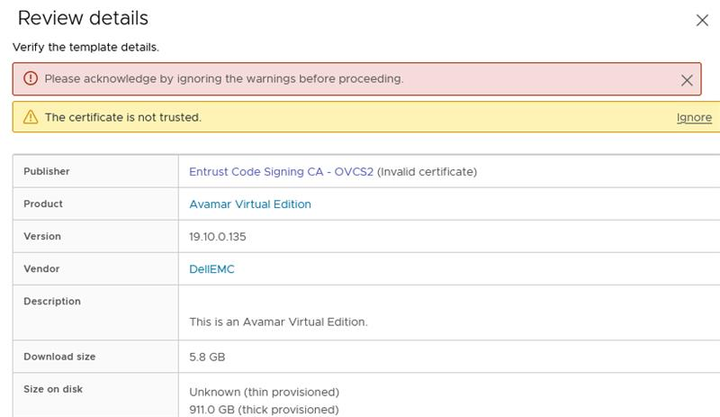
Cause
從 vCenter 7.0 U2 開始,vSphere 會對 OVA/OVF 套裝執行更嚴格的憑證驗證。會驗證 OVF 簽署憑證的到期時間、有效性,以及簽署憑證是否受信任。此驗證程序要求簽署憑證的整個鏈結必須與 vSphere VMware 端點憑證儲存 (VECS) 儲存一起受到信任。
如需更多關於此 vSphere 行為的資訊,請參閱 VMware KB 336085
Resolution
因應措施:
儘管有警告,但仍可按一下「忽略」以繼續部署。
主意:
若要解決憑證警告,請將簽署憑證鏈結新增至 vCenter VECS 存放區,並在安全的環境中部署 OVA,請按照下列步驟操作:
-
下載 Entrust 憑證:
-
根 CA:
流覽「Entrust Root 憑證下載」頁面,然後搜尋含指紋的「Entrust Root 認證機構 (G2)」:8C F4 27 FD 79 0C 3A D1 66 06 8D E8 1E 57 EF BB 93 22 72 D4。 -
代碼簽署 (認證機構) CA:
瀏覽「Entrust Certificate Services Subordinate CA」頁面,然後搜尋含指紋的「Entrust Code Signing CA - OVCS2」:A6 1D C5 D9 0A 06 00 3E B4 DD 35 99 B7 A0 52 FC 3F 70 D7 CC。此檔案在單一檔案中包含兩個 CA 憑證。
-
-
將組合的 CA 憑證新增至 VECS 儲存:
- 連線至 vSphere Client。
- 赴
Administration > Certificates > Certificate Management。 - 挨
Trusted Root Store, 按下“添加”。 - 瀏覽並選取下載的 Root CA 認證檔案位置,然後按一下「確定」。
- 重複該過程以添加代碼簽名 CA 證書檔 ,方法是再次按下「添加」,瀏覽並選擇相應的檔。
- 現在應有三個 Entrust CA 憑證 (根 CA、中間程式碼簽署 CA 和程式碼簽署 CA) 列在
Trusted Root Certificates。
-
驗證:
- 在部署期間,「發行者」欄應顯示 Avamar Virtual Edition OVA 和其他 Dell 發行的 OVA 檔案的「受信任憑證」。
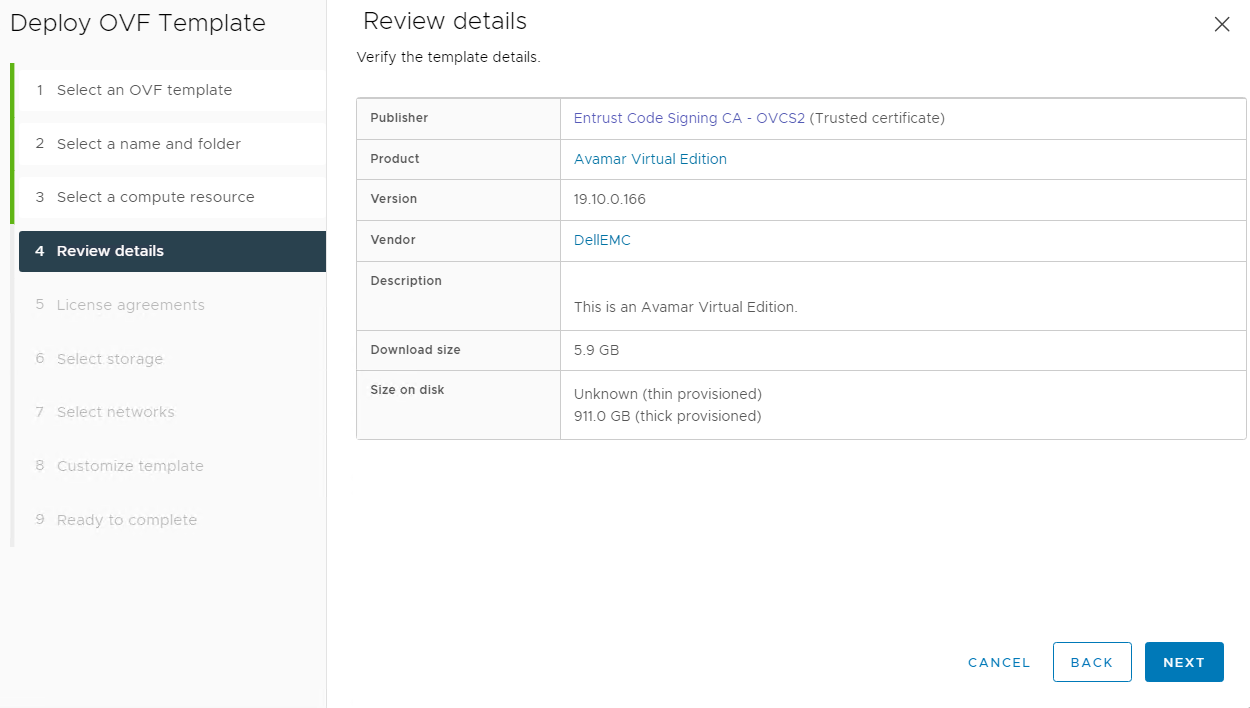
- 在部署期間,「發行者」欄應顯示 Avamar Virtual Edition OVA 和其他 Dell 發行的 OVA 檔案的「受信任憑證」。
Affected Products
AvamarArticle Properties
Article Number: 000227285
Article Type: Solution
Last Modified: 30 Jul 2024
Version: 2
Find answers to your questions from other Dell users
Support Services
Check if your device is covered by Support Services.