O NVIDIA RTX Desktop Manager mantém a área de trabalho aberta
Summary: Este artigo apresenta informações sobre o problema em que o recém-criado Desktop Manager NVIDIA RTX Desktop não pode ser fechado.
This article applies to
This article does not apply to
This article is not tied to any specific product.
Not all product versions are identified in this article.
Symptoms
Os computadores Dell com GPU discreta NVIDIA podem experimentar o NVIDIA RTX Desktop Manager ao não conseguir fechar o desktop recém-criado.
- Abra o NVIDIA RTX Desktop Manager e clique em ENABLE RTX DESKTOP MANAGER. O aplicativo cria o Desktop 1 como padrão.
- Clique no botão Nova área de trabalho para criar uma segunda área de trabalho.
- Clique no ícone X no canto superior direito do Desktop 2 , mas veja que ele não pode ser fechado.
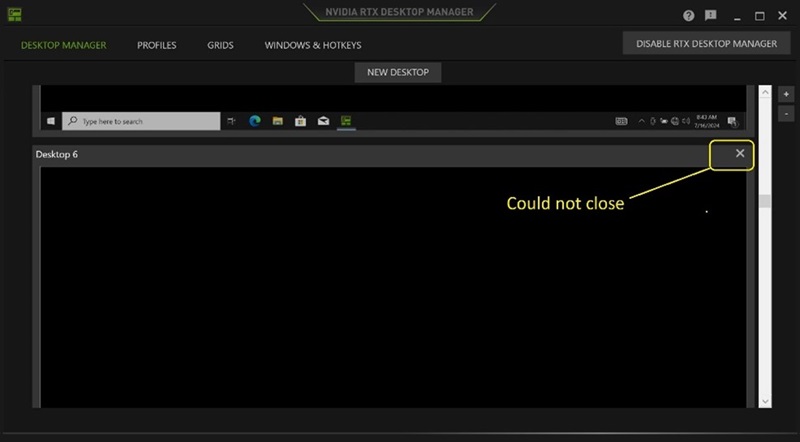
(Figura 1 — NVIDIA RTX Desktop Manager)
Plataformas afetadas:
- Precision 7780
- Precision 7680
- Precision 7770
- Precision 7670
- Precision 7560
- Precision 7760
- Precision 7550
- Precision 7750
- Precision 7540
- Precision 7740
- Precision 7530
- Precision 7730
- Precision 7520
- Precision 7720
- Precision 5480
- Precision 5490
- Latitude 3490
- Latitude 3480
- Latitude 3470
- Latitude 3550
- Latitude 3530
- Latitude 3520
Cause
N/D
Resolution
Atualizar a unidade gráfica NVIDIAr para a versão 552.84 ou posterior no computador resolve o problema. Para fazer download e instalar o driver, consulte Como fazer download e instalar os drivers Dell.
Affected Products
Dell Latitude 3480/3488, Latitude 3490, Latitude 3520, Latitude 3530, Latitude 3550, Latitude 3470, Precision 5480, Precision 5490, Precision 7520, Precision 7530, Precision 7540, Precision 7550, Precision 7560, Precision 7670, Precision 7680
, Precision 7720, Precision 7730, Precision 7740, Precision 7750, Precision 7760, Precision 7770, Precision 7780
...
Article Properties
Article Number: 000227614
Article Type: Solution
Last Modified: 21 May 2026
Version: 3
Find answers to your questions from other Dell users
Support Services
Check if your device is covered by Support Services.