NVIDIA RTX Desktop Manager mantiene la computadora de escritorio abierta
Summary: En este artículo, se proporciona información sobre el problema de escritorio recién creado en el administrador de escritorio NVIDIA RTX.
This article applies to
This article does not apply to
This article is not tied to any specific product.
Not all product versions are identified in this article.
Symptoms
Es posible que las computadoras Dell con GPU discreta NVIDIA experimenten que NVIDIA RTX Desktop Manager no puede cerrar el escritorio recién creado.
- Abra NVIDIA RTX Desktop Manager y haga clic en ENABLE RTX DESKTOP MANAGER. La aplicación creará Desktop 1 como predeterminado.
- Haga clic en el botón Nuevo escritorio para crear un segundo escritorio.
- Haga clic en el icono X en la esquina superior derecha de la computadora de escritorio 2 , pero verá que no se puede cerrar.
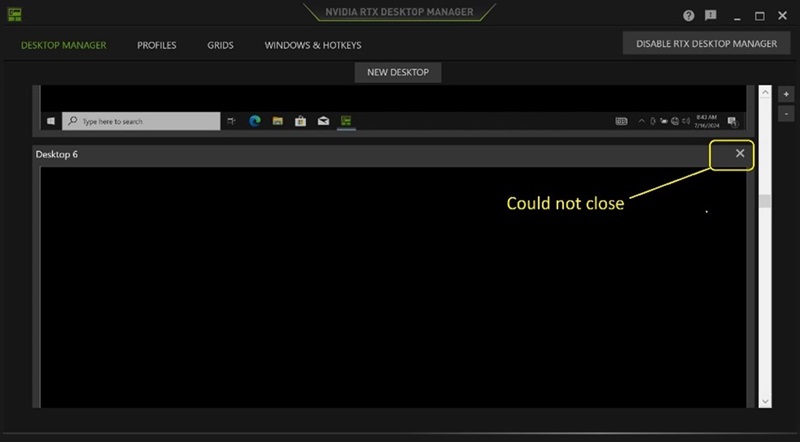
(Figura 1 : NVIDIA RTX Desktop Manager)
Plataformas afectadas:
- Precision 7780
- Precision 7680
- Precision 7770
- Precision 7670
- Precision 7560
- Precision 7760
- Precision 7550
- Precision 7750
- Precision 7540
- Precision 7740
- Precision 7530
- Precision 7730
- Precision 7520
- Precision 7720
- Precision 5480
- Precision 5490
- Latitude 3490
- Latitude 3480
- Latitude 3470
- Latitude 3550
- Latitude 3530
- Latitude 3520
Cause
N/D
Resolution
Actualizar la unidad gráfica NVIDIAr a la versión 552.84 o posterior en la computadora resuelve el problema. Para descargar e instalar el controlador, consulte Cómo descargar e instalar controladores de Dell.
Affected Products
Dell Latitude 3480/3488, Latitude 3490, Latitude 3520, Latitude 3530, Latitude 3550, Latitude 3470, Precision 5480, Precision 5490, Precision 7520, Precision 7530, Precision 7540, Precision 7550, Precision 7560, Precision 7670, Precision 7680
, Precision 7720, Precision 7730, Precision 7740, Precision 7750, Precision 7760, Precision 7770, Precision 7780
...
Article Properties
Article Number: 000227614
Article Type: Solution
Last Modified: 24 Apr 2025
Version: 2
Find answers to your questions from other Dell users
Support Services
Check if your device is covered by Support Services.