VxRail 上的 VCF:NSX 在檢查 LDAP 狀態時停滯
Summary: NSX UI 上的 Active Directory over Lightweight Directory Access Protocol (LDAP) 設定正確。NSX 無法完成 LDAP 設定的檢查。該狀態會導致它在功能上不可用。
This article applies to
This article does not apply to
This article is not tied to any specific product.
Not all product versions are identified in this article.
Symptoms
NSX UI 上的 Active Directory over LDAP 設定正確無誤。NSX 無法完成 LDAP 設定的檢查。該狀態會導致它在功能上不可用。
LDAP 設定正確,但無法新增使用者。
NSX UI 的 VMware Identity Manager 標籤上有一個不正常的標記,例如連線中斷。
本機主機存取記錄:VMware Identity Manager (VIDM) 狀態傳回 HTTP 代碼 400。
nsx-mgr> tail -f /var/log/proxy/localhost_access_log
2024-08-06T02:27:46.690Z - "GET /policy/api/v1/aaa/roles HTTP/1.1" 200 343 13 13
2024-08-06T02:27:46.738Z - "GET /favicon.ico HTTP/1.1" 200 5686 2 1
2024-08-06T02:27:46.811Z - "POST /policy/api/v1/search/aggregate?page_size=250 HTTP/1.1" 200 2026 105 105
2024-08-06T02:27:46.812Z - "POST /policy/api/v1/search/aggregate?page_size=50&cursor=0&sort_by=display_name&sort_ascending=true HTTP/1.1" 200 1306 113 113
2024-08-06T02:27:48.461Z - "GET /api/v1/node/aaa/providers/vidm/status HTTP/1.1" 400 135 1761 1760
Cause
NSX 在完成之前會掃描所有標識上下文。
如果已整合 VMware Identity Manager,且 NSX 和 VIDM 之間的連線中斷,則身分識別掃描會停滯。
Resolution
補救步驟:
1.從 NSX 管理員中檢查此錯誤的詳細原因:
curl -k -u 'admin:<nsx admin password>' -X GET https://localhost/api/v1/node/aaa/providers/vidm/status
輸出可能類似於以下內容:
"error_message": "Invalid VMware Identity Manager thumbprint specified."
2.檢查目前的 VIDM 指紋。

openssl s_client -connect <FQDN of vIDM host>:443 < /dev/null 2> /dev/null | openssl x509 -sha256 -fingerprint -noout -in /dev/stdin
3.在 NSX UI 上更換為正確的指紋,然後儲存。

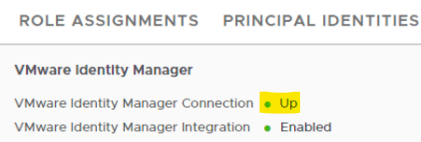
4.連線狀態復原後,會顯示「Up」
Affected Products
VxRail, VxRail Appliance Series, VxRail E560 VCF, VxRail E560F VCF, VxRail E560N VCF, VxRail G560 VCF, VxRail G560F VCF, VxRail P570 VCF, VxRail P570F VCF, VxRail P580N VCF, VxRail S570 VCF, VxRail V570 VCF, VxRail V570F VCFArticle Properties
Article Number: 000227655
Article Type: Solution
Last Modified: 08 Nov 2025
Version: 3
Find answers to your questions from other Dell users
Support Services
Check if your device is covered by Support Services.