VxRail: vCenter가 FQDN을 사용하여 노드를 다시 추가할 수 없음
Summary: vCenter가 FQDN(Fully Qualified Domain Name)을 사용하여 노드를 다시 추가할 수 없습니다.
This article applies to
This article does not apply to
This article is not tied to any specific product.
Not all product versions are identified in this article.
Symptoms
노드가 7.0.x에서 8.0.x로 업그레이드되었습니다. 노드 재부팅이 완료되면 vCenter가 노드에 다시 연결할 수 없습니다.
vCenter는 포트 443 및 22를 통해 노드에 연결할 수 있습니다.
사용자가 노드에서 인증서를 다시 생성하려고 시도했지만 여전히 실패했습니다.
6.7 U3
Vpxd.log에서 업그레이드를 위해 호스트를 검색하는 동안 "VMware vSphere Update Manager에 알 수 없는 오류가 발생했습니다."
A general system error occurred:
Unable to get CSR from host xxx.xxx.com
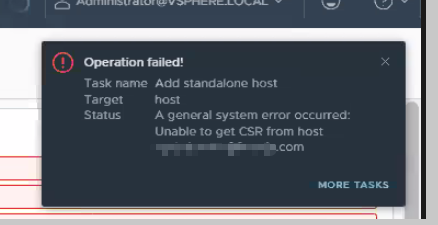
vCenter는 포트 443 및 22를 통해 노드에 연결할 수 있습니다.
사용자가 노드에서 인증서를 다시 생성하려고 시도했지만 여전히 실패했습니다.
6.7 U3
Vpxd.log에서 업그레이드를 위해 호스트를 검색하는 동안 "VMware vSphere Update Manager에 알 수 없는 오류가 발생했습니다."
2024-08-07T11:52:05.390Z info vpxd[250707] [Originator@6876 sub=vpxLro opID=lzjnobzy-1382-auto-12g-h5:70000638-d4] [VpxLRO] -- BEGIN lro-8542 -- datacenter-3 -- vim.Datacenter.queryConnectionInfoViaSpec -- 5221a2b0-37ba-501f-8a0a-96bb396d9578(52d9c116-18b2-4cc7-49a5-696a0a04ed45)
2024-08-07T11:52:05.696Z warning vpxd[252175] [Originator@6876 sub=IO.Connection opID=lzjnobzy-1382-auto-12g-h5:70000638-d4] Failed to SSL handshake; SSL(<io_obj p:0x00007fc0a92ff050, h:64, <TCP 'x.x.x.x : 59262'>, <TCP 'x.x.x.x : 443'>>), e: 104(Connection reset by peer), duration: 204msec
2024-08-07T11:52:05.696Z warning vpxd[252175] [Originator@6876 sub=HttpConnectionPool-000001 opID=lzjnobzy-1382-auto-12g-h5:70000638-d4] Failed to get pooled connection; <cs p:00007fc0d4858120, TCP:xxx.xxx.com:443 [xxx.xxx.com]>, SSL(<io_obj p:0x00007fc0a92ff050, h:64, <TCP 'x.x.x.x : 59262'>, <TCP 'x.x.x.x : 443'>>), duration: 305msec, N7Vmacore15SystemExceptionE(Connection reset by peer: The connection is terminated by the remote end with a reset packet. Usually, this is a sign of a network problem,  timeout, or service overload.)
Cause
방화벽 디바이스가 vCenter와 ESXi 호스트 사이에 있습니다. 방화벽이 SSL 애플리케이션을 차단하고 있습니다.
Resolution
사용자가 네트워킹 또는 보안 팀에 문의하여 방화벽 정책 설정을 확인하도록 합니다.
관련 트래픽이 차단된 경우 방화벽 관리 페이지에서 관련 이벤트를 볼 수 있습니다.
관련 트래픽이 차단된 경우 방화벽 관리 페이지에서 관련 이벤트를 볼 수 있습니다.
Additional Information
이러한 유형의 상황에 직면하는 경우 vCenter 및 ESXi에서 패킷 캡처를 수행할 수도 있습니다.
Article Properties
Article Number: 000227682
Article Type: Solution
Last Modified: 05 Sep 2024
Version: 2
Find answers to your questions from other Dell users
Support Services
Check if your device is covered by Support Services.