PowerProtect: DP Series and IDPA: "X.509 Certificate Subject CN Does Not Match the Entity Name" vulnerability for Avamar Server Port 9443
Summary: PowerProtect Data Protection (DP) Series Appliances and Integrated Data Protection Appliance (IDPA): Security Vulnerability scanning detected "X.509 Certificate Subject CN Does Not Match the Entity Name" for Avamar Server Port 9443 for IDPA version 2.7.8 or below. This article provides a procedure to resolve the issue. ...
This article applies to
This article does not apply to
This article is not tied to any specific product.
Not all product versions are identified in this article.
Symptoms
The following vulnerabilities could be detected on the Protection Software (Avamar Server) for all IDPA versions on or below 2.7.8:
| Vulnerability Title | CVSS2 Score | Asset Name | Vulnerability Proof | Port | Protocol | Recommendation |
| X.509 Certificate Subject CN Does Not Match the Entity Name. | 7.1 | Avamar | The subject common name found in the X.509 certificate does not match the scan target: The subject CN Administrator does not match the Domain Name System (DNS) name specified on the site. | 9443 | TCP | Fix the subject's Common Name (CN) field in the certificate. |
Cause
The default Avamar Server self-signed SSL certificate on port 9443 has the common name (CN) set to Administrator. From the Avamar web interface on Port 9443, the certificate shows the CN information as below:
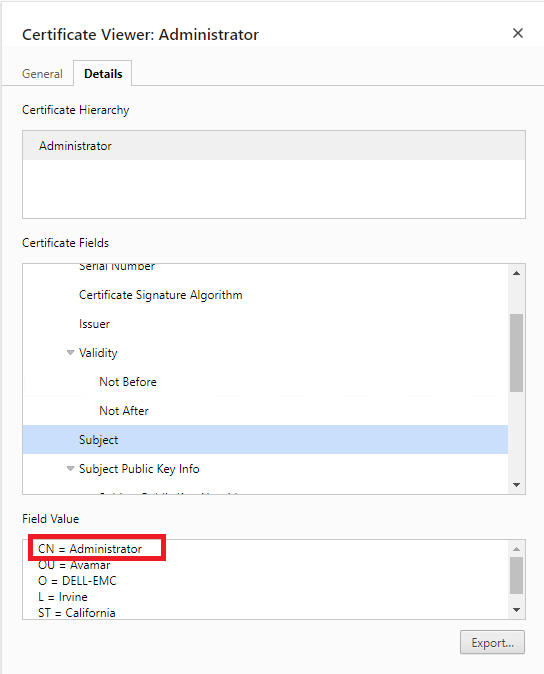
Figure 1: The default Avamar Server certificate on port 9443 shows the CN = Administrator.
Also, the same information can be found from the command-line output:
Figure 1: The default Avamar Server certificate on port 9443 shows the CN = Administrator.
Also, the same information can be found from the command-line output:
#: echo -n |openssl s_client -showcerts -connect localhost:9443
CONNECTED(00000003)
depth=0 C = US, ST = California, L = Irvine, O = DELL-EMC, OU = Avamar, CN = Administrator
verify error:num=18:self signed certificate
verify return:1
depth=0 C = US, ST = California, L = Irvine, O = DELL-EMC, OU = Avamar, CN = Administrator
verify return:1
---
Certificate chain
 0 s:/C=US/ST=California/L=Irvine/O=DELL-EMC/OU=Avamar/CN=Administrator
   i:/C=US/ST=California/L=Irvine/O=DELL-EMC/OU=Avamar/CN=Administrator

--- skipped the remaining part ---
Resolution
Here is the procedure to update the certificate on Avamar Server on port 9443:
1. Stop the Avamar Management Console Server (MCS) and EM Tomcat (EMT) services:
2. Backup and generate a new MCS Developer Kit (MCSDK) certificate:
3. Backup and update the Admin certificate:
For Avamar 19.4 or earlier versions:
For Avamar 19.8 or later versions:
4. Update the Avinstaller certificate:
5. Start the Avamar MC Server and EMT services:
The certificate's CN should have been updated to the hostname. Here is an example output:

Figure 2: The certificate's CN is matched with the machine name.
The same information can be found in the command-line output:
After a new Avamar MC Server certificate is generated, the Avamar Server information must be updated in the Data Protection Central (DPC) as well:
1. Log in to the DPC web user interface as administrator@dpc.local.
2. Select the Avamar Server from "System Management" and "Edit" it.
3. Update the Avamar credential, the Avamar Username is "MCUser," and then click "Next."
4. Accept the certificate change and "Save" it.

Figure 3: Accept a new Avamar server certificate in DPC.
1. Stop the Avamar Management Console Server (MCS) and EM Tomcat (EMT) services:
dpnctl stop mcs
dpnctl stop emt
2. Backup and generate a new MCS Developer Kit (MCSDK) certificate:
cp -p /usr/local/avamar/lib/rmi_ssl_keystore /usr/local/avamar/lib/rmi_ssl_keystore_$(date +%Y-%m-%d_%H-%M-%S)

keytool -delete -alias mcssl -keystore /usr/local/avamar/lib/rmi_ssl_keystore -storepass `ask_pass -r keystore_passphrase` -noprompt

keytool -delete -alias mcjwt -keystore /usr/local/avamar/lib/rmi_ssl_keystore -storepass `ask_pass -r keystore_passphrase` -noprompt

keytool -genkeypair -v -alias mcssl -keyalg RSA -sigalg SHA512withRSA -keysize 3072 -keystore /usr/local/avamar/lib/rmi_ssl_keystore -validity 3652 -dname "CN=`hostname -f`, OU=Dell EMC, O=Dell Technologies, L=Irvine, ST=California, C=US" -storepass `ask_pass -r keystore_passphrase` -keypass `ask_pass -r keystore_passphrase` -noprompt

keytool -genkeypair -v -alias mcjwt -keyalg RSA -sigalg SHA512withRSA -keysize 3072 -keystore /usr/local/avamar/lib/rmi_ssl_keystore -validity 3652 -dname "CN=`hostname -f`, OU=Dell EMC, O=Dell Technologies, L=Irvine, ST=California, C=US" -storepass `ask_pass -r keystore_passphrase` -keypass `ask_pass -r keystore_passphrase` -noprompt
3. Backup and update the Admin certificate:
For Avamar 19.4 or earlier versions:
cp -p /home/admin/.keystore /home/admin/.keystore_$(date +%Y-%m-%d_%H-%M-%S)

keytool -delete -alias tomcat -keystore /home/admin/.keystore -storepass `ask_pass -r keystore_passphrase` -noprompt

keytool -delete -alias mcssl -keystore /home/admin/.keystore -storepass `ask_pass -r keystore_passphrase` -noprompt

keytool -genkeypair -v -alias tomcat -keyalg RSA -sigalg SHA256withRSA -keysize 3072 -keystore /home/admin/.keystore -validity 3652 -dname "EMAILADDRESS=root, CN=`hostname -f`, OU=Dell EMC, O=Dell Technologies, L=Irvine, ST=California, C=US" -storepass `ask_pass -r keystore_passphrase` -keypass `ask_pass -r keystore_passphrase` -noprompt

keytool -list -alias mcssl -keystore /usr/local/avamar/lib/rmi_ssl_keystore -storepass `ask_pass -r keystore_passphrase` -rfc | keytool -import -trustcacerts -alias mcssl -keystore /home/admin/.keystore -storepass `ask_pass -r keystore_passphrase` -noprompt
For Avamar 19.8 or later versions:
cp -p /home/tomcat/.keystore /home/tomcat/.keystore_$(date +%Y-%m-%d_%H-%M-%S)

keytool -delete -alias tomcat -keystore /home/tomcat/.keystore -storepass `ask_pass -r keystore_passphrase` -noprompt

keytool -delete -alias mcssl -keystore /home/tomcat/.keystore -storepass `ask_pass -r keystore_passphrase` -noprompt

keytool -genkeypair -v -alias tomcat -keyalg RSA -sigalg SHA512withRSA -keysize 3072 -keystore /home/tomcat/.keystore -validity 3652 -dname "CN=`hostname -f`, OU=Dell EMC, O=Dell Technologies, L=Irvine, ST=California, C=US" -storepass `ask_pass -r keystore_passphrase` -keypass `ask_pass -r keystore_passphrase` -noprompt

keytool -list -alias mcssl -keystore /usr/local/avamar/lib/rmi_ssl_keystore -storepass `ask_pass -r keystore_passphrase` -rfc | keytool -import -trustcacerts -alias mcssl -keystore /home/tomcat/.keystore -storepass `ask_pass -r keystore_passphrase` -noprompt
4. Update the Avinstaller certificate:
cp -p /usr/local/avamar/lib/avi/avi_keystore /usr/local/avamar/lib/avi/avi_keystore_$(date +%Y-%m-%d_%H-%M-%S)

keytool -delete -alias tomcat -keystore /usr/local/avamar/lib/avi/avi_keystore -storepass `ask_pass -r keystore_passphrase` -noprompt

keytool -delete -alias mcssl -keystore /usr/local/avamar/lib/avi/avi_keystore -storepass `ask_pass -r keystore_passphrase` -noprompt

keytool -list -alias mcssl -keystore /usr/local/avamar/lib/rmi_ssl_keystore -storepass `ask_pass -r keystore_passphrase` -rfc | keytool -import -trustcacerts -alias mcssl -keystore /usr/local/avamar/lib/avi/avi_keystore -storepass `ask_pass -r keystore_passphrase` -noprompt

gen-ssl-cert --norestart --noupdateapache --updateavi --keystorepwd=`ask_pass -r keystore_passphrase` --verbose
5. Start the Avamar MC Server and EMT services:
dpnctl start mcs
dpnctl start emt
The certificate's CN should have been updated to the hostname. Here is an example output:
Figure 2: The certificate's CN is matched with the machine name.
The same information can be found in the command-line output:
#: echo -n |openssl s_client -showcerts -connect localhost:9443
CONNECTED(00000003)
depth=0 C = US, ST = California, L = Irvine, O = Dell Technologies, OU = Dell EMC, CN = idpa-ave.dpas.syd.lab
verify error:num=18:self signed certificate
verify return:1
depth=0 C = US, ST = California, L = Irvine, O = Dell Technologies, OU = Dell EMC, CN = idpa-ave.dpas.syd.lab
verify return:1
---
Certificate chain
 0 s:/C=US/ST=California/L=Irvine/O=Dell Technologies/OU=Dell EMC/CN=idpa-ave.dpas.syd.lab
   i:/C=US/ST=California/L=Irvine/O=Dell Technologies/OU=Dell EMC/CN=idpa-ave.dpas.syd.lab

--- skipped the remaining part ---
After a new Avamar MC Server certificate is generated, the Avamar Server information must be updated in the Data Protection Central (DPC) as well:
1. Log in to the DPC web user interface as administrator@dpc.local.
2. Select the Avamar Server from "System Management" and "Edit" it.
3. Update the Avamar credential, the Avamar Username is "MCUser," and then click "Next."
4. Accept the certificate change and "Save" it.
Figure 3: Accept a new Avamar server certificate in DPC.
Additional Information
For Avamar Proxy Ports 443 and 5480:
The following vulnerability could be detected on Avamar Proxy for all IDPA versions on or below 2.7.6:
The issue has been resolved in Avamar Proxy version 19.10. Upgrade to IDPA version 2.7.7 and it includes the Avamar version 19.10.
The workaround for IDPA 2.7.6 or below can be found in the Dell Avamar for VMware 19.9 User Guide. The procedure is under the "Import custom certificate in Avamar VMware Image Backup Proxy" section. There is also: Avamar: How to replace the certificate for Avamar VMware Image Backup Proxy ." (Requires authentication on Dell Support Portal)
The following vulnerability could be detected on Avamar Proxy for all IDPA versions on or below 2.7.6:
| Vulnerability Title | CVSS2 Score | Asset Name | Vulnerability Proof | Port | Protocol | Recommendation |
| X.509 Certificate Subject CN Does Not Match the Entity Name. | 7.1 | Avamar Proxy | The subject common name found in the X.509 certificate does not match the scan target: The subject CN Administrator does not match the DNS name specified on the site. | 5480 / 443 | TCP | Fix the subject's Common Name (CN) field in the certificate. |
The issue has been resolved in Avamar Proxy version 19.10. Upgrade to IDPA version 2.7.7 and it includes the Avamar version 19.10.
The workaround for IDPA 2.7.6 or below can be found in the Dell Avamar for VMware 19.9 User Guide. The procedure is under the "Import custom certificate in Avamar VMware Image Backup Proxy" section. There is also: Avamar: How to replace the certificate for Avamar VMware Image Backup Proxy ." (Requires authentication on Dell Support Portal)
Affected Products
PowerProtect Data Protection Appliance, PowerProtect DP4400, PowerProtect DP5300, PowerProtect DP5800, PowerProtect DP8300, PowerProtect DP8800, PowerProtect Data Protection Software, Integrated Data Protection Appliance Family
, Integrated Data Protection Appliance Software, PowerProtect DP5900, PowerProtect DP8400, PowerProtect DP8900
...
Article Properties
Article Number: 000227729
Article Type: Solution
Last Modified: 05 Aug 2025
Version: 2
Find answers to your questions from other Dell users
Support Services
Check if your device is covered by Support Services.