Laptops with DW5932e WWAN Module May Not Connect to a Cellular Network
Summary: This article provides information about the Latitude and Precision laptops with DW5932e Wireless Wide Area Network (WWAN) that may not connect to the cellular network.
This article applies to
This article does not apply to
This article is not tied to any specific product.
Not all product versions are identified in this article.
Symptoms
The DW5932e WWAN Module requires a background service DW5932e_SIMSVC to enable the radio to connect to the base station.
In certain scenarios, if the driver is installed using an .inf file or a non-Dell driver is installed, the required service may not be correctly installed. When the service is not installed or is not running, the laptop does not connect to the cellular network and reports no service.
Affected Systems:
- Latitude 7350
- Latitude 7450
- Latitude 7650
- Latitude 5350
- Latitude 5450
- Latitude 5550
- Latitude 9450 2-in-1
- Latitude 7350 Detachable
- Precision 5490
- Precision 5690
Cause
The required service DW5932e_SIMSVC is not installed or is not running.
Resolution
Downloading and installing the Dell DW5932e WWAN card driver on the computer resolves the issue. To download and install the driver, reference How to Download and Install Dell Drivers.
After the driver installation, ensure that the DW5932e_SIMSVC service is running.
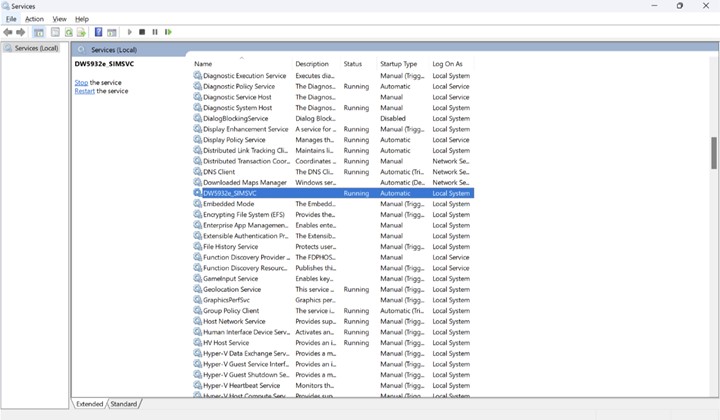
(Figure 1 - Services)
Affected Products
Latitude 5350, Latitude 7350, Latitude 7350 Detachable, Latitude 5450, Latitude 7450, Latitude 9450 2-in-1, Latitude 5550, Latitude 7650, Precision 5490, Mobile Precision 5690Article Properties
Article Number: 000227747
Article Type: Solution
Last Modified: 18 Apr 2025
Version: 2
Find answers to your questions from other Dell users
Support Services
Check if your device is covered by Support Services.