NetWorker:NMC 資料庫備份失敗,並顯示「裝置上沒有剩餘空間」
Summary: NetWorker Management Console (NMC) 資料庫的備份失敗。傳回的錯誤為「裝置上沒有剩餘空間」
This article applies to
This article does not apply to
This article is not tied to any specific product.
Not all product versions are identified in this article.
Symptoms
NMC 伺服器備份失敗,動作記錄中回報下列訊息:
108179:savepsm: Replicating database contents to /nsr/nmc/nmcdb_stage/pgdata...
108180:savepsm: Unable to execute /opt/lgtonmc/postgres_latest/bin/pg_basebackup in order to copy the database
108181:savepsm: See '/opt/lgtonmc/logs/pg_basebackup.log' for details
--- Job Indications ---
nsr.amer.lan:/nsr/nmc/nmcdb_stage: retried 1 times.
pg_basebackup.log報告「裝置上沒有剩餘空間」
[root@nsr 1]# cat /opt/lgtonmc/logs/pg_basebackup.log
pg_basebackup: could not write to file "/nsr/nmc/nmcdb_stage/pgdata/base/1/somefile": No space left on device
pg_basebackup: removing data directory "/nsr/nmc/nmcdb_stage/pgdata"
nmcdb 目錄的大小超過可用磁碟空間:
[root@nsr ~]# du -sh /nsr/nmc/nmcdb
1.6G    /nsr/nmc/nmcdb
[root@nsr ~]#
[root@nsr ~]# df -h | grep "Filesystem\|rhel-root"
Filesystem                                   Size  Used Avail Use% Mounted on
/dev/mapper/rhel-root                         70G   69G  1.4G  98% /
注意:在 Windows 伺服器上,檢查 [安裝磁碟機]:\Program Files\EMC NetWorker\Management\nmcdb 資料夾的磁碟空間使用方式,以及檔案總管「本系統」的磁碟空間可用性。
Cause
nmcdb 備份是 NMC 伺服器所使用的 postgres 資料庫檔案的備份。nmcdb 用戶端使用備份命令 savepsm。在 nmcdb 備份期間,檔案會「暫存」至 nmcdb_stage 目錄:
Linux:/nsr/nmc/nmcdb_stage
Windows:[安裝磁碟機]:\Program Files\EMC NetWorker\Management\nmcdb_stage
備份 nmcdb_stage 目錄後,備份完成後,nmcdb_stage 目錄就會清理乾淨。
NMC 安裝磁碟機上的磁碟空間不足,無法將檔案從線上 nmcdb 目錄暫存至nmcdb_stage目錄。
Resolution
有三種選項。
1.移除不再需要的檔案,以回收磁碟空間。
可清理的檔案必須由作業系統管理員判斷。
2.增加 NetWorker 安裝磁碟機上的磁碟空間。
磁碟空間應有足夠的空間將整個 nmcdb 目錄複製/暫存到nmcdb_stage目錄中。如果 /nsr 分割區達到 100% 磁碟空間用量,nmcdb 可能會損壞。如果系統包含 NetWorker 伺服器套裝,且 /nsr 分割區達到 100% 磁碟空間用量,則 NetWorker 伺服器資料庫 (nsrdb、mm、索引) 也可能損毀。
3.將nmcdb_stage目錄移至具有更多空間的另一個驅動器。
如果 /nsr 分區上的磁碟空間不足,則必須增加/回收該空間;但是,也可以將nmcdb_stage目錄移動到具有更多空間的另一個分區。
一個。在另一個驅動器上創建nmcdb_stage目錄。例如:
一個。在另一個驅動器上創建nmcdb_stage目錄。例如:
nve:~ # mkdir /space/nmcdb_stage
B. 更新 NMC 用戶端資源的儲存集欄位,以指定新暫存資料夾的完整路徑:
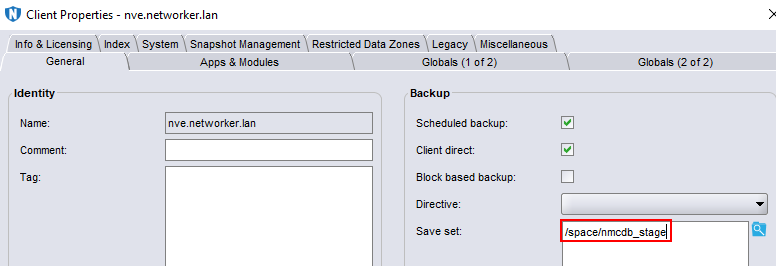
C. 執行 nmcdb 的備份並驗證它是否成功完成。或者,您可以使用 mminfo 命令驗證備份:
mminfo -avot -q client=NMC_clientName
Additional Information
Affected Products
NetWorker, NetWorker Management ConsoleProducts
NetWorker Family, NetWorker SeriesArticle Properties
Article Number: 000228276
Article Type: Solution
Last Modified: 07 Aug 2025
Version: 2
Find answers to your questions from other Dell users
Support Services
Check if your device is covered by Support Services.