How to view and download audit log from Unisphere for PowerMax GUI.
Summary: How to view and download audit log from Unisphere for PowerMax GUI.
This article applies to
This article does not apply to
This article is not tied to any specific product.
Not all product versions are identified in this article.
Instructions
Audit log
The Audit Log is secure and tamper-proof so event contents cannot be altered. Users with the Auditor access can view, but not modify, the log.
Storage system audit records come from the SYMAPI database and include all actions that are taken on that storage system.
The audit log is stored on the PowerMax array, it is 1 GB in size.
View the audit log
The storage system audit records include all actions that are taken on that storage system.
Audit logs can be large, therefore the list view opens pre-filtered to display the last 7 days of data. You are warned that the operation may take a long time when you attempt to retrieve audit log records for a period of greater than 7 days.
About this task
The storage system audit records come from the SYMAPI database and include all actions that are taken on that storage system. The audit log resides on the storage system and has a maximum size of 40 MB. Once the 40 MB limit is reached, the log begins to overwrite itself.
Beginning in release 9.2, operations that are performed using the Unisphere UI have been added to the audit log. These operations include the following:
- Performance registration enabled
- Performance registration disabled
- CloudIQ data collection enable
- CloudIQ data collection disable
- Delete Alert
- Changes to Job Schedule
- Delete Job
- Local User Added
- Local User Deleted
- Authentication disabled
- LDAP/AD Details modified
- Enable Alert Policy
- Disable Alert Policy
- Delete Compliance Alert Policy
- Edit Compliance Alert Policy
- Disable System Alert Threshold
- Delete System Alert Threshold
- Edit System Alert Threshold
- Create Performance Alert Threshold
- Edit Performance Alert Threshold
- System Alert Level Change
- Performance Alert Level Change
Audit log records can also be queried using the REST API.
To view the system audit log:
Steps
- Select the storage system.
- Select Events > Audit Log.
The following properties are displayed:
- Record—Unique identifier for the audit entry
- Date—Date that the audit entry was made.
- Application—Application operating on the storage system
- Action Code—Specific audit code for the operation on the storage system
- Username—User name for the user operating on the storage system
- User Type—User type of the user operating on the storage system
- Log Message—Message that is logged
The audit log records can be filtered in the following manner: - Application Type—All, <Application type>
- Date and Time—All, Today, Yesterday, Last 7 days, Last 30 days, this month, Last Month, Custom Range
- Username—All, <user ID>
- More—User Type, Action Code, OS Type, Host Name
- A search phrase
The filters can be cleared individually. In addition, all filters can be cleared.
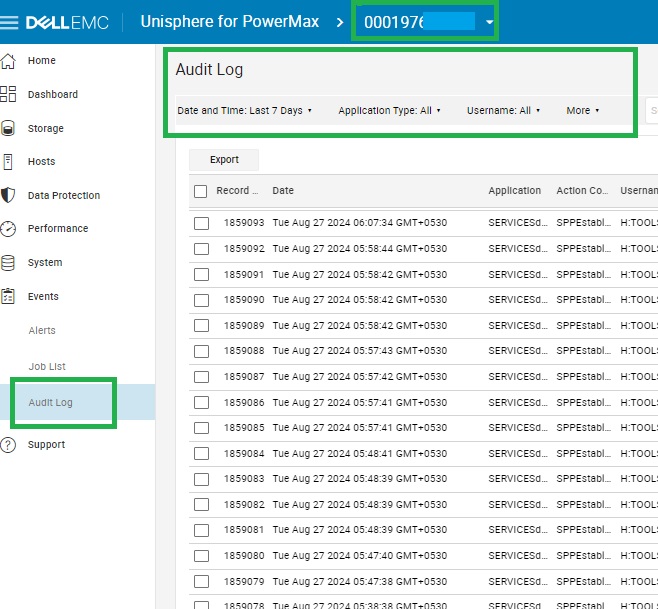
To export all or a selection of audit log records, click Export.
Export the audit log
All audit records or a selection of audit log records can be exported to a single file.
Steps
- Select the storage system.
- Select Events > Audit Log.
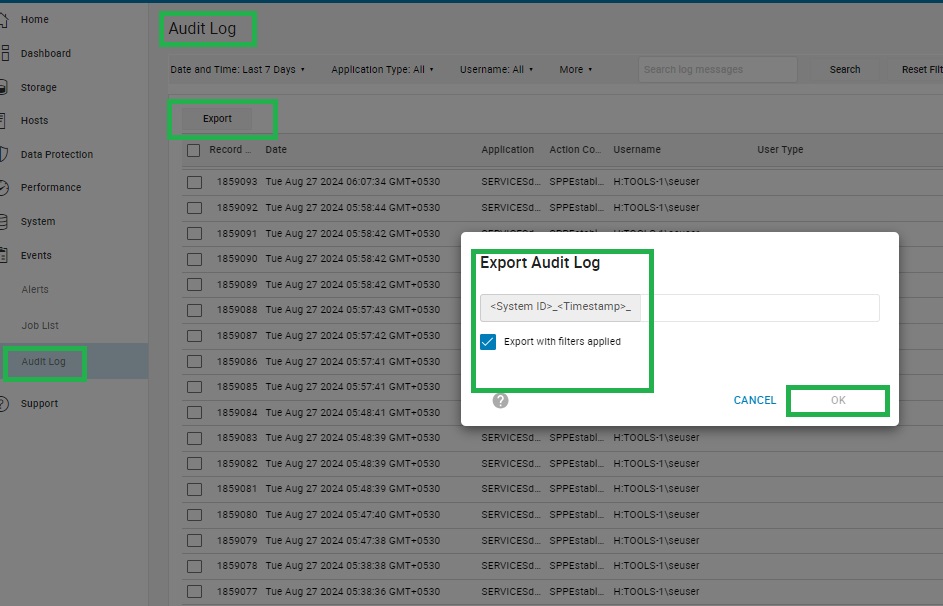
- Select all or a selection of audit logs and click Export.
- Optional: Select the Export with filters applied checkbox.
- Specify the name of the audit log file.
- Click OK.
Results
The audit log file is downloaded to the default download directory for the browser.
Additional Information
For further more details on audit logs
KB: 000193636
VMAX AFA, PowerMax V3 & V4: AUDIT LOGS : All you need to know. | Dell India
Affected Products
Unisphere for PowerMaxArticle Properties
Article Number: 000228348
Article Type: How To
Last Modified: 19 Dec 2024
Version: 2
Find answers to your questions from other Dell users
Support Services
Check if your device is covered by Support Services.