Alienware Command Center v6.3.7.0 Does Not Load Display, Keyboard, Mouse, or Headset
Summary: Learn about what to do when a display, keyboard, or headset device does not appear in Alienware Command Center version 6.3.7.
This article applies to
This article does not apply to
This article is not tied to any specific product.
Not all product versions are identified in this article.
Symptoms
After following a workflow of installing Alienware Command Center version 6.2.7.0 and then upgrading to version 6.3.7.0 by driver flow or manually running the installer, connected devices do not appear in the Alienware Command Center user interface as expected.
Affected Software:
- Alienware Command Center
Affected Versions:
- v6.3.7.0
Affected Platforms:
- Alienware Aurora R15
- Alienware Aurora R16
- Alienware m15 R7
- Alienware m16 R1
- Alienware m16 R2
- Alienware m17 R5 AMD
- Alienware m18 R1
- Alienware m18 R2
- Alienware x14
- Alienware x14 R2
- Alienware x15 R2
- Alienware x16 R1
- Alienware x16 R2
- Alienware x17 R2
- Dell G15 5530
- Dell G16 7630
Affected Peripherals:
- Alienware 25 Gaming Monitor AW2521H
- Alienware 25 Gaming Monitor AW2521HF
- Alienware 25 Gaming Monitor AW2521HFA
- Alienware 25 Gaming Monitor AW2521HFL
- Alienware 25 Gaming Monitor AW2521HFLA
- Alienware 25 Gaming Monitor AW2523HF
- Alienware 27 360Hz QD OLED Gaming Monitor AW2725DF
- Alienware 27 Gaming Monitor AW2720HF
- Alienware 27 Gaming Monitor AW2720HFA
- Alienware 27 Gaming Monitor AW2721D
- Alienware 27 Gaming Monitor AW2724DM
- Alienware 27 Gaming Monitor AW2724HF
- Alienware 32 4K QD OLED Gaming Monitor AW3225QF
- Alienware 34 Curved OLED Monitor AW3423DW
- Alienware 34 Curved QD OLED Gaming Monitor AW3423DWF
- Alienware 38 Curved Gaming Monitor AW3821DW
- Alienware 500Hz Gaming Monitor AW2524H
- Alienware 55 OLED Monitor AW5520QF
- Alienware AW3420DW
- Alienware Dual Mode Wireless Gaming Headset AW720H
- Alienware Low-Profile RGB Mechanical Gaming Keyboard | AW510K
- Alienware Mechanical Gaming Keyboard | AW310K
- Alienware Pro Wireless Gaming Keyboard
- Alienware Pro Wireless Gaming Mouse
- Alienware RGB Gaming Mouse AW510M
- Alienware RGB Mechanical Gaming Keyboard AW410K
- Alienware Tenkeyless Gaming Keyboard AW420K
- Alienware Tri-Mode Wireless Gaming Headset AW920H
- Alienware Tri-Mode Wireless Gaming Keyboard AW920K
- Alienware Tri-Mode Wireless Gaming Mouse AW720M
- Alienware Wired Gaming Mouse AW320M
- Alienware Wired/Wireless Gaming Mouse AW610M
- Alienware Wired Gaming Headset AW520H
- Alienware Wireless Gaming Mouse AW310M
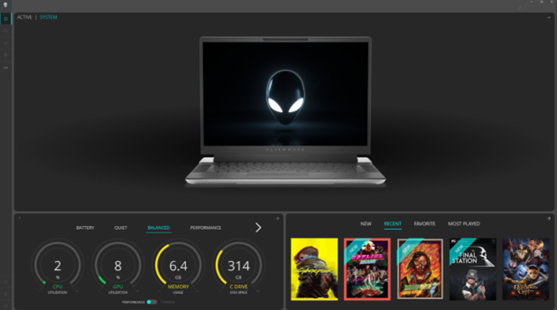
Devices are not found on the Alienware Command Center dashboard when this issue is encountered. They cannot be seen on any other configuration pages of Alienware Command Center. The example image below shows Alienware Command Center not detecting devices.
Cause
The AWCCSmartInstaller causes this to occur. The peripheral component installer is migrating to the InstallShield framework for their component. An error occurs during copying or removing of some files when trying to uninstall any previous versions and install the newer version.
Resolution
Updating to Alienware Command Center version 6.4 or later on the computer resolves the issue. To download and install Alienware Command Center, reference How to Download and Install Dell Drivers.
Affected Products
Alienware Aurora R15, Alienware Aurora R16, Alienware Command Center, Alienware Mechanical Gaming Keyboard | AW310K, Alienware RGB Mechanical Gaming Keyboard AW410K, Alienware Tenkeyless Gaming Keyboard AW420K
, Alienware Low-Profile RGB Mechanical Gaming Keyboard | AW510K, Alienware m15 R7, Alienware m16 R1, Alienware m16 R2, Alienware m17 R5 AMD, Alienware m18 R1, Alienware m18 R2, Alienware Wireless Gaming Mouse AW310M, Alienware RGB Gaming Mouse AW510M, Alienware Wired/Wireless Gaming Mouse AW610M, Alienware Tri-Mode Wireless Gaming Mouse AW720M, Alienware x14, Alienware x14 R2, Alienware x15 R2, Alienware x16 R1, Alienware x16 R2, Alienware x17 R2, Alienware Tri-Mode Wireless Gaming Headset AW920H, Alienware Wired Gaming Mouse AW320M, Alienware Pro Wireless Gaming Keyboard, Alienware Pro Wireless Gaming Mouse, Alienware Tri-Mode Wireless Gaming Keyboard AW920K, Alienware Wired Gaming Headset AW520H, Alienware Dual Mode Wireless Gaming Headset AW720H, Alienware 25 Gaming Monitor AW2523HF, Alienware 500Hz Gaming Monitor AW2524H, Alienware 27 Gaming Monitor AW2724DM, Alienware 27 Gaming Monitor AW2724HF, Alienware 27 360Hz QD OLED Gaming Monitor AW2725DF, Alienware 32 4K QD OLED Gaming Monitor AW3225QF, Alienware 34 Curved OLED Monitor AW3423DW, Alienware 34 Curved QD OLED Gaming Monitor AW3423DWF, Alienware 25 Gaming Monitor AW2521H, Alienware 25 Gaming Monitor AW2521HF, Alienware 25 Gaming Monitor AW2521HFA, Alienware 25 Gaming Monitor AW2521HFL, Alienware 25 Gaming Monitor AW2521HFLA, Alienware 27 Gaming Monitor AW2720HF, Alienware 27 Gaming Monitor AW2720HFA, Alienware 27 Gaming Monitor AW2721D, Alienware AW3420DW, Alienware 38 Curved Gaming Monitor AW3821DW, Alienware 55 OLED Monitor AW5520QF, Dell G15 5530, Dell G16 7630
...
Article Properties
Article Number: 000228419
Article Type: Solution
Last Modified: 25 Sep 2025
Version: 3
Find answers to your questions from other Dell users
Support Services
Check if your device is covered by Support Services.