O Alienware Command Center v6.3.7.0 não carrega a tela, o teclado, o mouse ou o headset
Summary: Saiba mais sobre o que fazer quando um monitor, teclado ou headset não aparece no Alienware Command Center versão 6.3.7.
This article applies to
This article does not apply to
This article is not tied to any specific product.
Not all product versions are identified in this article.
Symptoms
Depois de seguir um fluxo de trabalho de instalação do Alienware Command Center versão 6.2.7.0 e, em seguida, fazer upgrade para a versão 6.3.7.0 pelo fluxo do driver ou executar manualmente o instalador, os dispositivos conectados não aparecem na interface do usuário do Alienware Command Center como esperado.
Software afetado:
- Alienware Command Center
Versões afetadas:
- v6.3.7.0
Plataformas afetadas:
- Alienware Aurora R15
- Alienware Aurora R16
- Alienware m15 R7
- Alienware m16 R1
- Alienware m16 R2
- Alienware m17 R5 AMD
- Alienware m18 R1
- Alienware m18 R2
- Alienware x14
- Alienware x14 R2
- Alienware x15 R2
- Alienware x16 R1
- Alienware x16 R2
- Alienware x17 R2
- Dell G15 5530
- Dell G16 7630
Periféricos afetados:
- Monitor gamer Alienware 25 AW2521H
- Monitor gamer Alienware 25 AW2521HF
- Monitor gamer Alienware 25 AW2521HFA
- Monitor gamer Alienware 25 AW2521HFL
- Monitor gamer Alienware 25 AW2521HFLA
- Monitor gamer Alienware 25 AW2523HF
- Monitor gamer Alienware QD OLED de 27 360 Hz AW2725DF
- Monitor gamer Alienware 27 AW2720HF
- Monitor gamer Alienware 27 AW2720HFA
- Monitor gamer Alienware 27 AW2721D
- Monitor gamer Alienware 27 AW2724DM
- Monitor gamer Alienware 27 AW2724HF
- Monitor gamer 4K OLED Alienware 32 4K AW3225QF
- Monitor OLED curvo Alienware 34 AW3423DW
- Monitor gamer Alienware 34 Curvo QD OLED AW3423DWF
- Monitor curvo para jogos Alienware 38 AW3821DW
- Monitor gamer Alienware de 500 Hz AW2524H
- Alienware 55 OLED Monitor AW5520QF
- Alienware AW3420DW
- Headset gamer sem fio Alienware Dual Mode AW720H
- Teclado gamer mecânico RGB de baixo perfil Alienware | AW510K
- Teclado gamer mecânico Alienware | AW310K
- Teclado gamer Alienware Pro sem fio
- Mouse gamer Alienware Pro sem fio
- Mouse gamer Alienware RGB AW510M
- Teclado gamer mecânico RGB Alienware AW410K
- Teclado gamer Alienware sem teclado numérico AW420K
- Alienware Tri-Mode Wireless Gaming Headset AW920H
- Teclado gamer Alienware Tri-Mode sem fio AW920K
- Mouse gamer Alienware Tri-Mode sem fio AW720M
- Mouse gamer com fio Alienware AW320M
- Mouse para jogos com/sem fio Alienware AW610M
- Headset gamer Alienware com fio AW520H
- Mouse gamer sem fio Alienware AW310M
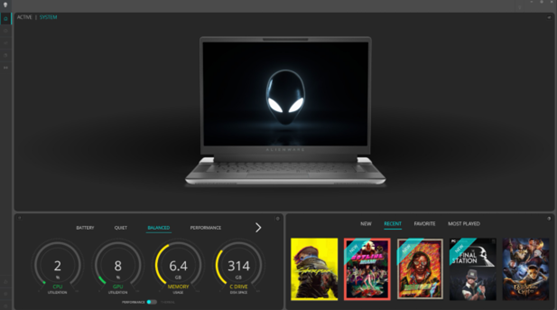
Quando esse problema é encontrado, os dispositivos não são encontrados no painel de controle do Alienware Command Center. Eles não podem ser vistos em nenhuma outra página de configuração do Alienware Command Center. A imagem de exemplo abaixo mostra o Alienware Command Center não detectando dispositivos.
Cause
A coluna AWCCSmartInstaller faz com que isso ocorra. O instalador do componente periférico está migrando para a estrutura do InstallShield para seu componente. Ocorre um erro durante a cópia ou remoção de alguns arquivos ao tentar desinstalar quaisquer versões anteriores e instalar a versão mais recente.
Resolution
Atualizar para o Alienware Command Center versão 6.4 ou posterior no computador resolve o problema. Para fazer download e instalar o Alienware Command Center, consulte Como fazer download e instalar os drivers Dell.
Affected Products
Alienware Aurora R15, Alienware Aurora R16, Alienware Command Center, Alienware Mechanical Gaming Keyboard | AW310K, Alienware RGB Mechanical Gaming Keyboard AW410K, Alienware Tenkeyless Gaming Keyboard AW420K
, Alienware Low-Profile RGB Mechanical Gaming Keyboard | AW510K, Alienware m15 R7, Alienware m16 R1, Alienware m16 R2, Alienware m17 R5 AMD, Alienware m18 R1, Alienware m18 R2, Alienware Wireless Gaming Mouse AW310M, Alienware RGB Gaming Mouse AW510M, Alienware Wired/Wireless Gaming Mouse AW610M, Alienware Tri-Mode Wireless Gaming Mouse AW720M, Alienware x14, Alienware x14 R2, Alienware x15 R2, Alienware x16 R1, Alienware x16 R2, Alienware x17 R2, Alienware Tri-Mode Wireless Gaming Headset AW920H, Alienware Wired Gaming Mouse AW320M, Alienware Pro Wireless Gaming Keyboard, Alienware Pro Wireless Gaming Mouse, Alienware Tri-Mode Wireless Gaming Keyboard AW920K, Alienware Wired Gaming Headset AW520H, Alienware Dual Mode Wireless Gaming Headset AW720H, Alienware 25 Gaming Monitor AW2523HF, Alienware 500Hz Gaming Monitor AW2524H, Alienware 27 Gaming Monitor AW2724DM, Alienware 27 Gaming Monitor AW2724HF, Alienware 27 360Hz QD OLED Gaming Monitor AW2725DF, Alienware 32 4K QD OLED Gaming Monitor AW3225QF, Alienware 34 Curved OLED Monitor AW3423DW, Alienware 34 Curved QD OLED Gaming Monitor AW3423DWF, Alienware 25 Gaming Monitor AW2521H, Alienware 25 Gaming Monitor AW2521HF, Alienware 25 Gaming Monitor AW2521HFA, Alienware 25 Gaming Monitor AW2521HFL, Alienware 25 Gaming Monitor AW2521HFLA, Alienware 27 Gaming Monitor AW2720HF, Alienware 27 Gaming Monitor AW2720HFA, Alienware 27 Gaming Monitor AW2721D, Alienware AW3420DW, Alienware 38 Curved Gaming Monitor AW3821DW, Alienware 55 OLED Monitor AW5520QF, Dell G15 5530, Dell G16 7630
...
Article Properties
Article Number: 000228419
Article Type: Solution
Last Modified: 25 Sep 2025
Version: 3
Find answers to your questions from other Dell users
Support Services
Check if your device is covered by Support Services.