VMware ESXi 8.0 U3:蓝屏:#PF 世界lpfc_do_work中的异常 14
Summary: VMware ESXi 8.0 U3 紫屏死机 (PSOD),原因是在 vmk_PsaStorMPPluginSpecific 结构中引用了不受支持的入口点。
This article applies to
This article does not apply to
This article is not tied to any specific product.
Not all product versions are identified in this article.
Symptoms
操作系统:VMware ESXi 8.0 U3
Dell Software:PowerPath/VE 8.2
更改:升级到 VMware ESXi 8.0 U3
VMware ESXi 8.0 U3 PSOD:#PF 世界lpfc_do_work中的异常 14
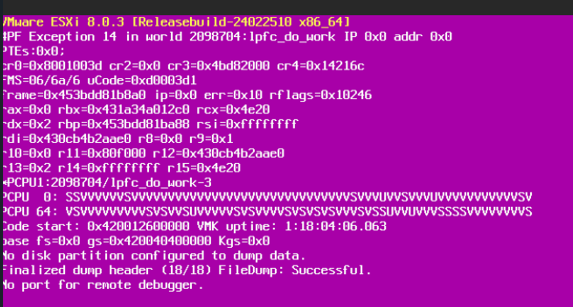
Dell Software:PowerPath/VE 8.2
更改:升级到 VMware ESXi 8.0 U3
VMware ESXi 8.0 U3 PSOD:#PF 世界lpfc_do_work中的异常 14
Cause
PowerPath/VE 不支持结构性能影响通知 (FPIN) 功能。
PowerPath/VE 8.2 是使用 VMware PSASDK 8.0 U1 构建的,该版本在 vmk_PsaStorMPPluginSpecific 结构中不包含 vmk_PsaStorMPPluginHandleLinkEvent handleLinkEvent 引用。
PowerPath/VE 8.2 是使用 VMware PSASDK 8.0 U1 构建的,该版本在 vmk_PsaStorMPPluginSpecific 结构中不包含 vmk_PsaStorMPPluginHandleLinkEvent handleLinkEvent 引用。
Resolution
解决办法:禁用对结构性能影响通知 (FPIN) 功能的支持。执行此操作的命令可在 VMware ESXi 8.0 U3 发行说明中找到。
使用命令 esxcli storage fpin info set -e=false 停用结构性能影响通知 (FPIN)。如果禁用了 FPIN 功能,驱动程序仍会报告 FPIN 事件。但是,FPIN 内核模块会拒绝这些事件,因此不会将它们发送到 vodb 或 PSA。该命令会将 FPIN 激活保存到 ConfigStore 和 VMkernel 系统接口 Shell,并在 ESXi 重新启动后持续存在。
使用命令 esxcli storage fpin info set -e=false 停用结构性能影响通知 (FPIN)。如果禁用了 FPIN 功能,驱动程序仍会报告 FPIN 事件。但是,FPIN 内核模块会拒绝这些事件,因此不会将它们发送到 vodb 或 PSA。该命令会将 FPIN 激活保存到 ConfigStore 和 VMkernel 系统接口 Shell,并在 ESXi 重新启动后持续存在。
Additional Information
如何检查是否已启用结构性能影响通知 (FPIN) 功能。
root@PPtest:~] esxcli storage fpin info get
FPIN Feature: true
Total HBAs:25
FPIN Supported HBAs:20
[root@PPtest:~]
如何禁用结构性能影响通知 (FPIN) 功能。
[root@PPtest:~] esxcli storage fpin info set -e=false
[root@PPtest:~]
注意:“FPIN Feature: false”表示它已被禁用
[root@PPtest:~] esxcli storage fpin info get
FPIN Feature: false
Total HBAs:25
FPIN Supported HBAs:20
[root@PPtest:~]
root@PPtest:~] esxcli storage fpin info get
FPIN Feature: true
Total HBAs:25
FPIN Supported HBAs:20
[root@PPtest:~]
如何禁用结构性能影响通知 (FPIN) 功能。
[root@PPtest:~] esxcli storage fpin info set -e=false
[root@PPtest:~]
注意:“FPIN Feature: false”表示它已被禁用
[root@PPtest:~] esxcli storage fpin info get
FPIN Feature: false
Total HBAs:25
FPIN Supported HBAs:20
[root@PPtest:~]
Article Properties
Article Number: 000228448
Article Type: Solution
Last Modified: 17 Oct 2025
Version: 3
Find answers to your questions from other Dell users
Support Services
Check if your device is covered by Support Services.