VMware ESXi 8.0 U3: Schermata blu: #PF Eccezione 14 nel mondo lpfc_do_work
Summary: VMware ESXi 8.0 U3 PSOD (Purple Screen of Death) a causa del riferimento a un punto di ingresso non supportato nella struttura vmk_PsaStorMPPluginSpecific.
This article applies to
This article does not apply to
This article is not tied to any specific product.
Not all product versions are identified in this article.
Symptoms
Sistema operativo: Software Dell VMware ESXi 8.0 U3
: Modifica a PowerPath/VE 8.2
: Eseguire l'upgrade a VMware ESXi 8.0 U3
VMware ESXi 8.0 U3 PSOD: #PF Eccezione 14 nel mondo lpfc_do_work
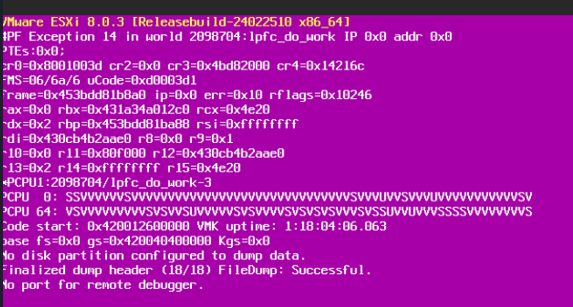
: Modifica a PowerPath/VE 8.2
: Eseguire l'upgrade a VMware ESXi 8.0 U3
VMware ESXi 8.0 U3 PSOD: #PF Eccezione 14 nel mondo lpfc_do_work
Cause
PowerPath/VE non supporta la funzione Fabric Performance Impact Notification (FPIN).
PowerPath/VE 8.2 è stato creato utilizzando VMware PSASDK 8.0 U1 che non contiene il riferimento vmk_PsaStorMPPluginHandleLinkEvent handleLinkEvent nella struttura vmk_PsaStorMPPluginSpecific.
PowerPath/VE 8.2 è stato creato utilizzando VMware PSASDK 8.0 U1 che non contiene il riferimento vmk_PsaStorMPPluginHandleLinkEvent handleLinkEvent nella struttura vmk_PsaStorMPPluginSpecific.
Resolution
Soluzione alternativa: Disabilitare il supporto per la funzione Fabric Performance Impact Notification (FPIN). Il comando per eseguire questa operazione è disponibile nelle note di rilascio di VMware ESXi 8.0 U3.
Utilizzare il comando esxcli storage fpin info set -e=false per disattivare la notifica FPIN (Fabric Performance Impact Notification). Se la funzione FPIN è disabilitata, i driver segnalano comunque gli eventi FPIN. Tuttavia, il modulo del kernel FPIN rifiuta questi eventi, pertanto non vengono inviati a vodb o PSA. Il comando salva l'attivazione FPIN sia in ConfigStore che nella shell dell'interfaccia di sistema VMkernel e persiste durante i riavvii di ESXi.
Utilizzare il comando esxcli storage fpin info set -e=false per disattivare la notifica FPIN (Fabric Performance Impact Notification). Se la funzione FPIN è disabilitata, i driver segnalano comunque gli eventi FPIN. Tuttavia, il modulo del kernel FPIN rifiuta questi eventi, pertanto non vengono inviati a vodb o PSA. Il comando salva l'attivazione FPIN sia in ConfigStore che nella shell dell'interfaccia di sistema VMkernel e persiste durante i riavvii di ESXi.
Additional Information
Come verificare se la funzione Fabric Performance Impact Notification (FPIN) è abilitata.
root@PPtest:~] informazioni fpin storage esxcli get
FPIN Caratteristica: true
HBA totali: HBA supportati da 25
FPIN: 20
[root@PPtest:~]
Come disabilitare la funzione Fabric Performance Impact Notification (FPIN).
[root@PPtest:~] ESXCLI Storage FPIN Info Set -E=false
[root@PPtest:~]
Nota: "Funzione FPIN: false" significa che è disabilitata
[root@PPtest:~] ESXCLI Storage FPIN Info Get
Funzione FPIN: false
HBA totali: HBA supportati da 25
FPIN: 20
[root@PPtest:~]
root@PPtest:~] informazioni fpin storage esxcli get
FPIN Caratteristica: true
HBA totali: HBA supportati da 25
FPIN: 20
[root@PPtest:~]
Come disabilitare la funzione Fabric Performance Impact Notification (FPIN).
[root@PPtest:~] ESXCLI Storage FPIN Info Set -E=false
[root@PPtest:~]
Nota: "Funzione FPIN: false" significa che è disabilitata
[root@PPtest:~] ESXCLI Storage FPIN Info Get
Funzione FPIN: false
HBA totali: HBA supportati da 25
FPIN: 20
[root@PPtest:~]
Article Properties
Article Number: 000228448
Article Type: Solution
Last Modified: 17 Oct 2025
Version: 3
Find answers to your questions from other Dell users
Support Services
Check if your device is covered by Support Services.