OS10 - Introduzione alla configurazione MTU
Summary: Introduzione alla configurazione MTU La MTU (Maximum Transmission Unit) definisce la dimensione massima del pacchetto che un'interfaccia può trasmettere senza frammentazione. Una corretta configurazione MTU è fondamentale per le prestazioni e la stabilità della rete. Questo documento fornisce informazioni dettagliate sul comportamento MTU, le impostazioni predefinite e i comandi di configurazione per gli switch di alimentazione Dell. ...
This article applies to
This article does not apply to
This article is not tied to any specific product.
Not all product versions are identified in this article.
Instructions
Principali argomenti trattati
Configurazione MTU predefinita
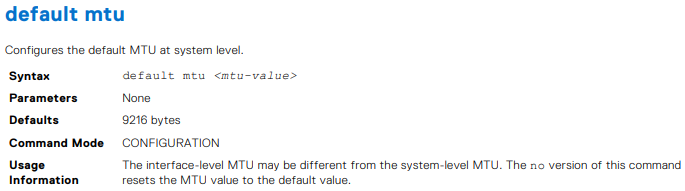
- Il valore MTU predefinito è 9.216 byte a partire dalla release 10.5.4.4. In precedenza, era di 1532 byte.
- Comandi per configurare e verificare i valori MTU:
default mtu <value>:Imposta un valore MTU personalizzato per tutte le interfacce senza una MTU configurata dall'utenteno default mtu:Reimposta le interfacce al valore di MTU predefinito del sistema.show default mtu:Visualizza la MTU predefinita a livello di sistemashow interface:Mostra la MTU corrente per un'interfaccia specifica
Esempi di configurazione MTU
- Esempi di visualizzazione e modifica della MTU predefinita utilizzando i comandi CLI
- Scenari di configurazione per LAN virtuali (VLAN) e reti virtuali , che evidenziano l'importanza di impostazioni MTU coerenti su tutte le interfacce per evitare flap VPN L2 e L3
Considerazioni e best practice
- Garantire impostazioni MTU uniformi su tutte le interfacce, incluse le interfacce logiche e fisiche tra i peer BGP (Border Gateway Protocol)
- La frammentazione non è supportata sulla maggior parte degli switch di alimentazione Dell, ad eccezione di modelli specifici come le piattaforme serie S4200-ON e S5148-ON
- OS10 seleziona il valore MTU più basso configurato sulla VLAN o sui membri della VLAN come MTU della VLAN
MTU
- Dopo l'aggiornamento alla versione 10.5.4.4, la MTU viene impostata per impostazione predefinita su 9216 su tutte le VLAN e le interfacce Ethernet che non dispongono già di una MTU configurata dall'utente
Potenziali problemi dovuti a una configurazione MTU errata
Perdita di pacchetti
- Se la MTU è impostata su un valore troppo basso, i pacchetti più grandi vengono scartati, con conseguente perdita significativa di dati e riduzione delle prestazioni della rete
Flap di rete
- Impostazioni MTU incoerenti tra le interfacce possono causare flap VPN L2 e L3, interrompendo la stabilità e la connettività della rete
Aumento della latenza
- Impostazioni MTU errate possono causare una maggiore frammentazione, causando una latenza più elevata e un throughput ridotto

Consente di visualizzare la MTU predefinita.
OS10# show default mtu
Default MTU 9216 bytes
Sistema predefinito senza configurazione utente
OS10# show interface ethernet 1/1/1
Ethernet 1/1/1 is up, line protocol is down
Hardware is Eth, address is 90:b1:00:00:00:a0
 Current address is 90:b1:00:00:00:a0
Pluggable media present, QSFP+ type is QSFP+ 40GBASE-LR4
 Wavelength is 1311
 Receive power reading is no power
Interface index is 11
Internet address is not set
Mode of IPv4 Address Assignment: not set
Interface IPv6 oper status: Disabled
MTU 9216 bytes, IP MTU 1500 bytes
LineSpeed 0, Auto-Negotiation off
Flowcontrol rx off tx off
ARP type: ARPA, ARP Timeout: 60
Last clearing of "show interface" counters: 20:45:24
Queuing strategy: fifo
Input statistics:
 0 packets, 0 octets
 0 64-byte pkts, 0 over 64-byte pkts, 0 over 127-byte pkts
 0 over 255-byte pkts, 0 over 511-byte pkts, 0 over 1023-byte pkts
 0 Multicasts, 0 Broadcasts, 0 Unicasts
 0 runts, 0 giants, 0 throttles
 0 CRC, 0 overrun, 0 discarded
Output statistics:
 0 packets, 0 octets
 0 64-byte pkts, 0 over 64-byte pkts, 0 over 127-byte pkts
 0 over 255-byte pkts, 0 over 511-byte pkts, 0 over 1023-byte pkts
 0 Multicasts, 0 Broadcasts, 0 Unicasts
 0 throttles, 0 discarded, 0 Collisions, wred drops
Rate Info(interval 30 seconds):
 Input 0 Mbits/sec, 0 packets/sec, 0% of line rate
Output 0 Mbits/sec, 0 packets/sec, 0% of line rate
Time since last interface status change: 20:45:25
OS10# configure terminal
OS10(config)# default mtu 9000
OS10(config)#
- Esempio
OS10# default mtu 9216
OS10# no default mtu



Tabella 54. Casi d'uso della configurazione MTU VLAN.
| Configuration |
Configurazione dell'interfaccia Ethernet |
Output dell'interfaccia mostrato |
|---|---|---|
interface vlan300 no shutdown ! |
interface ethernet1/1/6 no shutdown switchport mode trunk switchport trunk allowed vlan300 ! interface ethernet1/1/9 no shutdown switchport mode trunk switchport trunk allowed vlan300 |
OS10# show interface vlan300 Vlan300 is up, line protocol is up Address is 14:10:10:0d:00:e9, Current address is 14:10:10:0d:00:e9 Interface index is 84 Internet address is not set Mode of IPv4 Address Assignment: not set Interface IPv6 oper status: Enabled Link local IPv6 address: fe80::1010:10ff:fe0d:e9/10 MTU 1532 bytes, IP MTU 1500 bytes |
interface vlan300 no shutdown ! |
interface ethernet1/1/6 no shutdown switchport mode trunk switchport trunk allowed vlan300 ! interface ethernet1/1/9 no shutdown switchport mode trunk switchport trunk allowed vlan300 mtu 1312 |
OS10# show interface vlan300 Vlan300 is up, line protocol is up Address is 14:10:10:0d:00:e9, Current address is 14:10:10:0d:00:e9 Interface index is 84 Internet address is not set Mode of IPv4 Address Assignment: not set Interface IPv6 oper status: Enabled Link local IPv6 address: fe80::1010:10ff:fe0d:e9/10 MTU 1312 bytes, IP MTU 1280 bytes |
virtual-network 3333 ! interface vlan300 no shutdown virtual-network 3333 ! |
interface ethernet1/1/6 no shutdown switchport mode trunk switchport trunk allowed vlan300 ! interface ethernet1/1/9 no shutdown switchport mode trunk switchport trunk allowed vlan300 mtu 1312 |
OS10# # show interface vlan300 Vlan300 is up, line protocol is up Address is 14:18:77:0d:00:e9, Current address is 14:18:77:0d:00:e9 Interface index is 84 Internet address is not set Mode of IPv4 Address Assignment: not set Interface IPv6 oper status: Enabled Link local IPv6 address: fe80::1618:77ff:fe0d:e9/64 MTU 1532 bytes, IP MTU 1500 bytes |
virtual-network 3333 ! interface vlan300 no shutdown virtual-network 3333 ! interface virtual-network 3333 |
interface ethernet1/1/6 no shutdown switchport mode trunk switchport trunk allowed vlan300 ! interface ethernet1/1/9 no shutdown switchport mode trunk switchport trunk allowed vlan300 mtu 1312 |
show interface vlan300 Vlan300 is up, line protocol is up Address is 14:18:77:0d:00:e9, Current address is 14:18:77:0d:00:e9 Interface index is 84 Internet address is not set Mode of IPv4 Address Assignment: not set Interface IPv6 oper status: Enabled Link local IPv6 address: fe80::1618:77ff:fe0d:e9/64 MTU 1532 bytes, IP MTU 1500 bytes OS10# show interface virtual-network 3333 Virtual-network 3333 is up, line protocol is up Address is 14:18:77:0d:00:ea, Current address is 14:18:77:0d:00:ea Interface index is 87 Internet address is not set Mode of IPv4 Address Assignment: not set Interface IPv6 oper status: Enabled MTU 1312 bytes, IP MTU 1280 bytes |

- Esempio
OS10(conf-if-eth1/1/7)# mtu 3000


- Esempio
OS10# show default mtu
Default MTU 9216 bytes

Additional Information
Documentazione online della Guida dell'utente di OS10 - Supporto per il software SmartFabric OS10 | Documentazione | Dell Stati Uniti
Affected Products
SmartFabric OS10 SoftwareArticle Properties
Article Number: 000228459
Article Type: How To
Last Modified: 07 Nov 2025
Version: 4
Find answers to your questions from other Dell users
Support Services
Check if your device is covered by Support Services.