OS10 — wprowadzenie do konfiguracji MTU
Summary: Wprowadzenie do konfiguracji MTU Maksymalna jednostka transmisji (MTU) określa największy rozmiar pakietu, który interfejs może przesłać bez fragmentacji. Właściwa konfiguracja MTU ma kluczowe znaczenie dla wydajności i stabilności sieci. Niniejszy dokument zawiera szczegółowe informacje na temat zachowania MTU, ustawień domyślnych i poleceń konfiguracyjnych przełączników Dell Power. ...
This article applies to
This article does not apply to
This article is not tied to any specific product.
Not all product versions are identified in this article.
Instructions
Kluczowe tematy
Domyślna konfiguracja MTU
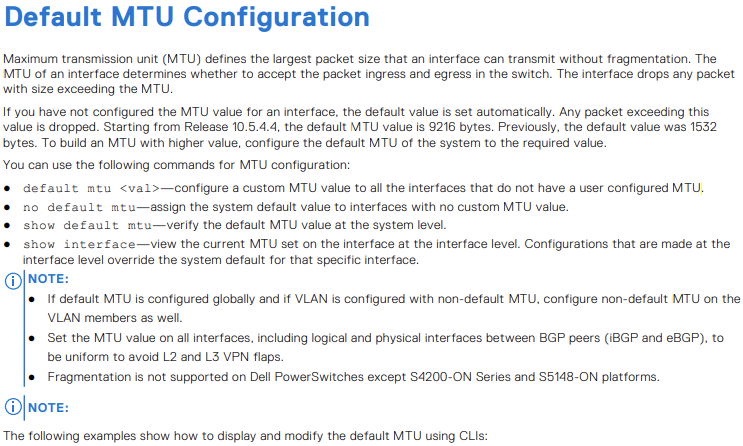
- Domyślna wartość MTU to 9216 bajtów, począwszy od wersji 10.5.4.4. Wcześniej było to 1532 bajty.
- Polecenia służące do konfigurowania i weryfikowania wartości MTU:
default mtu <value>:Ustawia niestandardową wartość MTU dla wszystkich interfejsów bez jednostki MTU skonfigurowanej przez użytkownikano default mtu:Resetuje interfejsy do domyślnej wartości MTU systemushow default mtu:Wyświetla domyślną jednostkę MTU na poziomie systemushow interface:Wyświetla bieżącą jednostkę MTU dla określonego interfejsu
Przykłady konfiguracji MTU
- Przykłady wyświetlania i modyfikowania domyślnej jednostki MTU przy użyciu poleceń interfejsu wiersza polecenia
- Scenariusze konfiguracji wirtualnych sieci LAN (VLAN) i sieci wirtualnych, podkreślające znaczenie spójnych ustawień MTU na wszystkich interfejsach w celu uniknięcia klap sieci VPN L2 i L3
Istotne zagadnienia i najlepsze praktyki
- Zapewnienie jednolitych ustawień MTU na wszystkich interfejsach, w tym interfejsach logicznych i fizycznych między elementami równorzędnymi protokołu BGP (Border Gateway Protocol)
- Fragmentacja nie jest obsługiwana w większości przełączników Dell Power, z wyjątkiem określonych modeli, takich jak platformy z serii S4200-ON i S5148-ON
- OS10 wybiera najniższą wartość MTU skonfigurowaną w sieci VLAN lub elementach VLAN, która ma być jednostką MTU sieci VLAN
MTU
- Po uaktualnieniu do wersji 10.5.4.4 wartość MTU jest domyślnie ustawiona na 9216 we wszystkich sieciach VLAN i interfejsach Ethernet, które nie mają jeszcze jednostki MTU skonfigurowanej przez użytkownika
Potencjalne problemy z nieprawidłową konfiguracją MTU
Utrata pakietów
- Jeśli wartość MTU jest ustawiona zbyt nisko, większe pakiety są odrzucane, co prowadzi do znacznej utraty danych i pogorszenia wydajności sieci
Klapki sieci
- Niespójne ustawienia MTU między interfejsami mogą powodować klapy sieci VPN L2 i L3, zakłócając stabilność sieci i łączność
Zwiększone opóźnienia
- Nieprawidłowe ustawienia MTU mogą prowadzić do zwiększonej fragmentacji, powodując większe opóźnienia i zmniejszoną przepustowość
Wyświetla domyślną wartość MTU.
OS10# show default mtu
Default MTU 9216 bytes
Domyślne ustawienie systemu bez konfiguracji użytkownika
OS10# show interface ethernet 1/1/1
Ethernet 1/1/1 is up, line protocol is down
Hardware is Eth, address is 90:b1:00:00:00:a0
 Current address is 90:b1:00:00:00:a0
Pluggable media present, QSFP+ type is QSFP+ 40GBASE-LR4
 Wavelength is 1311
 Receive power reading is no power
Interface index is 11
Internet address is not set
Mode of IPv4 Address Assignment: not set
Interface IPv6 oper status: Disabled
MTU 9216 bytes, IP MTU 1500 bytes
LineSpeed 0, Auto-Negotiation off
Flowcontrol rx off tx off
ARP type: ARPA, ARP Timeout: 60
Last clearing of "show interface" counters: 20:45:24
Queuing strategy: fifo
Input statistics:
 0 packets, 0 octets
 0 64-byte pkts, 0 over 64-byte pkts, 0 over 127-byte pkts
 0 over 255-byte pkts, 0 over 511-byte pkts, 0 over 1023-byte pkts
 0 Multicasts, 0 Broadcasts, 0 Unicasts
 0 runts, 0 giants, 0 throttles
 0 CRC, 0 overrun, 0 discarded
Output statistics:
 0 packets, 0 octets
 0 64-byte pkts, 0 over 64-byte pkts, 0 over 127-byte pkts
 0 over 255-byte pkts, 0 over 511-byte pkts, 0 over 1023-byte pkts
 0 Multicasts, 0 Broadcasts, 0 Unicasts
 0 throttles, 0 discarded, 0 Collisions, wred drops
Rate Info(interval 30 seconds):
 Input 0 Mbits/sec, 0 packets/sec, 0% of line rate
Output 0 Mbits/sec, 0 packets/sec, 0% of line rate
Time since last interface status change: 20:45:25
OS10# configure terminal
OS10(config)# default mtu 9000
OS10(config)#

- Przykład
OS10# default mtu 9216
OS10# no default mtu


Tabela 54. Przypadki użycia konfiguracji MTU VLAN.
| Konfiguracja |
Konfiguracja interfejsu Ethernet |
show interface output (pokaż dane wyjściowe interfejsu |
|---|---|---|
interface vlan300 no shutdown ! |
interface ethernet1/1/6 no shutdown switchport mode trunk switchport trunk allowed vlan300 ! interface ethernet1/1/9 no shutdown switchport mode trunk switchport trunk allowed vlan300 |
OS10# show interface vlan300 Vlan300 is up, line protocol is up Address is 14:10:10:0d:00:e9, Current address is 14:10:10:0d:00:e9 Interface index is 84 Internet address is not set Mode of IPv4 Address Assignment: not set Interface IPv6 oper status: Enabled Link local IPv6 address: fe80::1010:10ff:fe0d:e9/10 MTU 1532 bytes, IP MTU 1500 bytes |
interface vlan300 no shutdown ! |
interface ethernet1/1/6 no shutdown switchport mode trunk switchport trunk allowed vlan300 ! interface ethernet1/1/9 no shutdown switchport mode trunk switchport trunk allowed vlan300 mtu 1312 |
OS10# show interface vlan300 Vlan300 is up, line protocol is up Address is 14:10:10:0d:00:e9, Current address is 14:10:10:0d:00:e9 Interface index is 84 Internet address is not set Mode of IPv4 Address Assignment: not set Interface IPv6 oper status: Enabled Link local IPv6 address: fe80::1010:10ff:fe0d:e9/10 MTU 1312 bytes, IP MTU 1280 bytes |
virtual-network 3333 ! interface vlan300 no shutdown virtual-network 3333 ! |
interface ethernet1/1/6 no shutdown switchport mode trunk switchport trunk allowed vlan300 ! interface ethernet1/1/9 no shutdown switchport mode trunk switchport trunk allowed vlan300 mtu 1312 |
OS10# # show interface vlan300 Vlan300 is up, line protocol is up Address is 14:18:77:0d:00:e9, Current address is 14:18:77:0d:00:e9 Interface index is 84 Internet address is not set Mode of IPv4 Address Assignment: not set Interface IPv6 oper status: Enabled Link local IPv6 address: fe80::1618:77ff:fe0d:e9/64 MTU 1532 bytes, IP MTU 1500 bytes |
virtual-network 3333 ! interface vlan300 no shutdown virtual-network 3333 ! interface virtual-network 3333 |
interface ethernet1/1/6 no shutdown switchport mode trunk switchport trunk allowed vlan300 ! interface ethernet1/1/9 no shutdown switchport mode trunk switchport trunk allowed vlan300 mtu 1312 |
show interface vlan300 Vlan300 is up, line protocol is up Address is 14:18:77:0d:00:e9, Current address is 14:18:77:0d:00:e9 Interface index is 84 Internet address is not set Mode of IPv4 Address Assignment: not set Interface IPv6 oper status: Enabled Link local IPv6 address: fe80::1618:77ff:fe0d:e9/64 MTU 1532 bytes, IP MTU 1500 bytes OS10# show interface virtual-network 3333 Virtual-network 3333 is up, line protocol is up Address is 14:18:77:0d:00:ea, Current address is 14:18:77:0d:00:ea Interface index is 87 Internet address is not set Mode of IPv4 Address Assignment: not set Interface IPv6 oper status: Enabled MTU 1312 bytes, IP MTU 1280 bytes |

- Przykład
OS10(conf-if-eth1/1/7)# mtu 3000


- Przykład
OS10# show default mtu
Default MTU 9216 bytes

Additional Information
Podręcznik użytkownika OS10 Dokumentacja online — Pomoc techniczna dla oprogramowania SmartFabric OS10 | Dokumentacja | Dell US
Affected Products
SmartFabric OS10 SoftwareArticle Properties
Article Number: 000228459
Article Type: How To
Last Modified: 07 Nov 2025
Version: 4
Find answers to your questions from other Dell users
Support Services
Check if your device is covered by Support Services.