OS10 MTU 組態簡介
Summary: MTU 組態簡介 最大傳輸單元 (MTU) 定義介面可以在不分段的情況下傳輸的最大數據包大小。正確的 MTU 組態對於網路效能和穩定性至關重要。本文件提供有關 Dell 電源交換器 MTU 行為、預設設定及組態命令的詳細資訊。
This article applies to
This article does not apply to
This article is not tied to any specific product.
Not all product versions are identified in this article.
Instructions
涵蓋的關鍵主題
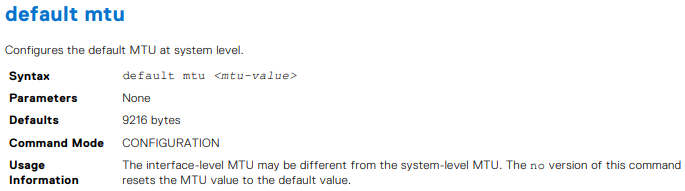
預設 MTU 組態
- 從版本 10.5.4.4 開始,預設 MTU 值為 9216 位元組。先前為 1532 位元組。
- 設定和驗證 MTU 值的命令:
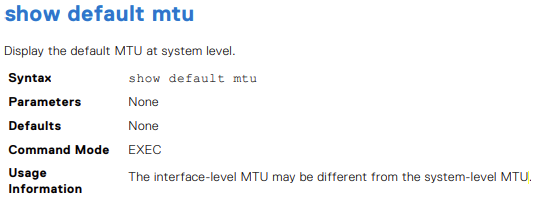
default mtu <value>:為所有不含使用者設定 MTU 的介面設定自訂 MTU 值no default mtu:將介面重設為系統預設 MTU 值show default mtu:顯示系統層級的預設 MTUshow interface:顯示特定介面目前的 MTU
MTU 組態範例
- 如何使用 CLI 命令顯示和修改預設 MTU 的範例
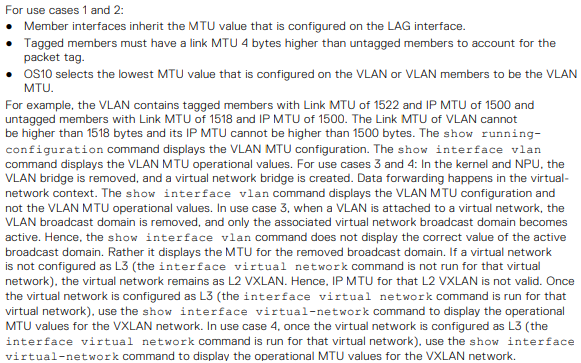
- 虛擬 LAN (VLAN) 和虛擬網路的設定方案,強調所有介面上 MTU 設定一致的重要性,以避免 L2 和 L3 VPN 變動
考量事項與最佳實務
- 確保所有介面的 MTU 設定一致,包括邊界閘道協定 (BGP) 對等方之間的邏輯和物理介面
- 除了 S4200-ON 系列和 S5148-ON 等特定型號平台外,大部分 Dell 電源交換器都不支援重組
- OS10 會選取在 VLAN 或 VLAN 成員上設定的最低 MTU 值作為 VLAN MTU
MTU
- 升級至 10.5.4.4 後,尚未使用者設定 MTU 的所有 VLAN 和乙太網路介面上的 MTU 預設為 9216
MTU 組態不正確的潛在問題
丟包
- 如果 MTU 設置得太低,則會丟棄較大的數據包,從而導致顯著的數據丟失和網路性能下降
網路變動
- 介面之間的 MTU 設定不一致可能會導致 L2 和 L3 VPN 出現抖動,從而破壞網路穩定性和連線能力。
延遲增加
- 不正確的 MTU 設定會導致碎片增加,從而導致延遲增加和輸送量降低

顯示預設 MTU。
OS10# show default mtu
Default MTU 9216 bytes
無使用者組態的系統預設值
OS10# show interface ethernet 1/1/1
Ethernet 1/1/1 is up, line protocol is down
Hardware is Eth, address is 90:b1:00:00:00:a0
 Current address is 90:b1:00:00:00:a0
Pluggable media present, QSFP+ type is QSFP+ 40GBASE-LR4
 Wavelength is 1311
 Receive power reading is no power
Interface index is 11
Internet address is not set
Mode of IPv4 Address Assignment: not set
Interface IPv6 oper status: Disabled
MTU 9216 bytes, IP MTU 1500 bytes
LineSpeed 0, Auto-Negotiation off
Flowcontrol rx off tx off
ARP type: ARPA, ARP Timeout: 60
Last clearing of "show interface" counters: 20:45:24
Queuing strategy: fifo
Input statistics:
 0 packets, 0 octets
 0 64-byte pkts, 0 over 64-byte pkts, 0 over 127-byte pkts
 0 over 255-byte pkts, 0 over 511-byte pkts, 0 over 1023-byte pkts
 0 Multicasts, 0 Broadcasts, 0 Unicasts
 0 runts, 0 giants, 0 throttles
 0 CRC, 0 overrun, 0 discarded
Output statistics:
 0 packets, 0 octets
 0 64-byte pkts, 0 over 64-byte pkts, 0 over 127-byte pkts
 0 over 255-byte pkts, 0 over 511-byte pkts, 0 over 1023-byte pkts
 0 Multicasts, 0 Broadcasts, 0 Unicasts
 0 throttles, 0 discarded, 0 Collisions, wred drops
Rate Info(interval 30 seconds):
 Input 0 Mbits/sec, 0 packets/sec, 0% of line rate
Output 0 Mbits/sec, 0 packets/sec, 0% of line rate
Time since last interface status change: 20:45:25
OS10# configure terminal
OS10(config)# default mtu 9000
OS10(config)#
- 範例
OS10# default mtu 9216
OS10# no default mtu



表 54.VLAN MTU 組態的使用案例。
| 組態 |
乙太網路介面組態 |
顯示介面輸出 |
|---|---|---|
interface vlan300 no shutdown ! |
interface ethernet1/1/6 no shutdown switchport mode trunk switchport trunk allowed vlan300 ! interface ethernet1/1/9 no shutdown switchport mode trunk switchport trunk allowed vlan300 |
OS10# show interface vlan300 Vlan300 is up, line protocol is up Address is 14:10:10:0d:00:e9, Current address is 14:10:10:0d:00:e9 Interface index is 84 Internet address is not set Mode of IPv4 Address Assignment: not set Interface IPv6 oper status: Enabled Link local IPv6 address: fe80::1010:10ff:fe0d:e9/10 MTU 1532 bytes, IP MTU 1500 bytes |
interface vlan300 no shutdown ! |
interface ethernet1/1/6 no shutdown switchport mode trunk switchport trunk allowed vlan300 ! interface ethernet1/1/9 no shutdown switchport mode trunk switchport trunk allowed vlan300 mtu 1312 |
OS10# show interface vlan300 Vlan300 is up, line protocol is up Address is 14:10:10:0d:00:e9, Current address is 14:10:10:0d:00:e9 Interface index is 84 Internet address is not set Mode of IPv4 Address Assignment: not set Interface IPv6 oper status: Enabled Link local IPv6 address: fe80::1010:10ff:fe0d:e9/10 MTU 1312 bytes, IP MTU 1280 bytes |
virtual-network 3333 ! interface vlan300 no shutdown virtual-network 3333 ! |
interface ethernet1/1/6 no shutdown switchport mode trunk switchport trunk allowed vlan300 ! interface ethernet1/1/9 no shutdown switchport mode trunk switchport trunk allowed vlan300 mtu 1312 |
OS10# # show interface vlan300 Vlan300 is up, line protocol is up Address is 14:18:77:0d:00:e9, Current address is 14:18:77:0d:00:e9 Interface index is 84 Internet address is not set Mode of IPv4 Address Assignment: not set Interface IPv6 oper status: Enabled Link local IPv6 address: fe80::1618:77ff:fe0d:e9/64 MTU 1532 bytes, IP MTU 1500 bytes |
virtual-network 3333 ! interface vlan300 no shutdown virtual-network 3333 ! interface virtual-network 3333 |
interface ethernet1/1/6 no shutdown switchport mode trunk switchport trunk allowed vlan300 ! interface ethernet1/1/9 no shutdown switchport mode trunk switchport trunk allowed vlan300 mtu 1312 |
show interface vlan300 Vlan300 is up, line protocol is up Address is 14:18:77:0d:00:e9, Current address is 14:18:77:0d:00:e9 Interface index is 84 Internet address is not set Mode of IPv4 Address Assignment: not set Interface IPv6 oper status: Enabled Link local IPv6 address: fe80::1618:77ff:fe0d:e9/64 MTU 1532 bytes, IP MTU 1500 bytes OS10# show interface virtual-network 3333 Virtual-network 3333 is up, line protocol is up Address is 14:18:77:0d:00:ea, Current address is 14:18:77:0d:00:ea Interface index is 87 Internet address is not set Mode of IPv4 Address Assignment: not set Interface IPv6 oper status: Enabled MTU 1312 bytes, IP MTU 1280 bytes |
- 範例
OS10(conf-if-eth1/1/7)# mtu 3000

- 範例
OS10# show default mtu
Default MTU 9216 bytes

Additional Information
OS10 使用者指南在線文檔 - SmartFabric OS10 軟體支援 |文檔 |Dell US
Affected Products
SmartFabric OS10 SoftwareArticle Properties
Article Number: 000228459
Article Type: How To
Last Modified: 07 Nov 2025
Version: 4
Find answers to your questions from other Dell users
Support Services
Check if your device is covered by Support Services.