Avamar:19.10 编辑已禁用的组策略时,Avamar Administrator 控制台会自动启用组
Summary: 本文介绍 Avamar 19.10 中的一种行为,其中 Avamar Administrator 控制台会在编辑已禁用的组策略时自动启用组。
This article applies to
This article does not apply to
This article is not tied to any specific product.
Not all product versions are identified in this article.
Symptoms
-
启动 Avamar Administrator,然后转至 策略 窗口。
-
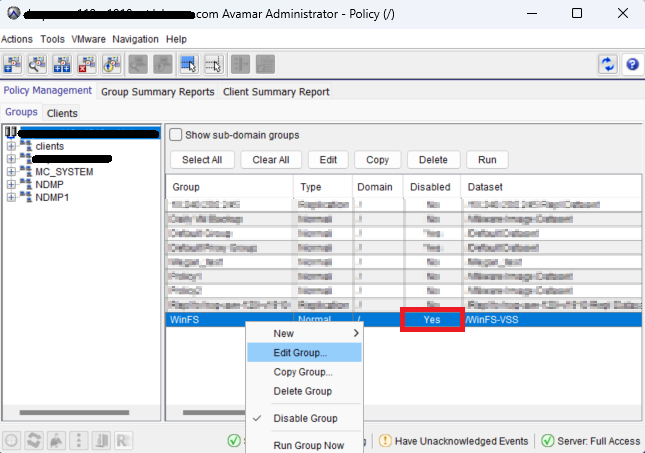
选择已禁用的组策略,右键单击并 单击“Edit Group...”
-
出现 Edit Group窗口时,“Disabled”复选框字段处于清除状态,如果单击 OK,则表示组策略处于启用状态:


Cause
此问题出现在 Avamar 19.10 版本中,并被确定为软件缺陷。
Resolution
要解决此问题,请使用 Avamar 用户界面 (AUI),或始终选中 Avamar 管理员控制台中的“Disabled”复选框,然后再保存(单击 OK)组策略。
该缺陷已在 Avamar 19.12 版本中得到修复。
Affected Products
AvamarProducts
Avamar ServerArticle Properties
Article Number: 000228606
Article Type: Solution
Last Modified: 16 May 2025
Version: 4
Find answers to your questions from other Dell users
Support Services
Check if your device is covered by Support Services.