Dell Networking OS10 GRE 組態簡介
Summary: 通用路由封裝 (GRE) 是一種 IP 封裝協定,用於在網路上的兩個路由器之間建立虛擬點對點連接。它通常用於在不同網站之間通過隧道路由協定(如 RIP 和 OSPF)。GRE 在徵求意見 (RFC 2784.
This article applies to
This article does not apply to
This article is not tied to any specific product.
Not all product versions are identified in this article.
Instructions
涵蓋的關鍵主題
GRE 通道的組態:
- GRE 隧道在兩個路由器之間配置,以直接發送和接收 GRE 數據包。
- 配置涉及設置隧道介面,指定隧道模式、源和目標。
限制與限制:
- 最多支援 100 個通道
- 底層和覆蓋路徑不支援 IPv6。
- 某些介面和IP位址在與GRE隧道一起使用時有限制。
通道保持連接設定:
- 設定保活設定,以使用網際網路控制訊息通訊協定 (ICMP) 回應和應答封包來監控通道端點連線能力。
等價多重路徑 (ECMP) 覆蓋和底圖:
- ECMP 負載共用,用於在可用路由之間分配流量
- 支援的組合以覆蓋和底層 ECMP 路由。
命令與範例:
- 用於設定 GRE 隧道、保持連接設定和 ECMP 路由的詳細命令語法和範例
設定錯誤可能出現的問題
隧道拍打:
- 不正確的保活設置會導致隧道頻繁上下,從而導致不穩定。
MTU 不相符:
- 具有不同 MTU 設置的路徑上的 GRE 隧道可能會導致數據包分段或丟失。
路由環路:
- 配置錯誤的路由可能會導致環路,從而導致流量過多和潛在的網路中斷。
最佳實務
一致的 MTU 設定:
- 確保 MTU 設置在整個 GRE 隧道中保持一致,以避免碎片。
正確的 keepalive 組態:
- 配置保活設置以監控隧道運行狀況並避免不必要的擺動。
清晰的文件:
- 維護隧道配置和相關路由的清晰文檔,以防止配置錯誤。
GRE 通道使用案例。
連線遠端站點:
- GRE 隧道可以通過互聯網連接遠端網站,從而實現安全高效的通信。
通道非 IP 流量:
- GRE 可以封裝非 IP 流量,使其適用於各種網路協定。
負載平衡:
- 將 ECMP 與 GRE 隧道配合使用,可在多條路徑上分配流量負載,從而提高網路性能。
網路拓撲範例
想像一個網路,有兩個遠端網站,網站 A 和網站 B,通過 Internet 連接。每個網站都有一個路由器,它們之間配置了一個 GRE 隧道。
拓撲將如下所示:
站點 A (10.10.10.0/24) ---- OS10-1 ----網際網路---- OS10-2 ----站點 B (10.20.10.0/24)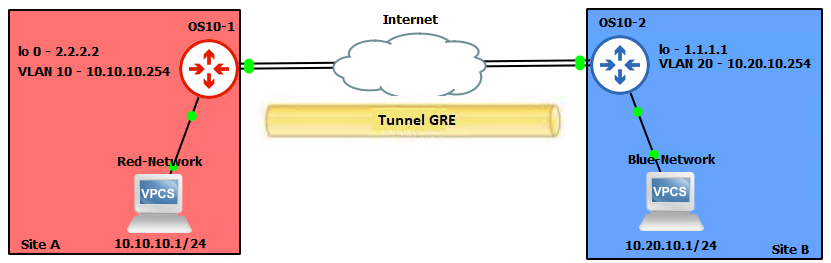


OS10(config)# interface tunnel 10
OS10(conf-if-tunnel-10)# <165>1 2022-11-11T17:55:16.614662+00:00 OS10 dn_alm 731 - -
 Node.1-Unit.1:PRI [event], Dell (OS10) %IFM_ASTATE_UP: Interface admin state up
:tunnel10
OS10(conf-if-tunnel-10)# ip vrf forwarding red
% Error: Interface tunnel10, Tunnel mode is mandatory config and must exist for other
tunnel configs.
OS10(conf-if-tunnel-10)# mode gre-ipv4
OS10(conf-if-tunnel-10)# ip vrf forwarding red
OS10(conf-if-tunnel-10)# ip address 120.1.1.1/24
OS10(conf-if-tunnel-10)# <165>1 2022-11-11T17:55:31.454972+00:00 OS10 dn_alm 731 - -
 Node.1-Unit.1:PRI [event], Dell (OS10) %IP_ADDRESS_ADD: IP Address add is successful.
 IP 120.1.1.1/24 in VRF:red added successfully
OS10(conf-if-tunnel-10)# tunnel destination 16.16.16.16
OS10(conf-if-tunnel-10)# tunnel source loopback10
OS10(conf-if-tunnel-10)# <165>1 2022-11-11T17:56:17.197783+00:00 OS10 dn_alm 731 - -
 Node.1-Unit.1:PRI [event], Dell (OS10) %IFM_OSTATE_UP: Interface operational state is
up :tunnel10

OS10(conf-if-tunnel-10)# show configuration
!
interface tunnel10
mode gre-ipv4
no shutdown
ip vrf forwarding red
ip address 120.1.1.1/24
tunnel destination 10.10.10.10
tunnel source loopback10
keepalive down-timer 10
keepalive enable
keepalive probe-interval 6
keepalive up-timer 12

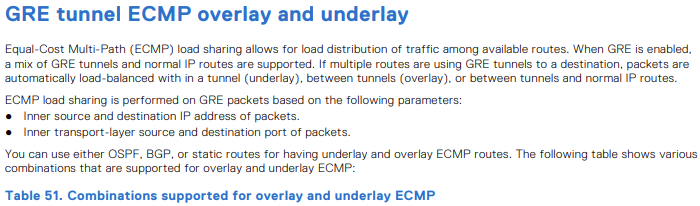
| 底層 ECMP 路由 | 重疊 ECMP 路由 | 支援 |
|---|---|---|
| 靜的 | 靜的 | 是 |
| 靜的 | OSPF | 是 |
| 靜的 | BGP | 是 |
| OSPF | 靜的 | 是 |
| OSPF | OSPF | 否 |
| OSPF | BGP | 是 |
| BGP | 靜的 | 是 |
| BGP | OSPF | 是 |
| BGP | BGP | 否 |

OS10(config)# hardware overlay-ecmp-profile mode balanced-overlay-ecmp
OS10(config)# <165>1 2022-10-11T10:25:26.474891+00:00 AG1-9978 dn_alm 717 - - Node.1-
Unit.1:PRI [event], Dell (OS10) %VXLAN_OVERLAY_ECMP_PROFILE_MODIFIED: VxLAN Overlay
ECMP: Configuration is modified, Save and Reload the device for the profile to be
effect

OS10# show running-configuration interface tunnel 21
!
interface tunnel21
 mode gre-ipv4
 no shutdown
 ip address 10.10.10.2/24
 tunnel destination 5.5.5.5
 tunnel source loopback3
OS10# show running-configuration interface tunnel 22
!
interface tunnel22
 mode gre-ipv4
 no shutdown
 ip address 10.10.10.3/24
 tunnel destination 6.6.6.6
 tunnel source loopback4
OS10# show running-configuration interface tunnel 23
!
interface tunnel23
 mode gre-ipv4
 no shutdown
 ip address 10.10.10.4/24
 tunnel destination 7.7.7.7
 tunnel source loopback5
OS10# show running-configuration interface tunnel 24
!
interface tunnel24
 mode gre-ipv4
 no shutdown
 ip address 10.10.10.5/24
 tunnel destination 8.8.8.8
 tunnel source loopback6
OS10# show running-configuration route
!
ip route 77.1.1.0/24 100.1.1.2
ip route 77.1.1.0/24 10.10.10.2
ip route 77.1.1.0/24 10.10.10.3
ip route 77.1.1.0/24 10.10.10.4
ip route 77.1.1.0/24 10.10.10.5
OS10# show ip route 10.1.1.0/24
Routing entry for 77.1.1.0/24
Known via static
Distance 1, Metric 0
Last update 08:57:53
Routing descriptors Blocks:
 via 100.1.1.2 tunnel10
 via 10.10.10.2 tunnel21
 via 10.10.10.3 tunnel22
 via 10.10.10.4 tunnel23
 via 10.10.10.5 tunnel24

OS10# show ip route 67.67.67.0/24
Routing entry for 67.67.67.0/24
Known via ospf, type
Distance 110,
Metric 21
Last update 09:35:46
Routing descriptors Blocks:
 via 10.1.1.2 ethernet1/1/25:1
 via 12.1.1.2 ethernet1/1/25:2
 via 23.2.2.2 vlan2
 via 23.2.3.2 vlan3
 via 23.2.4.2 vlan4
 via 23.2.5.2 vlan5
 via 23.2.6.2 vlan6
 via 23.2.7.2 vlan7
 via 23.2.8.2 vlan8
 via 23.2.9.2 vlan9
OS10# show ip route 68.68.68.0/24
Routing entry for 68.68.68.0/24
Known via ospf, type
Distance 110,
Metric 21
Last update 09:36:35
Routing descriptors Blocks:
 via 10.1.1.2 ethernet1/1/25:1
 via 12.1.1.2 ethernet1/1/25:2
 via 23.2.2.2 vlan2
 via 23.2.3.2 vlan3
 via 23.2.4.2 vlan4
 via 23.2.5.2 vlan5
 via 23.2.6.2 vlan6
OS10# show running-configuration interface vlan 2
!
interface vlan2
 no shutdown
 ip address 23.2.2.1/24
 ip ospf 1 area 0.0.0.0
OS10# show running-configuration interface vlan 3
!
interface vlan3
 no shutdown
 ip address 23.2.3.1/24
 ip ospf 1 area 0.0.0.0
OS10# show running-configuration interface vlan 4
!
interface vlan4
 no shutdown
 ip address 23.2.4.1/24
 ip ospf 1 area 0.0.0.0
OS10# show running-configuration interface tunnel 21
!
interface tunnel21
 mode gre-ipv4
 no shutdown
 ip address 131.131.131.1/24
 tunnel destination 67.67.67.67
 tunnel source loopback3
OS10# show running-configuration interface tunnel 22
!
interface tunnel22
 mode gre-ipv4
 no shutdown
 ip address 132.132.132.1/24
 tunnel destination 68.68.68.68
 tunnel source loopback4
-
範例
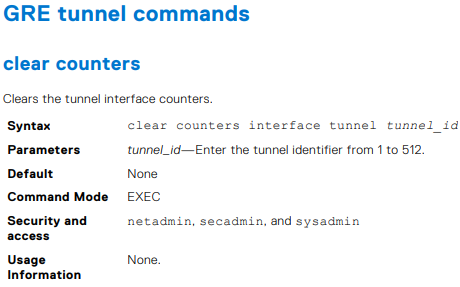
OS10# clear counters interface tunnel 10

-
範例
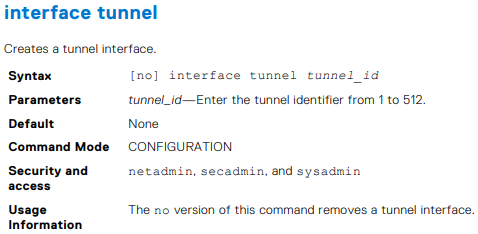
OS10(config)# interface tunnel 10


-
範例
OS10(conf-if-tunnel-40)# ip address 10.1.1.1/24


-
範例
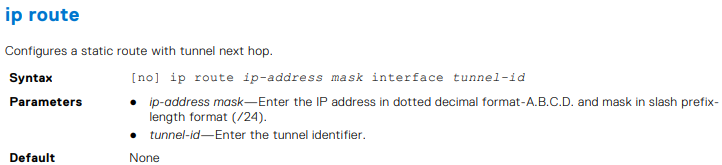
OS10(conf)# ip route 1.1.1.0/24 interface tunnel 10
OS10(conf)# ip route 2.2.2.0/24 3.3.3.3 interface tunnel 10

-
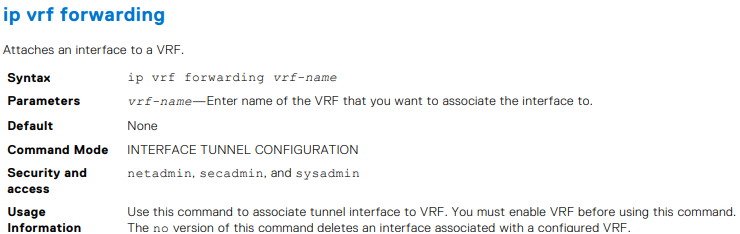
範例
OS10(conf-if-tunnel-4)# ip vrf forwarding Vrf_red

-
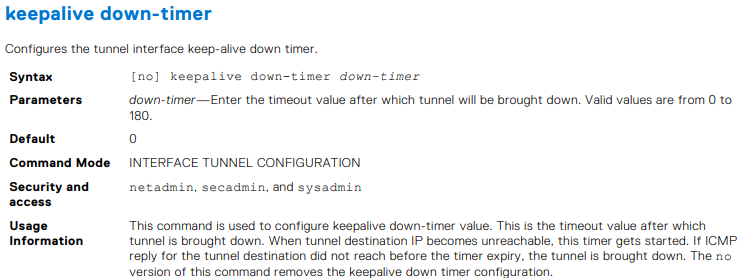
範例
OS10(conf-if-tunnel-1)# keepalive down-timer 10

-
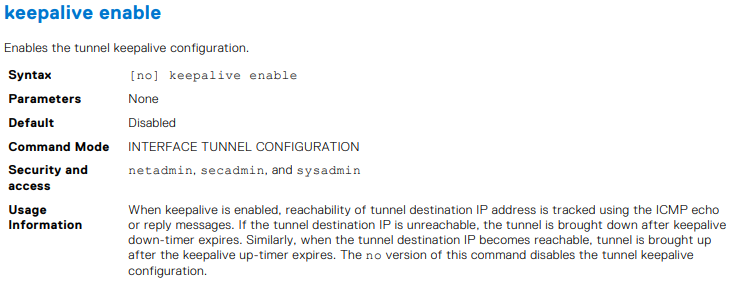
範例
OS10(conf-if-tunnel-1)# keepalive enable

-
範例
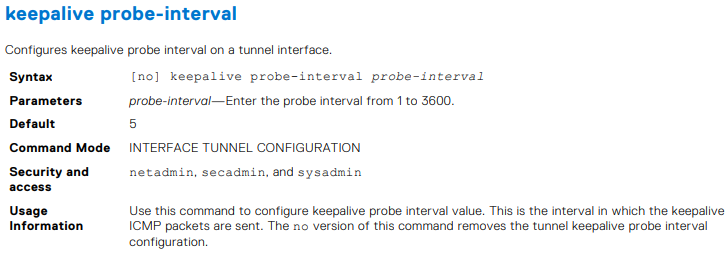
OS10(conf-if-tunnel-1)# keepalive probe-interval 10


-
範例
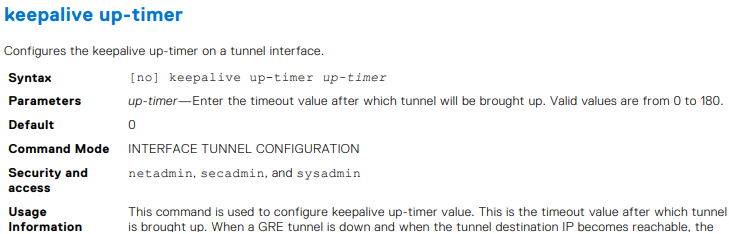
OS10(conf-if-tunnel-1)# keepalive up-timer 10

-
範例
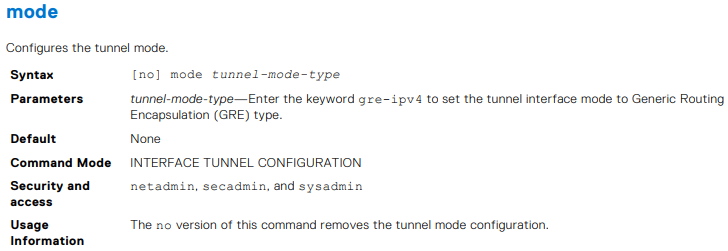
OS10(conf-if-tunnel-1)# mode gre-ipv4

-
範例
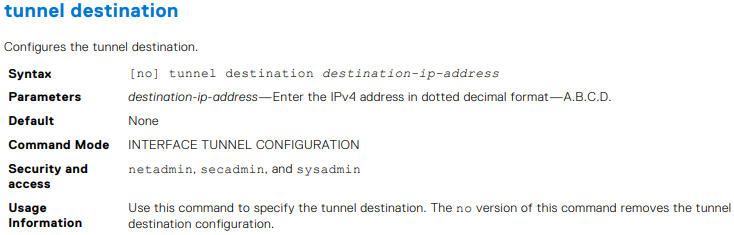
OS10(conf-if-tunnel-40)# tunnel destination 10.10.10.10


-
範例
OS10(conf-if-tunnel-4)# tunnel source vlan 10

-
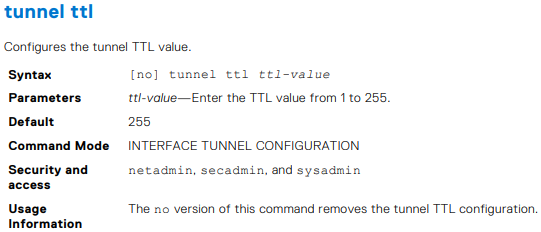
範例
OS10(conf-if-tunnel-1)# tunnel ttl 220

-
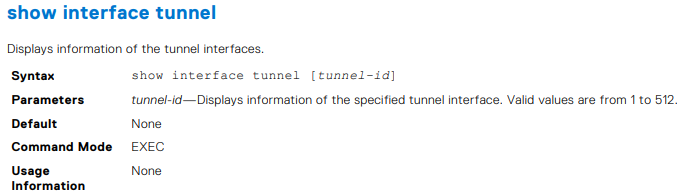
範例
OS10# show interface tunnel 10
Tunnel 10 is up, line protocol is up
Hardware is Tunnel
Tunnel mode GREv4
Tunnel source IP 2.2.2.2, Tunnel source Intf loopback1
Tunnel destination 7.7.7.7
Tunnel TTL 255
Tunnel keepalive enabled
Keepalive probe interval 10, Up timer 5, Down timer 5
Interface index is 45
Internet address is 10.1.1.1/24
Mode of IPv4 Address Assignment: MANUAL
Interface IPv6 oper status: Enabled
ARP type: ARPA, ARP Timeout: 60
Last clearing of "show interface" counters: 00:11:22
Queuing strategy: fifo
Input statistics:
 0 packets, octets
Output statistics:
 0 packets, octets
Time since last interface status change: 00:27:11

-
範例
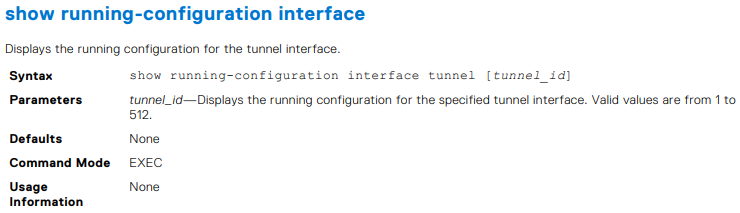
OS10# show running-configuration interface tunnel
!
interface tunnel10
 no shutdown
 mode gre-ipv4
 ip address 100.1.1.1/24
 tunnel destination 3.3.3.3
 tunnel source 1.1.1.1
!
interface tunnel20
 no shutdown
 mode gre-ipv4
 ip address 101.1.1.1/24
 tunnel destination 5.5.5.5
 tunnel source 6.6.6.6
OS10# show running-configuration interface tunnel 10
!
interface tunnel10
 no shutdown
 mode gre-ipv4
 ip address 100.1.1.1/24
 tunnel destination 3.3.3.3
 tunnel source 1.1.1.1

範例
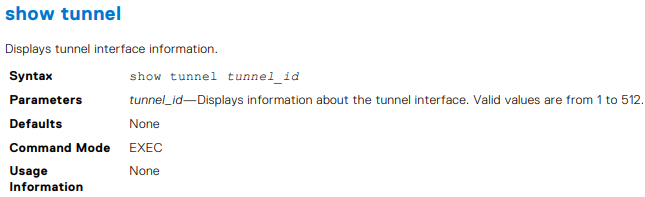
OS10# show tunnel
Name 		Mode 	Source-IP 	Destination-IP 	SrcIntf 		TTL 	VRF 	Status 	Protocol
=================================================================================================
Tunnel 1	GREv4 	1.1.1.1 	6.6.6.6 		Loopback 2 		255 	default up 		up
Tunnel 2 	GREv4 	2.2.2.2 	7.7.7.7 		Loopback 123 	255 	default up 		up
Tunnel 3 	GREv4 	3.3.3.3 	8.8.8.8 		Loopback 100 	255 	default up 		up
OS10# show tunnel 10
Name 		Mode 	Source-IP 	Destination-IP 	SrcIntf 		TTL 	VRF 	Status 	Protocol
=================================================================================================
Tunnel 10 	GREv4 	1.1.1.1 	7.6.6.6 		Loopback 2 		255 	default up 		up

-
範例
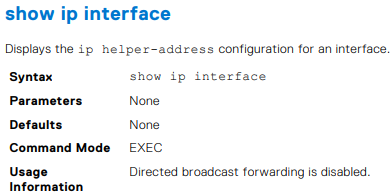
OS10# show ip int gig 1/3
GigabitEthernet 1/3 is up, line protocol is down
Internet address is 10.11.0.1/24
Broadcast address is 10.11.0.255
Address determined by user input
IP MTU is 1500 bytes
Helper address is 192.168.0.1
192.168.0.2
Directed broadcast forwarding is disabled

-
範例
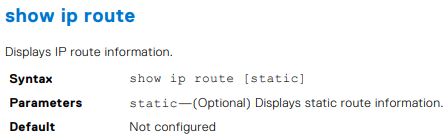
OS10# show ip route
Codes: C - connected
S - static
B - BGP, IN - internal BGP, EX - external BGP, EV - EVPN BGP
O - OSPF, IA - OSPF inter area, N1 - OSPF NSSA external type 1,
N2 - OSPF NSSA external type 2, E1 - OSPF external type 1,
E2 - OSPF external type 2, * - candidate default,
+ - summary route, > - non-active route
Gateway of last resort is not set
Destination Gateway Dist/Metric Last Change
--------------------------------------------------------------------
C 1.1.1.0/24 via 1.1.1.1 ethernet1/1/1:1 0/0 01:32:53
C 10.1.1.0/24 via 100.1.1.1 loopback1 0/0 00:00:06
C 2.2.2.0/24 via 2.1.1.1.1 Tunnel 1 0/0 00:00:15
OS10# show ip route static
Codes: C - connected
S - static
B - BGP, IN - internal BGP, EX - external BGP, EV - EVPN BGP
O - OSPF, IA - OSPF inter area, N1 - OSPF NSSA external type 1,
N2 - OSPF NSSA external type 2, E1 - OSPF external type 1,
E2 - OSPF external type 2, * - candidate default,
+ - summary route, > - non-active route
Gateway of last resort is not set
Destination Gateway Dist/Metric Last Change
----------------------------------------------------------------------
C 1.1.1.0/24 via 1.1.1.1 ethernet1/1/1:1 0/0 01:32:53
C 10.1.1.0/24 via 100.1.1.1 loopback1 0/0 00:00:06
S 80.1.10.0/24 via 100.1.1.1 tunnel10 1/0 00:02:33

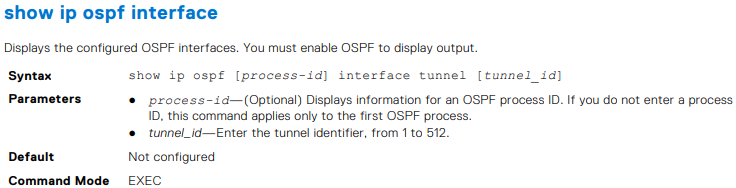
OS10# show ip ospf interface tunnel 10
tunnel10 is up, line protocol is up
  Internet Address 100.1.1.1/24, Area 0.0.0.0
  Process ID 1, Router ID 1.1.1.1, Network Type broadcast, Cost: 1
  Transmit Delay is 1 sec, State DR, Priority 1
  Designated Router (ID) 1.1.1.1 (local), Interface address 100.1.1.1
  Backup Designated router (ID) , Interface address 0.0.0.0
  Timer intervals configured, Hello 10, Dead 40, Wait 40, Retransmit 5
  Neighbor Count is 0, Adjacent neighbor count is 0
OS10# show ip ospf 1 interface tunnel 10
tunnel10 is up, line protocol is up
  Internet Address 100.1.1.1/24, Area 0.0.0.0
  Process ID 1, Router ID 1.1.1.1, Network Type broadcast, Cost: 1
  Transmit Delay is 1 sec, State DR, Priority 1
  Designated Router (ID) 1.1.1.1 (local), Interface address 100.1.1.1
  Backup Designated router (ID) , Interface address 0.0.0.0
  Timer intervals configured, Hello 10, Dead 40, Wait 40, Retransmit 5
  Neighbor Count is 0, Adjacent neighbor count is 0

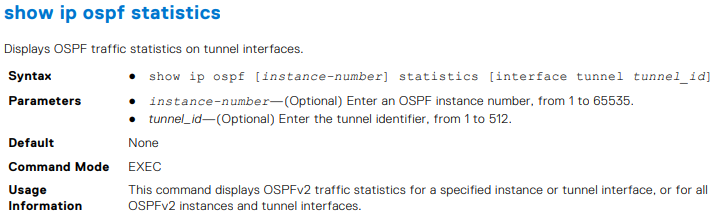
-
範例
OS10# show ip ospf 1 statistics interface tunnel 10
Interface tunnel10
 Receive Statistics
 rx-invalid 	0 	rx-invalid-bytes 	0
 rx-hello 		0 	rx-hello-bytes 		0
 rx-db-des 		0 	rx-db-des-bytes 	0
 rx-ls-req 		0 	rx-ls-req-bytes 	0
 rx-ls-upd 		0 	rx-ls-upd-bytes 	0
 rx-ls-ack 		0 	rx-ls-ack-bytes 	0
 Transmit Statistics
 tx-failed 		0 	tx-failed-bytes 	0
 tx-hello 		52 	tx-hello-bytes 		3328
 tx-db-des 		0 	tx-db-des-bytes 	0
 tx-ls-req 		0 	tx-ls-req-bytes 	0
 tx-ls-upd 		0 	tx-ls-upd-bytes 	0
 tx-ls-ack 		0 	tx-ls-ack-bytes 	0
 Error packets (Receive statistics)
 bad-src 		0 	dupe-id 			0 	hello-err	 0
 mtu-mismatch 	0 	nbr-ignored 		0 	wrong-proto  0
 resource-err 	0 	bad-lsa-len 		0 	lsa-bad-type 0
 lsa-bad-len 	0 	lsa-bad-cksum 		0 	auth-fail    0
 netmask-mismatch 0 hello-tmr-mismatch 	0 	dead-ivlmismatch 0
 options-mismatch 0 nbr-admin-down 		0 	own-hellodrop    0
 self-orig 		0 	wrong-length 		0 	checksumerror 	 0
 version-mismatch 0 area-mismatch 		0

Additional Information
Affected Products
SmartFabric OS10 SoftwareArticle Properties
Article Number: 000228691
Article Type: How To
Last Modified: 03 Oct 2025
Version: 2
Find answers to your questions from other Dell users
Support Services
Check if your device is covered by Support Services.