BIOSでM.2 PCIe SSD2を無効にすると、Dell PrecisionおよびLatitudeノートパソコンが起動できない
Summary: この記事では、M.2 PCIe BIOS設定を変更したときにDell Precision 3571およびLatitude 5531が起動しない問題について説明します。
This article applies to
This article does not apply to
This article is not tied to any specific product.
Not all product versions are identified in this article.
Symptoms
Dell Precision 3571およびLatitude 5531でWindowsが起動しない、またはDellのロゴ画面が表示されたままになる場合があります。これは、WindowsがM.2 PCIe SSD1にインストールされており、BIOSストレージ設定でM.2 PCIe SSD2オプションが[オフ]に変更された場合に発生します。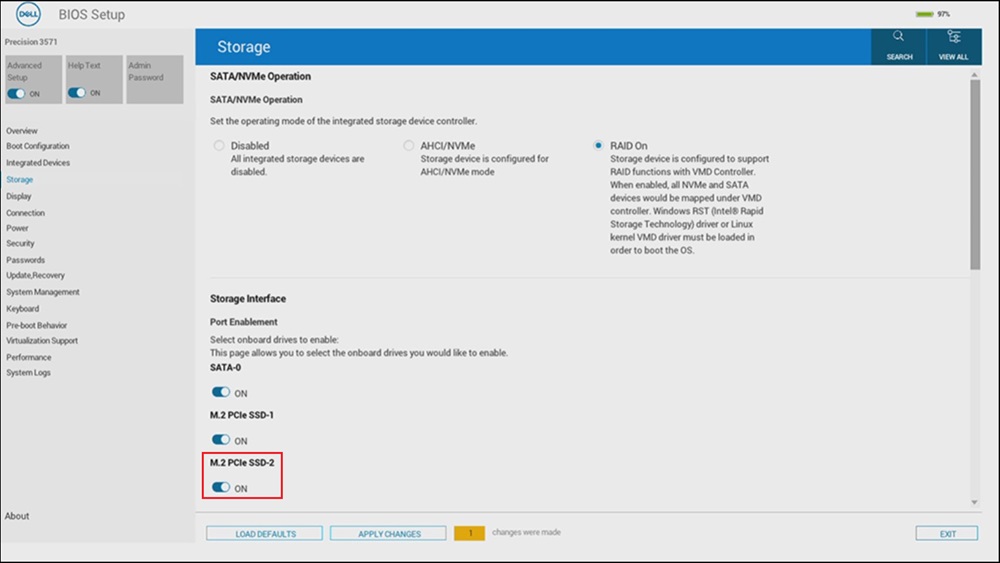
対象となるシステム:
- Precision 3571
- Latitude 5531
Cause
これは、インテルAlder Lakeチップセットの制限が原因で発生します。
Resolution
M.2 PCIe SSD BIOSオプション
Windowsがm.2 PCIe SSD1スロットのドライブにインストールされている場合、M.2 PCIe SSD2のBIOS設定は「オン」のままにする必要があります。
Affected Products
Latitude 5531, Precision 3571Article Properties
Article Number: 000229541
Article Type: Solution
Last Modified: 24 Apr 2025
Version: 3
Find answers to your questions from other Dell users
Support Services
Check if your device is covered by Support Services.