VxRail: LCM From VxRail 7.0.520 or 7.0.521 Presents Error: vSAN Disk Object Repair Timeout Retrieval
Summary: This article addresses the failure of the VxRail Life-Cycle Management (LCM) process when upgrading from versions 7.0.520 or 7.0.521. It offers a solution for the "vSAN disk object repair timeout" issue. ...
This article applies to
This article does not apply to
This article is not tied to any specific product.
Not all product versions are identified in this article.
Symptoms
The VxRail LCM User Interface vCenter plugin Updates tab shows:
Error message:
VxRail Update ran into a problem...
Failed to retrieve the existing value of the vSAN disk object repair timeout.
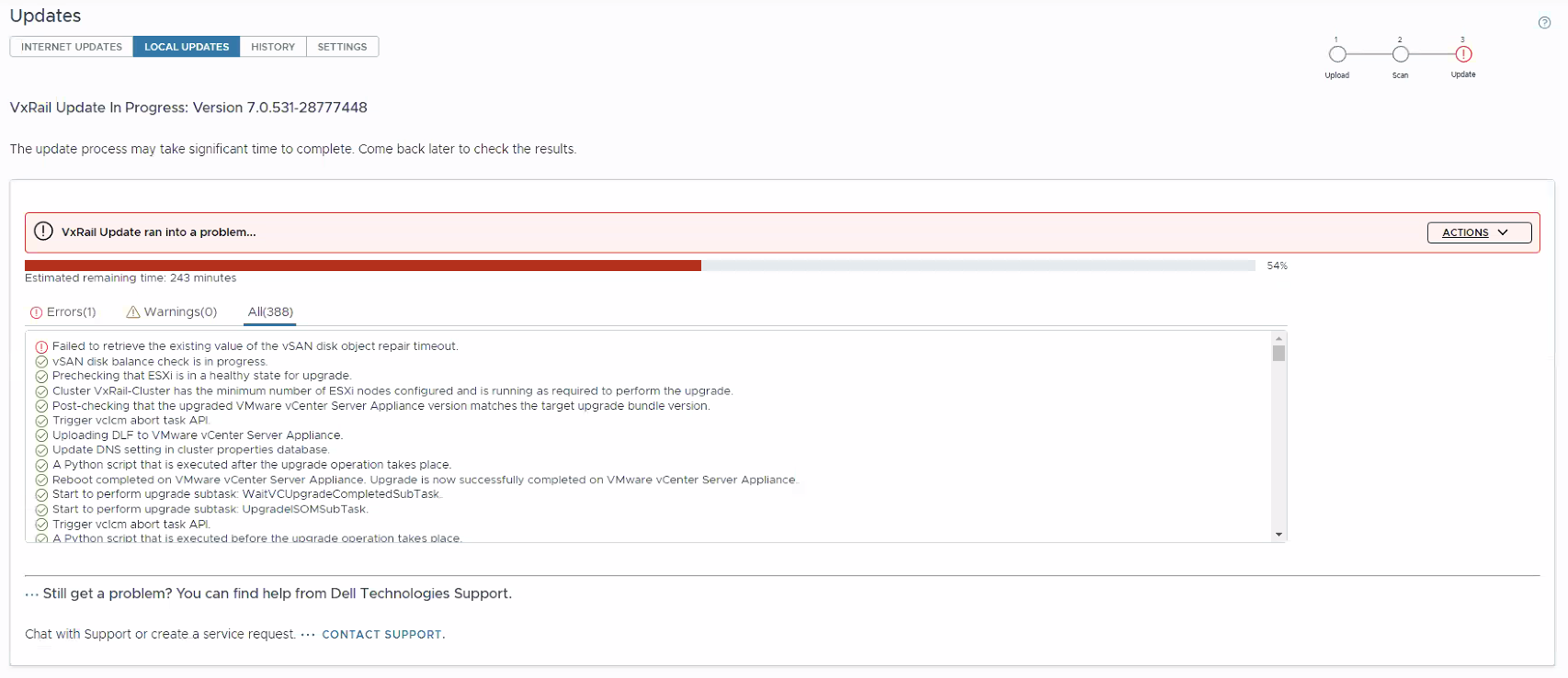
On the VxRail Manager, the /var/log/mystic/lcm-web.log shows:
2024-09-27T15:19:21.429Z <7ff91b9f32f61676bfb7758d9af41713> lcm [ERROR] <94> ComponentUpgradeService.java performComponentUpgrade() (323): Component VMWARE_ESXI upgrade failed due to Failed to retrieve the existing value of the vSAN disk object repair timeout..
2024-09-27T15:19:21.429Z <7ff91b9f32f61676bfb7758d9af41713> lcm [INFO] <94> LCMServiceImpl.java handleUpgradeException() (1812): handling upgrade exception.
2024-09-27T15:19:21.429Z <7ff91b9f32f61676bfb7758d9af41713> lcm [INFO] <94> LCMServiceImpl.java handleUpgradeException() (1817): Error from vc or node upgrade, sync the composite file
...
2024-09-27T15:19:21.467Z <7ff91b9f32f61676bfb7758d9af41713> lcm [ERROR] <94> LCMServiceImpl.java handleUpgradeException() (1855): failed to upgrade: VXRAIL_COMPOSITE-7.0.531-28777448_for_7.0.x.zip,
 with exception:
com.vce.lcm.exception.LCMInternalException: Failed to retrieve the existing value of the vSAN disk object repair timeout.
        at com.vce.lcm.core.upgrade.ComponentUpgradeService.performComponentUpgrade(ComponentUpgradeService.java:336)
        at com.vce.lcm.api.LCMServiceImpl.performBatchUpgrade(LCMServiceImpl.java:2152)
...
024-09-27T15:19:21.514Z <7ff91b9f32f61676bfb7758d9af41713> lcm [INFO] <94> VirtualApplianceUpgradeParameterStatusHandler.java notifyError() (102): Notify errors for upgrade bundle UpgradeBundleProfile{name='VXRAIL_COMPOSITE-7.0.531-28777448_for_7.0.x.zip', description='null', sizeInKBytes='15664544', bundleFileName='VXRAIL_COMPOSITE-7.0.531-28777448_for_7.0.x.zip', version='7.0.531', build='28777448', targetHardwareInfo='', targetModelInfo='com.vce.commons.vcm.state.CompositeManifestFile$TargetModelInfo@3901ec9', replaceTargetInfo='com.vce.commons.vcm.state.CompositeManifestFile$ReplaceTargetInfo@16a5c26c', targetNicModelInfo='com.vce.commons.vcm.state.CompositeManifestFile$TargetNicModelInfo@2949e0b9', removeUpgradeVIB='false', forceInstall='false', skipList='[]', upgradeTime='0', rebootFlag='false', isUpgradeComponent='false', totalEstimated='100668', totalUsed='54511', minimumVxRailVersion='7.0.010', patchType=''}, upgradeStep UPGRADE, upgradeTarget UpgradeTarget{ComponentType=VXRAIL_COMPOSITE, name='esxxxx.domain.country', isPipelineTask='false'}, action Retrieve the value of the vSAN disk object repair timeout., message Failed to retrieve the existing value of the vSAN disk object repair timeout.
Extra error detail helps identify the affected host and the additional symptom Too many outstanding operations:
2024-09-27T15:18:29.011Z <7ff91b9f32f61676bfb7758d9af41713> lcm [INFO] <374> BatchUpgrade.java updateVsanClomTimeoutValueBeforeUpgrade() (881): Obtaining the existing vSAN Clom timeout value for th
e host : esxxxx.domain.country
...
2024-09-27T15:18:33.070Z <7ff91b9f32f61676bfb7758d9af41713> lcm [WARN] <374> ScriptServiceImpl.java runLocalScript() (507): [/etc/vmware-marvin/scripts/lcm/scripts/update-vsan-clom-repair-timeout.p
y@localhost]: <stderr> Traceback (most recent call last):
  File "/usr/lib/vmware-marvin/marvind/temp/3741351928508979296.tmp", line 154, in <module>
    main()
  File "/usr/lib/vmware-marvin/marvind/temp/3741351928508979296.tmp", line 149, in main
    get_timeout_value(options)
  File "/usr/lib/vmware-marvin/marvind/temp/3741351928508979296.tmp", line 133, in get_timeout_value
    result = advanced_sys_settings.List(False, VSAN_PROPERTY)
             ^^^^^^^^^^^^^^^^^^^^^^^^^^^^^^^^^^^^^^^^^^^^^^^^
  File "/usr/lib/python3.11/site-packages/pyVmomi/VmomiSupport.py", line 706, in <lambda>
    self.f(*(self.args + (obj,) + args), **kwargs)
  File "/usr/lib/python3.11/site-packages/pyVmomi/VmomiSupport.py", line 512, in _InvokeMethod
    return self._stub.InvokeMethod(self, info, args)
           ^^^^^^^^^^^^^^^^^^^^^^^^^^^^^^^^^^^^^^^^^
  File "/usr/lib/python3.11/site-packages/pyVmomi/ManagedMethodExecutorHelper.py", line 74, in InvokeMethod
    result = self.mme.ExecuteSoap(moid=moid,
             ^^^^^^^^^^^^^^^^^^^^^^^^^^^^^^^
  File "/usr/lib/python3.11/site-packages/pyVmomi/VmomiSupport.py", line 706, in <lambda>
    self.f(*(self.args + (obj,) + args), **kwargs)
  File "/usr/lib/python3.11/site-packages/pyVmomi/VmomiSupport.py", line 512, in _InvokeMethod
    return self._stub.InvokeMethod(self, info, args)
           ^^^^^^^^^^^^^^^^^^^^^^^^^^^^^^^^^^^^^^^^^
  File "/usr/lib/python3.11/site-packages/pyVmomi/SoapAdapter.py", line 1397, in InvokeMethod
    raise obj # pylint: disable-msg=E0702
    ^^^^^^^^^
pyVmomi.VmomiSupport.vmodl.fault.SystemError: (vmodl.fault.SystemError) {
   dynamicType = <unset>,
   dynamicProperty = (vmodl.DynamicProperty) [],
   msg = 'A general system error occurred: Too many outstanding operations',
   faultCause = <unset>,
   faultMessage = (vmodl.LocalizableMessage) [],
   reason = 'Too many outstanding operations'
}
Cause
A code issue in VxRail Release 7.0.520 and 7.0.521 causes esxcli host commands to get stuck over time. The query in the logs returns:
reason = 'Too many outstanding operations'
This results in the LCM failure, the upgrade process fails to retrieve a VSAN configuration value through esxcli.
Note: This issue is only seen on VxRail clusters on mentioned release versions with Secure Connect Gateway configured.
Resolution
A permanent fix for this issue is in VxRail release 7.0.531. Release notes are found at Dell VxRail 7.0.x Release Notes | Dell US (customer login required)
The user must restart the hostd management service on the failed node before restarting the VxRail LCM upgrade script. This clears the outstanding requests and allows the upgrade to continue.
/etc/init.d/hostd restart
For guidance in restarting the ESXi hostd service, reference Broadcom article Restarting the Management agents in ESXi
If assistance is required reviewing the logs, identifying the affected host, or restarting the service contact Dell Support.
Additional Information
If STIG has been applied, review the article VxRail: Incorrect file permissions for some libraries During Upgrade to 7.0.400 with STIG, as a potential cause for this error
Affected Products
VxRail, VxRail Appliance Series, VxRail SoftwareArticle Properties
Article Number: 000230587
Article Type: Solution
Last Modified: 17 Nov 2025
Version: 7
Find answers to your questions from other Dell users
Support Services
Check if your device is covered by Support Services.