iDRAC9: The firmware update job is not starting
Summary: In some instances, the firmware update job may fail to initiate when performing a firmware update through available iDRAC interfaces.
This article applies to
This article does not apply to
This article is not tied to any specific product.
Not all product versions are identified in this article.
Symptoms
The firmware update job has been created but remains in the "New" job state.
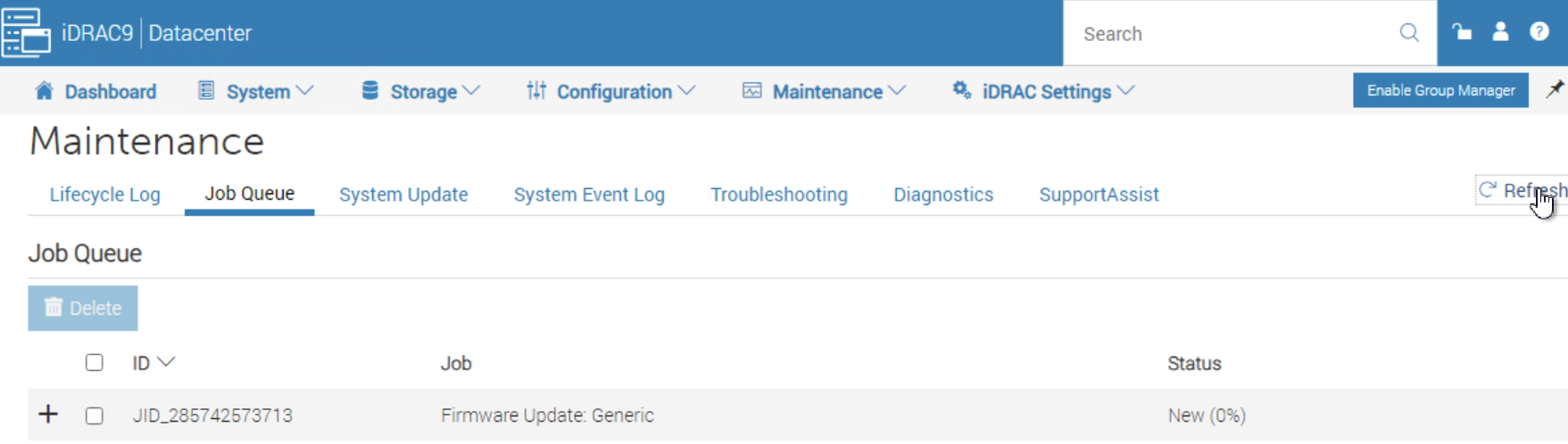
Identify the issue:
If either of the below are true then the error message can be seen.
- If the job queue has not been cleared
- If another Firmware Update job is present and previously failed due to a timeout, or is stuck in the downloading job state.
Message event: JCP052: The job was in either running or downloading state and timed out before completion.
Example: Job Timeout

Example: Job Downloading

Cause
The Integrated Dell Remote Access Controller (iDRAC) Remote Enablement Downloader is detecting another ongoing instance because of a lockfile, which is preventing new firmware update jobs from moving out of the "New" job state. When a firmware update job is running, the lockfile is removed once the job is completed. However, this issue can occur if a previous firmware update job fails during the file transfer of the update package to the iDRAC.
- On iDRAC Firmware prior to 7.00.60.00, the job queue displays a previous Firmware Update Job state as Downloading.
- On iDRAC Firmware version 7.00.60.00 or later, the job queue displays a previous Firmware Update Job state as Failed due to Timeout.
Resolution
Fix:
This issue is resolved in the iDRAC Firmware version 7.20.10.50.
Workaround:
To work around the issue, reset the iDRAC and then re-create the firmware update job.
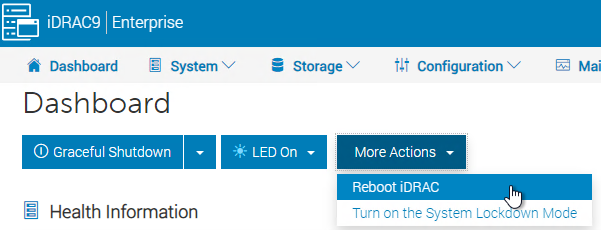
Affected Products
iDRAC9Products
iDRAC9 - 7.xx Series, PowerEdge XR2, Poweredge C4140, PowerEdge C6420, PowerEdge C6520, PowerEdge C6525, PowerEdge C6615, PowerEdge C6620, PowerEdge FC640, PowerEdge HS5610, PowerEdge HS5620, PowerEdge M640, PowerEdge M640 (for PE VRTX)
, PowerEdge MX5016s, PowerEdge MX740C, PowerEdge MX750c, PowerEdge MX760c, PowerEdge MX840C, PowerEdge R240, PowerEdge R250, PowerEdge R260, PowerEdge R340, PowerEdge R350, PowerEdge R360, PowerEdge R440, PowerEdge R450, PowerEdge R540, PowerEdge R550, PowerEdge R640, PowerEdge R6415, PowerEdge R650, PowerEdge R650xs, PowerEdge R6515, PowerEdge R6525, PowerEdge R660, PowerEdge R660xs, PowerEdge R6615, PowerEdge R6625, PowerEdge R740, PowerEdge R740XD, PowerEdge R740XD2, PowerEdge R7415, PowerEdge R7425, PowerEdge R750, PowerEdge R750XA, PowerEdge R750xs, PowerEdge R7515, PowerEdge R7525, PowerEdge R760, PowerEdge R760XA, PowerEdge R760xd2, PowerEdge R760xs, PowerEdge R7615, PowerEdge R7625, PowerEdge R840, PowerEdge R860, PowerEdge R940, PowerEdge R940xa, PowerEdge R960, PowerEdge T140, PowerEdge T150, PowerEdge T160, PowerEdge T340, PowerEdge T350, PowerEdge T360, PowerEdge T440, PowerEdge T550, PowerEdge T560, PowerEdge T640, PowerEdge XE2420, PowerEdge XE7420, PowerEdge XE7440, PowerEdge XE8545, PowerEdge XE8640, PowerEdge XE9640, PowerEdge XE9680, PowerEdge XR11, PowerEdge XR12, PowerEdge XR4510c, PowerEdge XR4520c, PowerEdge XR5610, PowerEdge XR7620, PowerEdge XR8610t, PowerEdge XR8620t
...
Article Properties
Article Number: 000234480
Article Type: Solution
Last Modified: 29 Apr 2025
Version: 3
Find answers to your questions from other Dell users
Support Services
Check if your device is covered by Support Services.