PowerEdge: nvidia-smi shows "PCIe.Link.Gen.Max" is different from "PCIe.Link.Gen.Current"
Summary: Why the nvidia-smi output shows the PCIe link Gen current value different from the Max value.
This article applies to
This article does not apply to
This article is not tied to any specific product.
Not all product versions are identified in this article.
Symptoms
A situation when the user complains that the nvidia-smi output shows that the GPU PCIe link is not connecting at the maximum available PCIe link and suspects a hardware issue with the board/riser or the GPU itself.
A sample output from NVSMI logs shows a similar situation for reference:
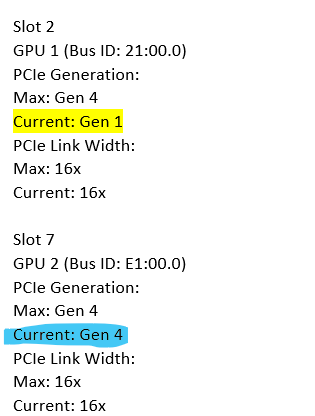
The output shows two similar GPUs connected to a PowerEdge system showing different values of the "PCIe.Link.Gen.Current" parameter. While the GPU in slot 2 it links up at Gen 1, the second GPU in slot 7 links up at the max supported PCIe Gen.
Cause
This behavior is by design. When the GPUs are not in use, they can reduce the link speed to free up resources and operates at lower clocks consuming less power. They can transition to MAX link as and when required.
In some instances when the GPU can support higher PCIe Gen but the system slot or riser is of lower Gen, then the Max link reported is of the corresponding slot or riser of the system.
Resolution
More information about this and other parameter is available at the NVIDIA Website.
https://enterprise-support.nvidia.com/s/article/Useful-nvidia-smi-Queries-2
https://enterprise-support.nvidia.com/s/article/Useful-nvidia-smi-Queries-2
Affected Products
OEMR R750xa, OEMR R760xa, OEMR R940xa, PowerEdge R750XA, PowerEdge R760XA, PowerEdge R940xa, PowerEdge XE7420, PowerEdge XE7440, PowerEdge XE8545, PowerEdge XE8640Products
PowerEdge XE9640, PowerEdge XE9680Article Properties
Article Number: 000235789
Article Type: Solution
Last Modified: 13 May 2025
Version: 2
Find answers to your questions from other Dell users
Support Services
Check if your device is covered by Support Services.