Cyber Recovery : Échec de la récupération du certificat avec le protocole TLS
Summary: Après la mise à niveau vers Cyber Recovery 19.17, il existe une nouvelle option pour vérifier le certificat lors de l’activation du protocole TLS (Transport Layer Security). Cet article décrit les situations dans lesquelles la récupération du certificat a échoué avec le protocole TLS. ...
This article applies to
This article does not apply to
This article is not tied to any specific product.
Not all product versions are identified in this article.
Symptoms
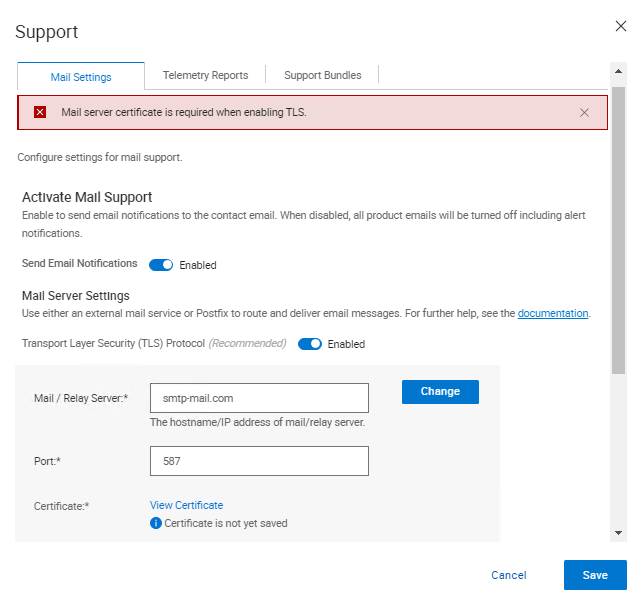
Après la mise à niveau vers Cyber Recovery 19.17, il existe une nouvelle option pour vérifier le certificat lors de l’activation du protocole TLS (Transport Layer Security). Lors de la vérification du certificat, l’erreur suivante s’affiche dans l’interface utilisateur de Cyber Recovery :
Mail server certificate is required when enabling TLS.
Cause
À partir des journaux Cyber Recovery, les entrées suivantes sont imprimées.
Sur crcli.log :
[2024-10-03 11:49:03.273] [DEBUG] [crcli] [restapi_client.go:384 HandleRESTAPIResponse()] : Entering
[2024-10-03 11:49:03.273] [DEBUG] [crcli] [restapi_client.go:392 HandleRESTAPIResponse()] : REST status code :500
[2024-10-03 11:49:03.273] [ERROR] [crcli] [restapi_client.go:401 HandleRESTAPIResponse()] : Failed to retrieve mail server certificate : Failed to connect to mail server: dial tcp: lookup smtp-mail.com: i/o timeout
[2024-10-03 11:49:03.273] [DEBUG] [crcli] [restapi_client.go:402 HandleRESTAPIResponse()] : Exiting
[2024-10-03 11:49:03.273] [ERROR] [crcli] [libcli.go:150 CliErrorExit()] : Failed to retrieve mail server certificate : Failed to connect to mail server: dial tcp: lookup smtp-mail.com: i/o timeout
Sur edge.log :
[2024-10-03 11:48:53.268] [DEBUG] [edge] [restapi_client.go:200 callRestApi()] : Perform request.Post path=https://notifications:9096/irapi/v8/notifications/retrieveEmailCert
[2024-10-03 11:49:03.272] [DEBUG] [edge] [restapi_client.go:209 callRestApi()] : status = 500 Internal Server Error
[2024-10-03 11:49:03.272] [DEBUG] [edge] [restapi_client.go:410 GetCRResponse()] : Entering
[2024-10-03 11:49:03.272] [DEBUG] [edge] [restapi_client.go:417 GetCRResponse()] : Exiting
[2024-10-03 11:49:03.272] [DEBUG] [edge] [restapi_client.go:210 callRestApi()] : Exiting
[2024-10-03 11:49:03.272] [DEBUG] [edge] [restapi_client.go:116 CallCRRESTAPI()] : Exiting
[2024-10-03 11:49:03.272] [DEBUG] [edge] [restapi_client.go:57 CallRESTAPIHeader()] : Exiting
[2024-10-03 11:49:03.272] [DEBUG] [edge] [restapi_client.go:384 HandleRESTAPIResponse()] : Entering
[2024-10-03 11:49:03.272] [DEBUG] [edge] [restapi_client.go:392 HandleRESTAPIResponse()] : REST status code :500
[2024-10-03 11:49:03.272] [ERROR] [edge] [restapi_client.go:401 HandleRESTAPIResponse()] : Failed to connect to mail server: dial tcp: lookup smtp-mail.com: i/o timeout
[2024-10-03 11:49:03.272] [DEBUG] [edge] [restapi_client.go:402 HandleRESTAPIResponse()] : Exiting
[2024-10-03 11:49:03.272] [DEBUG] [edge] [jsonerr.go:27 JSONError()] : Entering
[2024-10-03 11:49:03.272] [ERROR] [edge] [jsonerr.go:40 JSONError()] : 500 : Failed to connect to mail server: dial tcp: lookup smtp-mail.com: i/o timeout
[2024-10-03 11:49:03.272] [DEBUG] [edge] [jsonerr.go:44 JSONError()] : Exiting
[2024-10-03 11:49:03.272] [DEBUG] [edge] [notifications.go:560 RetrieveEmailCert()] : Exiting
[2024-10-03 11:49:03.272] [INFO] [edge] [restauth.go:111 func1()] : POST /cr/v8/notifications/retrieveEmailCert End RetrieveEmailCert Elapsed=10.005125439s
Sur notifications.log :
[2024-10-03 11:48:53.270] [INFO] [notifications] [restauth.go:68 func1()] : POST /irapi/v8/notifications/retrieveEmailCert Start RetrieveEmailCert
[2024-10-03 11:48:53.270] [DEBUG] [notifications] [restauth.go:210 validateToken()] : Entering
[2024-10-03 11:48:53.270] [DEBUG] [notifications] [restauth.go:194 DecryptToken()] : Entering
[2024-10-03 11:48:53.270] [DEBUG] [notifications] [encoding.go:48 DecodeString()] : Entering
[2024-10-03 11:48:53.270] [DEBUG] [notifications] [encoding.go:56 DecodeString()] : Exiting
[2024-10-03 11:48:53.270] [DEBUG] [notifications] [crcrypto.go:558 DecryptCFB()] : Entering
[2024-10-03 11:48:53.270] [DEBUG] [notifications] [crcrypto.go:579 DecryptCFB()] : Exiting
[2024-10-03 11:48:53.270] [DEBUG] [notifications] [encoding.go:48 DecodeString()] : Entering
[2024-10-03 11:48:53.270] [DEBUG] [notifications] [encoding.go:56 DecodeString()] : Exiting
[2024-10-03 11:48:53.270] [DEBUG] [notifications] [crcrypto.go:112 GenHash()] : Entering
[2024-10-03 11:48:53.270] [DEBUG] [notifications] [crcrypto.go:118 GenHash()] : Exiting
[2024-10-03 11:48:53.270] [DEBUG] [notifications] [restauth.go:206 DecryptToken()] : Exiting
[2024-10-03 11:48:53.270] [DEBUG] [notifications] [restauth.go:268 ValidateTokenTime()] : Entering
[2024-10-03 11:48:53.270] [DEBUG] [notifications] [restauth.go:281 ValidateTokenTime()] : Exiting
[2024-10-03 11:48:53.270] [DEBUG] [notifications] [restauth.go:255 validateToken()] : Exiting
[2024-10-03 11:48:53.270] [DEBUG] [notifications] [notifications.go:283 RetrieveEmailCert()] : Entering
[2024-10-03 11:48:53.270] [DEBUG] [notifications] [notifications.go:175 ValidateMailServer()] : Entering
[2024-10-03 11:48:53.270] [DEBUG] [notifications] [notifications.go:201 ValidateMailServerURL()] : Entering
[2024-10-03 11:48:53.270] [DEBUG] [notifications] [notifications.go:210 ValidateMailServerURL()] : Exiting
[2024-10-03 11:48:53.270] [DEBUG] [notifications] [notifications.go:215 ValidateMailServerPort()] : Entering
[2024-10-03 11:48:53.270] [DEBUG] [notifications] [notifications.go:222 ValidateMailServerPort()] : Exiting
[2024-10-03 11:48:53.270] [DEBUG] [notifications] [notifications.go:196 ValidateMailServer()] : Exiting
[2024-10-03 11:48:53.270] [DEBUG] [notifications] [email.go:227 RetrieveEmailCert()] : Entering
[2024-10-03 11:48:53.270] [DEBUG] [notifications] [email.go:272 GetTLSConn()] : Entering
[2024-10-03 11:49:03.271] [DEBUG] [notifications] [email.go:283 GetTLSConn()] : Exiting
[2024-10-03 11:49:03.272] [ERROR] [notifications] [email.go:235 RetrieveEmailCert()] : Failed to connect to mail server: dial tcp: lookup smtp-mail.com: i/o timeout
[2024-10-03 11:49:03.272] [DEBUG] [notifications] [email.go:236 RetrieveEmailCert()] : Exiting
[2024-10-03 11:49:03.272] [ERROR] [notifications] [notifications.go:321 RetrieveEmailCert()] : Failed to connect to mail server: dial tcp: lookup smtp-mail.com: i/o timeout
[2024-10-03 11:49:03.272] [DEBUG] [notifications] [jsonerr.go:27 JSONError()] : Entering
[2024-10-03 11:49:03.272] [ERROR] [notifications] [jsonerr.go:40 JSONError()] : 500 : Failed to connect to mail server: dial tcp: lookup smtp-mail.com: i/o timeout
[2024-10-03 11:49:03.272] [DEBUG] [notifications] [jsonerr.go:44 JSONError()] : Exiting
[2024-10-03 11:49:03.272] [DEBUG] [notifications] [notifications.go:323 RetrieveEmailCert()] : Exiting
À partir de la version 19.17, Cyber Recovery a commencé à vérifier le certificat du serveur de messagerie lors de l’utilisation de TLS.
Dans les environnements autres que DNS (Domain Name System), la saisie du serveur de messagerie en tant que nom DNS échoue, car Cyber Recovery ne parvient pas à résoudre le nom d’hôte sur une adresse IP en raison de l’absence de DNS dans l’environnement.
Lorsqu’une adresse IP est utilisée comme champ Serveur de messagerie/relais dans CR et que le certificat fourni par le serveur de messagerie ne comporte pas l’adresse IP dans le certificat, la vérification échoue car le certificat est en cours de vérification par rapport à l’adresse IP.
Il existe quelques solutions de contournement pour que cela fonctionne :
- Ajoutez l’adresse IP au certificat fourni par le serveur de messagerie pour que la vérification puisse fonctionner.
- Ajoutez l’entrée du serveur de messagerie et de l’adresse IP dans
/etc/hostsdans le conteneur de notifications pour permettre à CR de résoudre avec succès le serveur de messagerie et la vérification du certificat peut avoir lieu.
Resolution
Il existe deux options pour résoudre ce problème :
- Le serveur de messagerie utilise un nom de domaine complet (FQDN) et Cyber Recovery ne parvient pas à obtenir le certificat.
- Vérifiez que vous utilisez un serveur DNS dans votre environnement de coffre-fort et s’il fonctionne correctement.
- S’il n’y a pas de serveur DNS dans le coffre-fort, suivez les étapes ci-dessous :
- Saisissez les détails du serveur SMTP (Simple Mail Transfer Protocol) dans les fichiers hôtes du docker de notifications.
- Connectez-vous à Cyber Recovery à l’aide de SSH.
- Exécutez la commande suivante :
docker exec -it cr_notifications_1 bash - Ouvrez le fichier dans un éditeur de texte :
/etc/hosts - Ajoutez les entrées du serveur SMTP en tant qu’adresse IP, FQDN et nom abrégé.
- Enregistrez le fichier.
- Exécutez cette commande pour quitter le conteneur Docker :
exit
- Pour rendre l’entrée dans le champ
/etc/hostsFichier persistant jusqu’aux redémarrages, procédez comme suit :- Ajoutez une ligne dans
cr-install-path>/etc/docker-compose-prod-<current-version>.ymlpour l’adresse IP que vous souhaitez ajouter à/etc/hostsNotifications: - La nouvelle ligne mise en gras doit comporter le FQDN SMTP, puis l’adresse IP :
SMTP.server.com :xxx.xxx.xxx.xxx
build: .image: ${registryName}/cr_notifications:${notificationsVersion}container_name: cr_notifications_1security_opt:- no-new-privileges:truehostname: notificationsexpose:- "9096"depends_on:- postgresqlcap_drop:- ALLenvironment:- LD_LIBRARY_PATH=/cr/lockbox/lib- CRHOSTNAME=${dockerHostFQDN}- ENABLE_TLS=${enableTLS}- ENABLE_POSTFIX=${enablePostfix}- GODEBUG=tlskyber=0extra_hosts:- dockerbridge:${dockerBridge}- ${dockerHostFQDN}:${dockerHost}- SMTP.server.com:xxx.xxx.xxx.xxx - Puis, exécutez
'crsetup.sh – forcerecreate'LORSQU’AUCUNE TÂCHE N’EST EN COURS D’EXÉCUTION.
- Ajoutez une ligne dans
- Saisissez les détails du serveur SMTP (Simple Mail Transfer Protocol) dans les fichiers hôtes du docker de notifications.
- L’utilisation d’une adresse IP pour le SMTP et Cyber Recovery ne parvient pas à obtenir le certificat.
-
- Dans ce cas, un nouveau certificat contenant l’adresse IP utilisée doit être généré.
ou
-
- Si le certificat a été créé à l’aide d’un FQDN, au lieu d’utiliser l’adresse IP pour se connecter au SMTP, utilisez le FQDN dans l’interface utilisateur de Cyber Recovery.
Affected Products
PowerProtect Cyber Recovery, Cyber Recovery SeriesArticle Properties
Article Number: 000242079
Article Type: Solution
Last Modified: 07 Jan 2026
Version: 3
Find answers to your questions from other Dell users
Support Services
Check if your device is covered by Support Services.