Cyber Recovery: TLS 프로토콜을 사용하여 인증서를 검색하지 못했습니다.
Summary: Cyber Recovery 19.17로 업그레이드한 후 TLS(Transport Layer Security) 프로토콜을 활성화할 때 인증서를 확인하는 새로운 옵션이 있습니다. 이 문서에서는 TLS 프로토콜을 사용하여 인증서를 검색하지 못한 상황에 대해 설명합니다.
This article applies to
This article does not apply to
This article is not tied to any specific product.
Not all product versions are identified in this article.
Symptoms
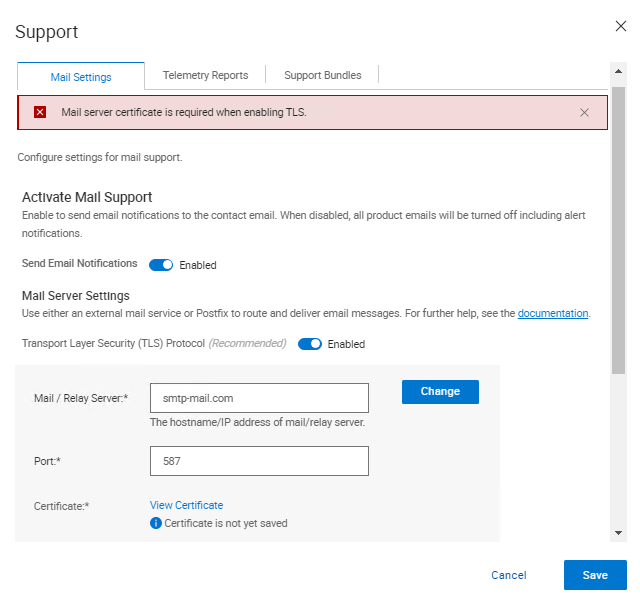
Cyber Recovery 19.17로 업그레이드한 후 TLS(Transport Layer Security) 프로토콜을 활성화할 때 인증서를 확인하는 새로운 옵션이 있습니다. 인증서를 확인할 때 Cyber Recovery UI에 다음 오류가 표시됩니다.
Mail server certificate is required when enabling TLS.
Cause
Cyber Recovery 로그에서 다음 항목이 인쇄됩니다.
crcli.log에서:
[2024-10-03 11:49:03.273] [DEBUG] [crcli] [restapi_client.go:384 HandleRESTAPIResponse()] : Entering
[2024-10-03 11:49:03.273] [DEBUG] [crcli] [restapi_client.go:392 HandleRESTAPIResponse()] : REST status code :500
[2024-10-03 11:49:03.273] [ERROR] [crcli] [restapi_client.go:401 HandleRESTAPIResponse()] : Failed to retrieve mail server certificate : Failed to connect to mail server: dial tcp: lookup smtp-mail.com: i/o timeout
[2024-10-03 11:49:03.273] [DEBUG] [crcli] [restapi_client.go:402 HandleRESTAPIResponse()] : Exiting
[2024-10-03 11:49:03.273] [ERROR] [crcli] [libcli.go:150 CliErrorExit()] : Failed to retrieve mail server certificate : Failed to connect to mail server: dial tcp: lookup smtp-mail.com: i/o timeout
edge.log에서:
[2024-10-03 11:48:53.268] [DEBUG] [edge] [restapi_client.go:200 callRestApi()] : Perform request.Post path=https://notifications:9096/irapi/v8/notifications/retrieveEmailCert
[2024-10-03 11:49:03.272] [DEBUG] [edge] [restapi_client.go:209 callRestApi()] : status = 500 Internal Server Error
[2024-10-03 11:49:03.272] [DEBUG] [edge] [restapi_client.go:410 GetCRResponse()] : Entering
[2024-10-03 11:49:03.272] [DEBUG] [edge] [restapi_client.go:417 GetCRResponse()] : Exiting
[2024-10-03 11:49:03.272] [DEBUG] [edge] [restapi_client.go:210 callRestApi()] : Exiting
[2024-10-03 11:49:03.272] [DEBUG] [edge] [restapi_client.go:116 CallCRRESTAPI()] : Exiting
[2024-10-03 11:49:03.272] [DEBUG] [edge] [restapi_client.go:57 CallRESTAPIHeader()] : Exiting
[2024-10-03 11:49:03.272] [DEBUG] [edge] [restapi_client.go:384 HandleRESTAPIResponse()] : Entering
[2024-10-03 11:49:03.272] [DEBUG] [edge] [restapi_client.go:392 HandleRESTAPIResponse()] : REST status code :500
[2024-10-03 11:49:03.272] [ERROR] [edge] [restapi_client.go:401 HandleRESTAPIResponse()] : Failed to connect to mail server: dial tcp: lookup smtp-mail.com: i/o timeout
[2024-10-03 11:49:03.272] [DEBUG] [edge] [restapi_client.go:402 HandleRESTAPIResponse()] : Exiting
[2024-10-03 11:49:03.272] [DEBUG] [edge] [jsonerr.go:27 JSONError()] : Entering
[2024-10-03 11:49:03.272] [ERROR] [edge] [jsonerr.go:40 JSONError()] : 500 : Failed to connect to mail server: dial tcp: lookup smtp-mail.com: i/o timeout
[2024-10-03 11:49:03.272] [DEBUG] [edge] [jsonerr.go:44 JSONError()] : Exiting
[2024-10-03 11:49:03.272] [DEBUG] [edge] [notifications.go:560 RetrieveEmailCert()] : Exiting
[2024-10-03 11:49:03.272] [INFO] [edge] [restauth.go:111 func1()] : POST /cr/v8/notifications/retrieveEmailCert End RetrieveEmailCert Elapsed=10.005125439s
notifications.log에서:
[2024-10-03 11:48:53.270] [INFO] [notifications] [restauth.go:68 func1()] : POST /irapi/v8/notifications/retrieveEmailCert Start RetrieveEmailCert
[2024-10-03 11:48:53.270] [DEBUG] [notifications] [restauth.go:210 validateToken()] : Entering
[2024-10-03 11:48:53.270] [DEBUG] [notifications] [restauth.go:194 DecryptToken()] : Entering
[2024-10-03 11:48:53.270] [DEBUG] [notifications] [encoding.go:48 DecodeString()] : Entering
[2024-10-03 11:48:53.270] [DEBUG] [notifications] [encoding.go:56 DecodeString()] : Exiting
[2024-10-03 11:48:53.270] [DEBUG] [notifications] [crcrypto.go:558 DecryptCFB()] : Entering
[2024-10-03 11:48:53.270] [DEBUG] [notifications] [crcrypto.go:579 DecryptCFB()] : Exiting
[2024-10-03 11:48:53.270] [DEBUG] [notifications] [encoding.go:48 DecodeString()] : Entering
[2024-10-03 11:48:53.270] [DEBUG] [notifications] [encoding.go:56 DecodeString()] : Exiting
[2024-10-03 11:48:53.270] [DEBUG] [notifications] [crcrypto.go:112 GenHash()] : Entering
[2024-10-03 11:48:53.270] [DEBUG] [notifications] [crcrypto.go:118 GenHash()] : Exiting
[2024-10-03 11:48:53.270] [DEBUG] [notifications] [restauth.go:206 DecryptToken()] : Exiting
[2024-10-03 11:48:53.270] [DEBUG] [notifications] [restauth.go:268 ValidateTokenTime()] : Entering
[2024-10-03 11:48:53.270] [DEBUG] [notifications] [restauth.go:281 ValidateTokenTime()] : Exiting
[2024-10-03 11:48:53.270] [DEBUG] [notifications] [restauth.go:255 validateToken()] : Exiting
[2024-10-03 11:48:53.270] [DEBUG] [notifications] [notifications.go:283 RetrieveEmailCert()] : Entering
[2024-10-03 11:48:53.270] [DEBUG] [notifications] [notifications.go:175 ValidateMailServer()] : Entering
[2024-10-03 11:48:53.270] [DEBUG] [notifications] [notifications.go:201 ValidateMailServerURL()] : Entering
[2024-10-03 11:48:53.270] [DEBUG] [notifications] [notifications.go:210 ValidateMailServerURL()] : Exiting
[2024-10-03 11:48:53.270] [DEBUG] [notifications] [notifications.go:215 ValidateMailServerPort()] : Entering
[2024-10-03 11:48:53.270] [DEBUG] [notifications] [notifications.go:222 ValidateMailServerPort()] : Exiting
[2024-10-03 11:48:53.270] [DEBUG] [notifications] [notifications.go:196 ValidateMailServer()] : Exiting
[2024-10-03 11:48:53.270] [DEBUG] [notifications] [email.go:227 RetrieveEmailCert()] : Entering
[2024-10-03 11:48:53.270] [DEBUG] [notifications] [email.go:272 GetTLSConn()] : Entering
[2024-10-03 11:49:03.271] [DEBUG] [notifications] [email.go:283 GetTLSConn()] : Exiting
[2024-10-03 11:49:03.272] [ERROR] [notifications] [email.go:235 RetrieveEmailCert()] : Failed to connect to mail server: dial tcp: lookup smtp-mail.com: i/o timeout
[2024-10-03 11:49:03.272] [DEBUG] [notifications] [email.go:236 RetrieveEmailCert()] : Exiting
[2024-10-03 11:49:03.272] [ERROR] [notifications] [notifications.go:321 RetrieveEmailCert()] : Failed to connect to mail server: dial tcp: lookup smtp-mail.com: i/o timeout
[2024-10-03 11:49:03.272] [DEBUG] [notifications] [jsonerr.go:27 JSONError()] : Entering
[2024-10-03 11:49:03.272] [ERROR] [notifications] [jsonerr.go:40 JSONError()] : 500 : Failed to connect to mail server: dial tcp: lookup smtp-mail.com: i/o timeout
[2024-10-03 11:49:03.272] [DEBUG] [notifications] [jsonerr.go:44 JSONError()] : Exiting
[2024-10-03 11:49:03.272] [DEBUG] [notifications] [notifications.go:323 RetrieveEmailCert()] : Exiting
버전 19.17부터 Cyber Recovery는 TLS를 사용할 때 메일 서버 인증서를 확인하기 시작했습니다.
DNS(Domain Name System)가 아닌 환경에서는 환경 내에 DNS가 없기 때문에 Cyber Recovery에서 호스트 이름을 IP 주소로 확인할 수 없기 때문에 메일 서버를 DNS 이름으로 입력하지 못합니다.
IP 주소가 CR 내에서 Mail/Relay Server(메일/릴레이 서버) 필드로 사용되고 메일 서버에서 제공한 인증서에 인증서에 IP가 없는 경우, IP에 대해 인증서를 확인하므로 확인이 실패합니다.
이 작업을 수행하기 위한 몇 가지 해결 방법이 있습니다.
- 검증이 작동할 수 있도록 메일 서버에서 제공한 인증서에 IP 주소를 추가합니다.
- 에서 메일 서버 및 IP에 대한 항목을 추가합니다.
/etc/hosts알림 컨테이너에서 CR이 메일 서버를 성공적으로 확인하고 인증서 확인을 수행할 수 있도록 합니다.
Resolution
이 문제를 해결하기 위한 두 가지 옵션이 있습니다.
- 메일 서버가 FQDN(Fully Qualified Domain Name)을 사용하고 있으며 Cyber Recovery가 인증서를 가져오지 못했습니다.
- 볼트 환경에서 DNS 서버를 사용하고 있는지, 제대로 작동하는지 확인합니다.
- 자격 증명 모음에 DNS 서버가 없는 경우 다음 단계를 수행합니다.
- 알림 Docker에 대한 호스트 파일에 SMTP(Simple Mail Transfer Protocol) 서버 세부 정보를 입력합니다.
- SSH를 사용하여 Cyber Recovery에 연결합니다.
- 다음 명령을 실행합니다.
docker exec -it cr_notifications_1 bash - 텍스트 편집기로 파일을 엽니다.
/etc/hosts - SMTP 서버에 대한 항목을 IP, FQDN 및 짧은 이름으로 추가합니다.
- 파일을 저장합니다.
- 다음 명령을 실행하여 Docker 컨테이너를 종료합니다.
exit
- 항목에 입력하려면
/etc/hosts재부팅을 통해 파일이 유지되는 경우 다음을 수행합니다.- 한 줄 추가
cr-install-path>/etc/docker-compose-prod-<current-version>.yml추가하려는 IP의 경우/etc/hosts알림을: - 굵게 강조 표시된 새 줄에는 SMTP FQDN과 IP가 차례로 있어야 합니다.
SMTP.server.com:xxx.xxx.xxx.xxx
build: .image: ${registryName}/cr_notifications:${notificationsVersion}container_name: cr_notifications_1security_opt:- no-new-privileges:truehostname: notificationsexpose:- "9096"depends_on:- postgresqlcap_drop:- ALLenvironment:- LD_LIBRARY_PATH=/cr/lockbox/lib- CRHOSTNAME=${dockerHostFQDN}- ENABLE_TLS=${enableTLS}- ENABLE_POSTFIX=${enablePostfix}- GODEBUG=tlskyber=0extra_hosts:- dockerbridge:${dockerBridge}- ${dockerHostFQDN}:${dockerHost}- SMTP.server.com:xxx.xxx.xxx.xxx - 그리고 다음을 실행합니다.
'crsetup.sh – forcerecreate'실행 중인 작업이 없는 경우
- 한 줄 추가
- 알림 Docker에 대한 호스트 파일에 SMTP(Simple Mail Transfer Protocol) 서버 세부 정보를 입력합니다.
- SMTP에 IP 주소를 사용하고 Cyber Recovery에서 인증서를 가져오지 못합니다.
-
- 이 경우 사용 중인 IP 주소를 포함하도록 새 인증서를 생성해야 합니다.
또는
-
- IP를 사용하여 SMTP에 연결하는 대신 FQDN을 사용하여 인증서를 만든 경우 Cyber Recovery UI에서 FQDN을 사용합니다.
Affected Products
PowerProtect Cyber Recovery, Cyber Recovery SeriesArticle Properties
Article Number: 000242079
Article Type: Solution
Last Modified: 07 Jan 2026
Version: 3
Find answers to your questions from other Dell users
Support Services
Check if your device is covered by Support Services.