Recuperação cibernética: Falha na recuperação do certificado com o protocolo TLS
Summary: Após o upgrade para o Cyber Recovery 19.17, há uma nova opção para verificar o certificado ao habilitar o protocolo TLS. Este artigo aborda situações em que a recuperação do certificado falhou com o protocolo TLS. ...
This article applies to
This article does not apply to
This article is not tied to any specific product.
Not all product versions are identified in this article.
Symptoms
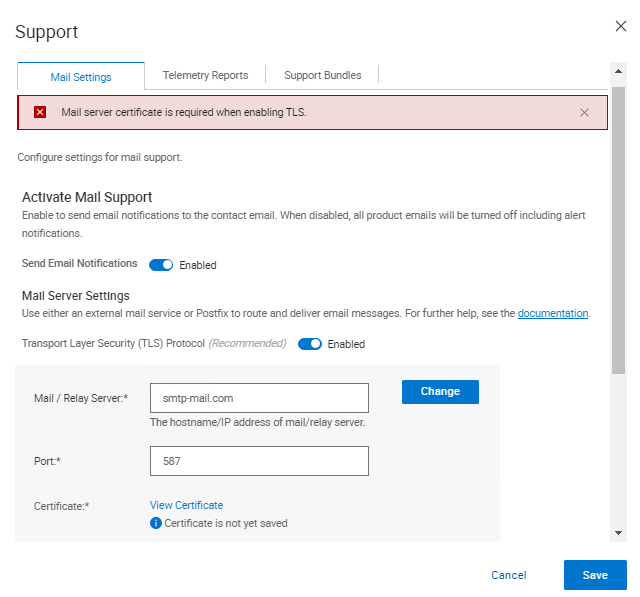
Depois do upgrade para o Cyber Recovery 19.17, há uma nova opção para verificar o certificado ao habilitar o protocolo TLS. Ao verificar o certificado, o seguinte erro é exibido na interface do usuário do Cyber Recovery:
Mail server certificate is required when enabling TLS.
Cause
Nos registros do Cyber Recovery, as seguintes entradas são impressas.
Em crcli.log:
[2024-10-03 11:49:03.273] [DEBUG] [crcli] [restapi_client.go:384 HandleRESTAPIResponse()] : Entering
[2024-10-03 11:49:03.273] [DEBUG] [crcli] [restapi_client.go:392 HandleRESTAPIResponse()] : REST status code :500
[2024-10-03 11:49:03.273] [ERROR] [crcli] [restapi_client.go:401 HandleRESTAPIResponse()] : Failed to retrieve mail server certificate : Failed to connect to mail server: dial tcp: lookup smtp-mail.com: i/o timeout
[2024-10-03 11:49:03.273] [DEBUG] [crcli] [restapi_client.go:402 HandleRESTAPIResponse()] : Exiting
[2024-10-03 11:49:03.273] [ERROR] [crcli] [libcli.go:150 CliErrorExit()] : Failed to retrieve mail server certificate : Failed to connect to mail server: dial tcp: lookup smtp-mail.com: i/o timeout
Em edge.log:
[2024-10-03 11:48:53.268] [DEBUG] [edge] [restapi_client.go:200 callRestApi()] : Perform request.Post path=https://notifications:9096/irapi/v8/notifications/retrieveEmailCert
[2024-10-03 11:49:03.272] [DEBUG] [edge] [restapi_client.go:209 callRestApi()] : status = 500 Internal Server Error
[2024-10-03 11:49:03.272] [DEBUG] [edge] [restapi_client.go:410 GetCRResponse()] : Entering
[2024-10-03 11:49:03.272] [DEBUG] [edge] [restapi_client.go:417 GetCRResponse()] : Exiting
[2024-10-03 11:49:03.272] [DEBUG] [edge] [restapi_client.go:210 callRestApi()] : Exiting
[2024-10-03 11:49:03.272] [DEBUG] [edge] [restapi_client.go:116 CallCRRESTAPI()] : Exiting
[2024-10-03 11:49:03.272] [DEBUG] [edge] [restapi_client.go:57 CallRESTAPIHeader()] : Exiting
[2024-10-03 11:49:03.272] [DEBUG] [edge] [restapi_client.go:384 HandleRESTAPIResponse()] : Entering
[2024-10-03 11:49:03.272] [DEBUG] [edge] [restapi_client.go:392 HandleRESTAPIResponse()] : REST status code :500
[2024-10-03 11:49:03.272] [ERROR] [edge] [restapi_client.go:401 HandleRESTAPIResponse()] : Failed to connect to mail server: dial tcp: lookup smtp-mail.com: i/o timeout
[2024-10-03 11:49:03.272] [DEBUG] [edge] [restapi_client.go:402 HandleRESTAPIResponse()] : Exiting
[2024-10-03 11:49:03.272] [DEBUG] [edge] [jsonerr.go:27 JSONError()] : Entering
[2024-10-03 11:49:03.272] [ERROR] [edge] [jsonerr.go:40 JSONError()] : 500 : Failed to connect to mail server: dial tcp: lookup smtp-mail.com: i/o timeout
[2024-10-03 11:49:03.272] [DEBUG] [edge] [jsonerr.go:44 JSONError()] : Exiting
[2024-10-03 11:49:03.272] [DEBUG] [edge] [notifications.go:560 RetrieveEmailCert()] : Exiting
[2024-10-03 11:49:03.272] [INFO] [edge] [restauth.go:111 func1()] : POST /cr/v8/notifications/retrieveEmailCert End RetrieveEmailCert Elapsed=10.005125439s
Em notifications.log:
[2024-10-03 11:48:53.270] [INFO] [notifications] [restauth.go:68 func1()] : POST /irapi/v8/notifications/retrieveEmailCert Start RetrieveEmailCert
[2024-10-03 11:48:53.270] [DEBUG] [notifications] [restauth.go:210 validateToken()] : Entering
[2024-10-03 11:48:53.270] [DEBUG] [notifications] [restauth.go:194 DecryptToken()] : Entering
[2024-10-03 11:48:53.270] [DEBUG] [notifications] [encoding.go:48 DecodeString()] : Entering
[2024-10-03 11:48:53.270] [DEBUG] [notifications] [encoding.go:56 DecodeString()] : Exiting
[2024-10-03 11:48:53.270] [DEBUG] [notifications] [crcrypto.go:558 DecryptCFB()] : Entering
[2024-10-03 11:48:53.270] [DEBUG] [notifications] [crcrypto.go:579 DecryptCFB()] : Exiting
[2024-10-03 11:48:53.270] [DEBUG] [notifications] [encoding.go:48 DecodeString()] : Entering
[2024-10-03 11:48:53.270] [DEBUG] [notifications] [encoding.go:56 DecodeString()] : Exiting
[2024-10-03 11:48:53.270] [DEBUG] [notifications] [crcrypto.go:112 GenHash()] : Entering
[2024-10-03 11:48:53.270] [DEBUG] [notifications] [crcrypto.go:118 GenHash()] : Exiting
[2024-10-03 11:48:53.270] [DEBUG] [notifications] [restauth.go:206 DecryptToken()] : Exiting
[2024-10-03 11:48:53.270] [DEBUG] [notifications] [restauth.go:268 ValidateTokenTime()] : Entering
[2024-10-03 11:48:53.270] [DEBUG] [notifications] [restauth.go:281 ValidateTokenTime()] : Exiting
[2024-10-03 11:48:53.270] [DEBUG] [notifications] [restauth.go:255 validateToken()] : Exiting
[2024-10-03 11:48:53.270] [DEBUG] [notifications] [notifications.go:283 RetrieveEmailCert()] : Entering
[2024-10-03 11:48:53.270] [DEBUG] [notifications] [notifications.go:175 ValidateMailServer()] : Entering
[2024-10-03 11:48:53.270] [DEBUG] [notifications] [notifications.go:201 ValidateMailServerURL()] : Entering
[2024-10-03 11:48:53.270] [DEBUG] [notifications] [notifications.go:210 ValidateMailServerURL()] : Exiting
[2024-10-03 11:48:53.270] [DEBUG] [notifications] [notifications.go:215 ValidateMailServerPort()] : Entering
[2024-10-03 11:48:53.270] [DEBUG] [notifications] [notifications.go:222 ValidateMailServerPort()] : Exiting
[2024-10-03 11:48:53.270] [DEBUG] [notifications] [notifications.go:196 ValidateMailServer()] : Exiting
[2024-10-03 11:48:53.270] [DEBUG] [notifications] [email.go:227 RetrieveEmailCert()] : Entering
[2024-10-03 11:48:53.270] [DEBUG] [notifications] [email.go:272 GetTLSConn()] : Entering
[2024-10-03 11:49:03.271] [DEBUG] [notifications] [email.go:283 GetTLSConn()] : Exiting
[2024-10-03 11:49:03.272] [ERROR] [notifications] [email.go:235 RetrieveEmailCert()] : Failed to connect to mail server: dial tcp: lookup smtp-mail.com: i/o timeout
[2024-10-03 11:49:03.272] [DEBUG] [notifications] [email.go:236 RetrieveEmailCert()] : Exiting
[2024-10-03 11:49:03.272] [ERROR] [notifications] [notifications.go:321 RetrieveEmailCert()] : Failed to connect to mail server: dial tcp: lookup smtp-mail.com: i/o timeout
[2024-10-03 11:49:03.272] [DEBUG] [notifications] [jsonerr.go:27 JSONError()] : Entering
[2024-10-03 11:49:03.272] [ERROR] [notifications] [jsonerr.go:40 JSONError()] : 500 : Failed to connect to mail server: dial tcp: lookup smtp-mail.com: i/o timeout
[2024-10-03 11:49:03.272] [DEBUG] [notifications] [jsonerr.go:44 JSONError()] : Exiting
[2024-10-03 11:49:03.272] [DEBUG] [notifications] [notifications.go:323 RetrieveEmailCert()] : Exiting
A partir da versão 19.17, o Cyber Recovery começou a verificar o certificado do servidor de e-mail ao usar o TLS.
Em ambientes que não sejam DNS (Domain Name System), inserir o servidor de e-mail como um nome DNS falha, pois o Cyber Recovery não consegue resolver o nome do host para um endereço IP devido à falta de DNS no ambiente.
Quando um endereço IP é usado como o campo Mail/Relay Server no CR e o certificado fornecido pelo servidor de e-mail não tem o IP no certificado, a verificação falha, pois o certificado está sendo verificado em relação ao IP.
Há algumas soluções temporárias para fazer isso funcionar:
- Adicione o endereço IP ao certificado fornecido pelo servidor de e-mail para que a verificação possa funcionar.
- Adicione a entrada para servidor de e-mail e IP em
/etc/hostsno contêiner de notificações para permitir que o CR resolva com sucesso o servidor de e-mail e a verificação do certificado possa ocorrer.
Resolution
Há duas opções para resolver esse problema:
- O servidor de e-mail está usando um nome de domínio totalmente qualificado (FQDN) e o Cyber Recovery não consegue obter o certificado.
- Verifique se você está usando um servidor DNS em seu ambiente de cofre e se ele está funcionando corretamente.
- Se não houver nenhum servidor DNS no cofre, siga as etapas abaixo:
- Informe os detalhes do servidor SMTP (Simple Mail Transfer Protocol) nos arquivos de hosts do docker de notificações.
- Conecte-se ao Cyber Recovery usando SSH.
- Execute este comando:
docker exec -it cr_notifications_1 bash - Abra o arquivo com um editor de texto:
/etc/hosts - Adicione as entradas para o servidor SMTP como IP, FQDN e nome curto.
- Salve o arquivo.
- Execute este comando para sair do contêiner do docker:
exit
- Para fazer a entrada no
/etc/hostsArquivo persistente por meio de reinicializações, faça o seguinte:- Adicionar uma linha
cr-install-path>/etc/docker-compose-prod-<current-version>.ymlpara o IP que você deseja adicionar/etc/hostsNotificações: - A nova linha destacada em negrito deve ter o FQDN SMTP e, em seguida, o IP:
SMTP.server.com:xxx.xxx.xxx.xxx
build: .image: ${registryName}/cr_notifications:${notificationsVersion}container_name: cr_notifications_1security_opt:- no-new-privileges:truehostname: notificationsexpose:- "9096"depends_on:- postgresqlcap_drop:- ALLenvironment:- LD_LIBRARY_PATH=/cr/lockbox/lib- CRHOSTNAME=${dockerHostFQDN}- ENABLE_TLS=${enableTLS}- ENABLE_POSTFIX=${enablePostfix}- GODEBUG=tlskyber=0extra_hosts:- dockerbridge:${dockerBridge}- ${dockerHostFQDN}:${dockerHost}- SMTP.server.com:xxx.xxx.xxx.xxx - Em seguida, execute
'crsetup.sh – forcerecreate'QUANDO NÃO HÁ TRABALHOS EM EXECUÇÃO.
- Adicionar uma linha
- Informe os detalhes do servidor SMTP (Simple Mail Transfer Protocol) nos arquivos de hosts do docker de notificações.
- O uso de um endereço IP para o SMTP e o Cyber Recovery falham ao obter o certificado.
-
- Nesse caso, um novo certificado deve ser gerado para conter o endereço IP que está sendo usado.
Ou
-
- Caso o certificado tenha sido criado usando um FQDN, em vez de usar o IP para se conectar ao SMTP, use o FQDN na IU do Cyber Recovery.
Affected Products
PowerProtect Cyber Recovery, Cyber Recovery SeriesArticle Properties
Article Number: 000242079
Article Type: Solution
Last Modified: 07 Jan 2026
Version: 3
Find answers to your questions from other Dell users
Support Services
Check if your device is covered by Support Services.