Cyber Recovery: Sertifika TLS protokolü nedeniyle başarısız oldu
Summary: Cyber Recovery 19.17 ye yükselttikten sonra Aktarım Katmanı Güvenliği (TLS) protokolünü etkinleştirirken sertifikayı doğrulamak için yeni bir seçenek sunulur. Bu makalede, TLS protokolüyle sertifika alma işleminin başarısız olduğu durumlar ele alınmaktadır. ...
This article applies to
This article does not apply to
This article is not tied to any specific product.
Not all product versions are identified in this article.
Symptoms
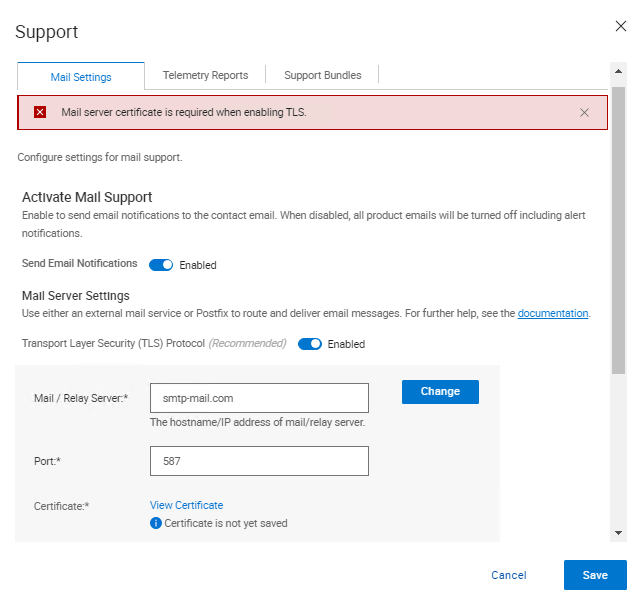
Cyber Recovery 19.17 ye yükselttikten sonra Aktarım Katmanı Güvenliği (TLS) protokolünü etkinleştirirken sertifikayı doğrulamak için yeni bir seçenek mevcuttur. Sertifika doğrulanırken Cyber Recovery kullanıcı arayüzünde aşağıdaki hata görüntülenir:
Mail server certificate is required when enabling TLS.
Cause
Cyber Recovery günlüklerinden aşağıdaki girişler yazdırılır.
crcli.log'de:
[2024-10-03 11:49:03.273] [DEBUG] [crcli] [restapi_client.go:384 HandleRESTAPIResponse()] : Entering
[2024-10-03 11:49:03.273] [DEBUG] [crcli] [restapi_client.go:392 HandleRESTAPIResponse()] : REST status code :500
[2024-10-03 11:49:03.273] [ERROR] [crcli] [restapi_client.go:401 HandleRESTAPIResponse()] : Failed to retrieve mail server certificate : Failed to connect to mail server: dial tcp: lookup smtp-mail.com: i/o timeout
[2024-10-03 11:49:03.273] [DEBUG] [crcli] [restapi_client.go:402 HandleRESTAPIResponse()] : Exiting
[2024-10-03 11:49:03.273] [ERROR] [crcli] [libcli.go:150 CliErrorExit()] : Failed to retrieve mail server certificate : Failed to connect to mail server: dial tcp: lookup smtp-mail.com: i/o timeout
edge.log'de:
[2024-10-03 11:48:53.268] [DEBUG] [edge] [restapi_client.go:200 callRestApi()] : Perform request.Post path=https://notifications:9096/irapi/v8/notifications/retrieveEmailCert
[2024-10-03 11:49:03.272] [DEBUG] [edge] [restapi_client.go:209 callRestApi()] : status = 500 Internal Server Error
[2024-10-03 11:49:03.272] [DEBUG] [edge] [restapi_client.go:410 GetCRResponse()] : Entering
[2024-10-03 11:49:03.272] [DEBUG] [edge] [restapi_client.go:417 GetCRResponse()] : Exiting
[2024-10-03 11:49:03.272] [DEBUG] [edge] [restapi_client.go:210 callRestApi()] : Exiting
[2024-10-03 11:49:03.272] [DEBUG] [edge] [restapi_client.go:116 CallCRRESTAPI()] : Exiting
[2024-10-03 11:49:03.272] [DEBUG] [edge] [restapi_client.go:57 CallRESTAPIHeader()] : Exiting
[2024-10-03 11:49:03.272] [DEBUG] [edge] [restapi_client.go:384 HandleRESTAPIResponse()] : Entering
[2024-10-03 11:49:03.272] [DEBUG] [edge] [restapi_client.go:392 HandleRESTAPIResponse()] : REST status code :500
[2024-10-03 11:49:03.272] [ERROR] [edge] [restapi_client.go:401 HandleRESTAPIResponse()] : Failed to connect to mail server: dial tcp: lookup smtp-mail.com: i/o timeout
[2024-10-03 11:49:03.272] [DEBUG] [edge] [restapi_client.go:402 HandleRESTAPIResponse()] : Exiting
[2024-10-03 11:49:03.272] [DEBUG] [edge] [jsonerr.go:27 JSONError()] : Entering
[2024-10-03 11:49:03.272] [ERROR] [edge] [jsonerr.go:40 JSONError()] : 500 : Failed to connect to mail server: dial tcp: lookup smtp-mail.com: i/o timeout
[2024-10-03 11:49:03.272] [DEBUG] [edge] [jsonerr.go:44 JSONError()] : Exiting
[2024-10-03 11:49:03.272] [DEBUG] [edge] [notifications.go:560 RetrieveEmailCert()] : Exiting
[2024-10-03 11:49:03.272] [INFO] [edge] [restauth.go:111 func1()] : POST /cr/v8/notifications/retrieveEmailCert End RetrieveEmailCert Elapsed=10.005125439s
notifications.log üzerinde:
[2024-10-03 11:48:53.270] [INFO] [notifications] [restauth.go:68 func1()] : POST /irapi/v8/notifications/retrieveEmailCert Start RetrieveEmailCert
[2024-10-03 11:48:53.270] [DEBUG] [notifications] [restauth.go:210 validateToken()] : Entering
[2024-10-03 11:48:53.270] [DEBUG] [notifications] [restauth.go:194 DecryptToken()] : Entering
[2024-10-03 11:48:53.270] [DEBUG] [notifications] [encoding.go:48 DecodeString()] : Entering
[2024-10-03 11:48:53.270] [DEBUG] [notifications] [encoding.go:56 DecodeString()] : Exiting
[2024-10-03 11:48:53.270] [DEBUG] [notifications] [crcrypto.go:558 DecryptCFB()] : Entering
[2024-10-03 11:48:53.270] [DEBUG] [notifications] [crcrypto.go:579 DecryptCFB()] : Exiting
[2024-10-03 11:48:53.270] [DEBUG] [notifications] [encoding.go:48 DecodeString()] : Entering
[2024-10-03 11:48:53.270] [DEBUG] [notifications] [encoding.go:56 DecodeString()] : Exiting
[2024-10-03 11:48:53.270] [DEBUG] [notifications] [crcrypto.go:112 GenHash()] : Entering
[2024-10-03 11:48:53.270] [DEBUG] [notifications] [crcrypto.go:118 GenHash()] : Exiting
[2024-10-03 11:48:53.270] [DEBUG] [notifications] [restauth.go:206 DecryptToken()] : Exiting
[2024-10-03 11:48:53.270] [DEBUG] [notifications] [restauth.go:268 ValidateTokenTime()] : Entering
[2024-10-03 11:48:53.270] [DEBUG] [notifications] [restauth.go:281 ValidateTokenTime()] : Exiting
[2024-10-03 11:48:53.270] [DEBUG] [notifications] [restauth.go:255 validateToken()] : Exiting
[2024-10-03 11:48:53.270] [DEBUG] [notifications] [notifications.go:283 RetrieveEmailCert()] : Entering
[2024-10-03 11:48:53.270] [DEBUG] [notifications] [notifications.go:175 ValidateMailServer()] : Entering
[2024-10-03 11:48:53.270] [DEBUG] [notifications] [notifications.go:201 ValidateMailServerURL()] : Entering
[2024-10-03 11:48:53.270] [DEBUG] [notifications] [notifications.go:210 ValidateMailServerURL()] : Exiting
[2024-10-03 11:48:53.270] [DEBUG] [notifications] [notifications.go:215 ValidateMailServerPort()] : Entering
[2024-10-03 11:48:53.270] [DEBUG] [notifications] [notifications.go:222 ValidateMailServerPort()] : Exiting
[2024-10-03 11:48:53.270] [DEBUG] [notifications] [notifications.go:196 ValidateMailServer()] : Exiting
[2024-10-03 11:48:53.270] [DEBUG] [notifications] [email.go:227 RetrieveEmailCert()] : Entering
[2024-10-03 11:48:53.270] [DEBUG] [notifications] [email.go:272 GetTLSConn()] : Entering
[2024-10-03 11:49:03.271] [DEBUG] [notifications] [email.go:283 GetTLSConn()] : Exiting
[2024-10-03 11:49:03.272] [ERROR] [notifications] [email.go:235 RetrieveEmailCert()] : Failed to connect to mail server: dial tcp: lookup smtp-mail.com: i/o timeout
[2024-10-03 11:49:03.272] [DEBUG] [notifications] [email.go:236 RetrieveEmailCert()] : Exiting
[2024-10-03 11:49:03.272] [ERROR] [notifications] [notifications.go:321 RetrieveEmailCert()] : Failed to connect to mail server: dial tcp: lookup smtp-mail.com: i/o timeout
[2024-10-03 11:49:03.272] [DEBUG] [notifications] [jsonerr.go:27 JSONError()] : Entering
[2024-10-03 11:49:03.272] [ERROR] [notifications] [jsonerr.go:40 JSONError()] : 500 : Failed to connect to mail server: dial tcp: lookup smtp-mail.com: i/o timeout
[2024-10-03 11:49:03.272] [DEBUG] [notifications] [jsonerr.go:44 JSONError()] : Exiting
[2024-10-03 11:49:03.272] [DEBUG] [notifications] [notifications.go:323 RetrieveEmailCert()] : Exiting
Sürüm 19.17'den itibaren Cyber Recovery, TLS kullanılırken posta sunucusu sertifikasını doğrulamaya başladı.
Etki Alanı Adı Sistemi (DNS) olmayan ortamlarda Cyber Recovery, ortamda DNS olmaması nedeniyle ana bilgisayar adı adını bir IP Adresine çözümleyemediği için posta sunucusuna DNS adı olarak girilemiyor.
CR içinde Mail/Relay Server alanı olarak bir IP adresi kullanıldığında ve posta sunucusu tarafından sağlanan sertifikanın sertifikada IP'si olmadığında, sertifika IP'ye göre doğrulanırken doğrulama başarısız olur.
Bunun işe yaraması için birkaç geçici çözüm vardır:
- Doğrulamanın çalışabilmesi için IP adresini posta sunucusu tarafından sağlanan sertifikaya ekleyin.
- Posta sunucusu ve IP girişini
/etc/hostsCR'nin posta sunucusunu başarıyla çözmesine izin vermek için bildirimler kapsayıcısında sertifika doğrulaması gerçekleşebilir.
Resolution
Bu sorunu çözmek için iki seçenek vardır:
- Posta sunucusu bir Tam Nitelikli Etki Alanı Adı (FQDN) kullanıyor ve Cyber Recovery sertifikayı alamıyor.
- Kasa ortamınızda bir DNS sunucusu kullandığınızı ve sunucunun düzgün çalıştığını doğrulayın.
- Kasada DNS sunucusu yoksa aşağıdaki adımları izleyin:
- Bildirimler docker'ı için ana bilgisayar dosyalarına Basit Posta Aktarım Protokolü (SMTP) sunucu ayrıntılarını girin.
- SSH kullanarak Cyber Recovery'ye bağlanın.
- Şu komutu çalıştırın:
docker exec -it cr_notifications_1 bash - Dosyayı bir metin düzenleyiciyle açın:
/etc/hosts - SMTP sunucusu için girişleri IP, FQDN ve kısa ad olarak ekleyin.
- Dosyayı kaydedin.
- Docker kapsayıcısından çıkmak için şu komutu çalıştırın:
exit
- Girişi yapmak için
/etc/hostsDosya yeniden başlatmalar aracılığıyla kalıcı hale geldiyse aşağıdakileri yapın:- Satır ekleme
cr-install-path>/etc/docker-compose-prod-<current-version>.ymleklemek istediğiniz IP için/etc/hostsBildirim: - Kalın ile vurgulanan yeni satırda SMTP FQDN'si ve ardından IP bulunmalıdır:
SMTP.server.com:xxx.xxx.xxx.xxx
build: .image: ${registryName}/cr_notifications:${notificationsVersion}container_name: cr_notifications_1security_opt:- no-new-privileges:truehostname: notificationsexpose:- "9096"depends_on:- postgresqlcap_drop:- ALLenvironment:- LD_LIBRARY_PATH=/cr/lockbox/lib- CRHOSTNAME=${dockerHostFQDN}- ENABLE_TLS=${enableTLS}- ENABLE_POSTFIX=${enablePostfix}- GODEBUG=tlskyber=0extra_hosts:- dockerbridge:${dockerBridge}- ${dockerHostFQDN}:${dockerHost}- SMTP.server.com:xxx.xxx.xxx.xxx - Ardından şunu çalıştırın:
'crsetup.sh – forcerecreate'ÇALIŞAN HIÇBIR IŞ OLMADIĞINDA.
- Satır ekleme
- Bildirimler docker'ı için ana bilgisayar dosyalarına Basit Posta Aktarım Protokolü (SMTP) sunucu ayrıntılarını girin.
- SMTP ve Cyber Recovery için bir IP adresi kullanmak sertifikayı alamıyor.
-
- Bu durumda, kullanılmakta olan IP adresini içerecek yeni bir sertifika oluşturulmalıdır.
Veya
-
- Sertifikanın bir FQDN kullanılarak oluşturulması durumunda SMTP'ye bağlanmak için IP yi kullanmak yerine Cyber Recovery kullanıcı arayüzündeki FQDN'yi kullanın.
Affected Products
PowerProtect Cyber Recovery, Cyber Recovery SeriesArticle Properties
Article Number: 000242079
Article Type: Solution
Last Modified: 07 Jan 2026
Version: 3
Find answers to your questions from other Dell users
Support Services
Check if your device is covered by Support Services.