Alienware Area-51 데스크탑에 설치된 M.2 SSD가 온보드 진단에서 잘못된 순서로 표시됨
Summary: 이 문서에서는 Alienware Area-51 AAT2250의 On-Board Diagnostics 페이지에 있는 M.2 SSD 디스플레이 순서에 대한 정보를 제공합니다.
This article applies to
This article does not apply to
This article is not tied to any specific product.
Not all product versions are identified in this article.
Symptoms
On-Board Diagnostics 구성 페이지의 SSD 위치 정보가 잘못된 순서로 표시될 수 있습니다. 이 문제는 SATA 작동 모드를 RAID On으로 설정하고, 3개의 PCIe SSD를 마더보드에 설치하고, 컴퓨터를 시작할 때 F12 키를 눌러 On-board Diagnostics로 부팅할 때 발생합니다.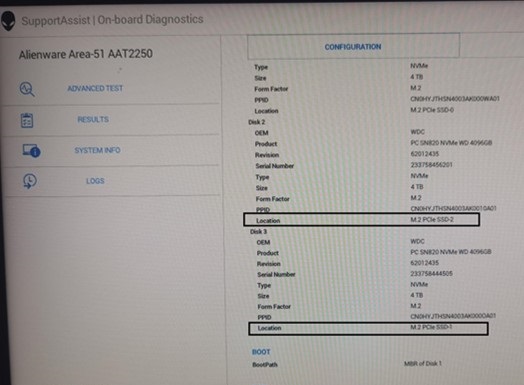
| 마더보드의 설치 위치 | On-board Diagnostics에 표시되는 위치 정보 | |
| 디스크 2 | M.2 PCIe SSD-1 | M.2 PCIe SSD-2 |
| 디스크 3 | M.2 PCIe SSD-2 | M.2 PCIe SSD-1 |
해당되는 플랫폼:
- Alienware Area-51 AAT2250
Cause
RAID ROM의 디스크 번호는 마더보드 위치 순서가 아닌 하드웨어 포트 번호를 따릅니다. 디스크 번호가 위치 정보와 동일해야 한다는 점을 지적하는 요청은 없습니다.
Resolution
이것은 예상대로 작동합니다.
Affected Products
Alienware Area-51 AAT2250Article Properties
Article Number: 000247013
Article Type: Solution
Last Modified: 15 Apr 2025
Version: 2
Find answers to your questions from other Dell users
Support Services
Check if your device is covered by Support Services.