安裝在 Alienware Area-51 桌上型電腦上的 M.2 SSD 在內建診斷程式中以錯誤的順序顯示
Summary: 本文在 Alienware Area-51 AAT2250的「內建診斷」頁面中,提供 M.2 SSD 顯示器順序的相關資訊。
This article applies to
This article does not apply to
This article is not tied to any specific product.
Not all product versions are identified in this article.
Symptoms
「內建診斷組態」頁面中的 SSD 位置資訊可能會以錯誤的順序顯示。將 SATA 作業模式設定為 RAID On、將三個 PCIe SSD 安裝至主機板,以及在啟動電腦時按下 F12 鍵以開機至內建診斷程式時,就會發生此問題。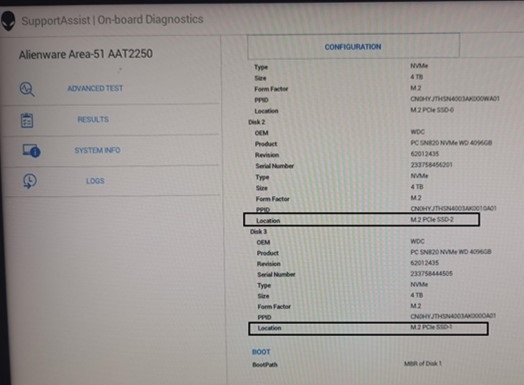
| 主機板上的安裝位置 | 內建診斷程式中顯示的位置資訊 | |
| 磁碟 2 | M.2 PCIe SSD-1 | M.2 PCIe SSD-2 |
| 磁碟 3 | M.2 PCIe SSD-2 | M.2 PCIe SSD-1 |
受影響的平台:
- Alienware Area-51 AAT2250
Cause
RAID ROM 中的磁碟號碼會遵循硬體連接埠號碼,而非主機板位置順序。沒有要求指出磁碟號碼必須與位置資訊相同。
Resolution
此作業如預期運作。
Affected Products
Alienware Area-51 AAT2250Article Properties
Article Number: 000247013
Article Type: Solution
Last Modified: 15 Apr 2025
Version: 2
Find answers to your questions from other Dell users
Support Services
Check if your device is covered by Support Services.