Alienware Area-51 台式机上安装的 M.2 SSD 在板载诊断程序中以错误的顺序显示
Summary: 本文提供有关 Alienware Area-51 AAT2250板载诊断程序页面中 M.2 SSD 显示顺序的信息。
This article applies to
This article does not apply to
This article is not tied to any specific product.
Not all product versions are identified in this article.
Symptoms
板载诊断程序配置页面中的 SSD 位置信息可能显示顺序错误。当将 SATA 操作模式设置为“RAID On”、在主板上安装三个 PCIe SSD 以及在启动计算机时按 F12 键引导至板载诊断程序时,会出现此问题。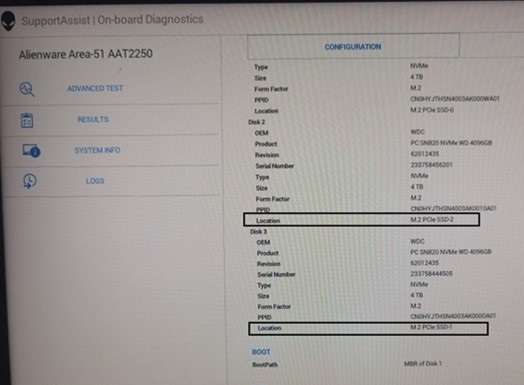
| 主板上的安装位置 | 板载诊断程序中显示的位置信息 | |
| 磁盘 2 | M.2 PCIe SSD-1 | M.2 PCIe SSD-2 |
| 磁盘 3 | M.2 PCIe SSD-2 | M.2 PCIe SSD-1 |
受影响的平台:
- Alienware Area-51 AAT2250
Cause
RAID ROM 中的磁盘编号遵循硬件端口编号,而不是主板位置顺序。无需要求指出磁盘编号必须与位置信息相同。
Resolution
这按预期工作。
Affected Products
Alienware Area-51 AAT2250Article Properties
Article Number: 000247013
Article Type: Solution
Last Modified: 15 Apr 2025
Version: 2
Find answers to your questions from other Dell users
Support Services
Check if your device is covered by Support Services.