XPS 13 Plus 9320 電容式觸控功能列的問題
Summary: 本文提供 XPS 13 Plus 9320 電容式觸控功能列的問題相關資訊。
This article applies to
This article does not apply to
This article is not tied to any specific product.
Not all product versions are identified in this article.
Symptoms
當電腦在過熱的狀態下使用或從睡眠中喚醒時,電容式觸控功能列可能沒有回應。電容式觸控功能列的自動亮度調節功能也可能無法正確適應背光環境。
| 較暗的環境 - BIOS 2.14.0 (左) 和 BIOS 2.16.1 (右) |
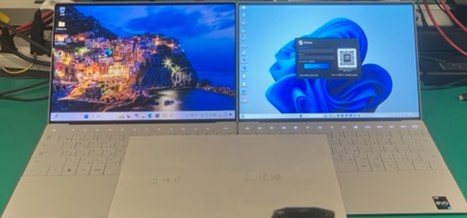 |
| 明亮的環境 - BIOS 2.14.0 (左) 和 BIOS 2.16.1 (右) |
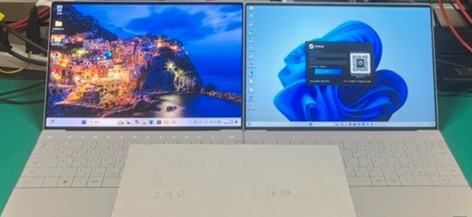 |
受影響的平台:
- XPS 13 Plus 9320
受影響的 BIOS 版本:
- 2.15.0
- 2.16.1
Cause
從睡眠中喚醒後,必須經過 BIOS 和內嵌控制器修改,才能新增自我初始化功能。
Resolution
將電腦更新至 BIOS 2.17.0 版或更新版本可解決問題。若要下載和安裝 BIOS,請參閱 Dell BIOS 和 UEFI 更新。
Affected Products
XPS 13 Plus 9320Article Properties
Article Number: 000248665
Article Type: Solution
Last Modified: 22 May 2026
Version: 5
Find answers to your questions from other Dell users
Support Services
Check if your device is covered by Support Services.