PowerFlex How to claim a new or replaced disk drive for VSAN
Summary: This article explains the steps to add new disk or a replaced disk to the management cluster nodes VSAN in PowerFlex
This article applies to
This article does not apply to
This article is not tied to any specific product.
Not all product versions are identified in this article.
Instructions
Converting a physical disk to non-RAID mode
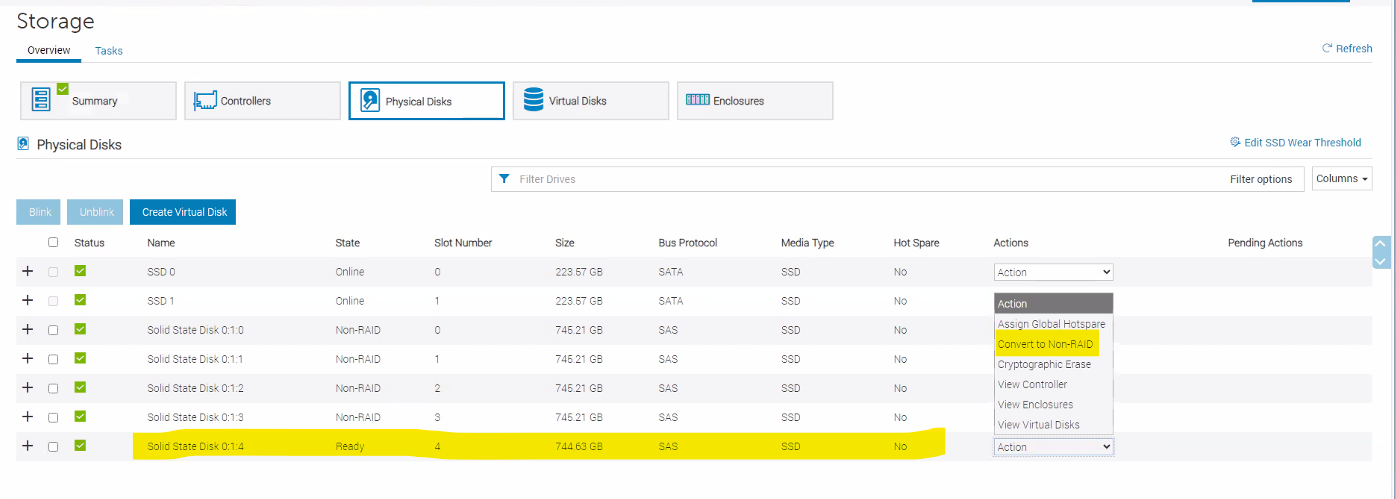
When a disk is in a non-RAID mode, the disk is exposed to the operating system unlike unconfigured good disks and is used in a direct pass-through mode.
To convert the physical disks to non-RAID mode, perform the following steps:
- In the iDRAC web interface, click Storage > Overview > Physical Disks.
- Find the new Disk in the disk list with the status ready
- Select Convert to Non-Raid from the Action drop-down list
Claim Storage Devices for a vSAN Cluster
Procedure
- Navigate to the vSAN cluster.
- Click the Configure tab.
- Under vSAN, click Disk Management.
- Click Claim Unused Disks.
- Select devices from the available list to add to the disk group.
- Select a flash device to be used as a Cache or Capacity tier disk.
- Click Create or OK.
To verify the role of each device added to the all-flash disk group, navigate to the Disk Role column at the bottom of the Disk Management page. The column shows the list of devices and their purpose in a disk group.
vSAN claims the devices that you selected and organizes them into default disk groups that support the vSAN datastore.
Additional Information
PERC 10 is not supported to convert drives to non-RAID.
Products
PowerFlex rack, VxFlex Ready Nodes, PowerFlex custom node, PowerFlex appliance R650, PowerFlex appliance R6525, PowerFlex appliance R660, PowerFlex appliance R6625, Powerflex appliance R750, PowerFlex appliance R760, PowerFlex appliance R7625
, PowerFlex custom node, PowerFlex custom node R650, PowerFlex custom node R6525, PowerFlex custom node R660, PowerFlex custom node R6625, PowerFlex custom node R750, PowerFlex custom node R760, PowerFlex custom node R7625, PowerFlex rack connectivity, PowerFlex Software, VxFlex Ready Node R640, VxFlex Ready Node R740xd, PowerFlex appliance R640, PowerFlex appliance R740XD, PowerFlex appliance R7525, PowerFlex appliance R840, VxFlex Ready Node R840
...
Article Properties
Article Number: 000248864
Article Type: How To
Last Modified: 15 Nov 2024
Version: 1
Find answers to your questions from other Dell users
Support Services
Check if your device is covered by Support Services.